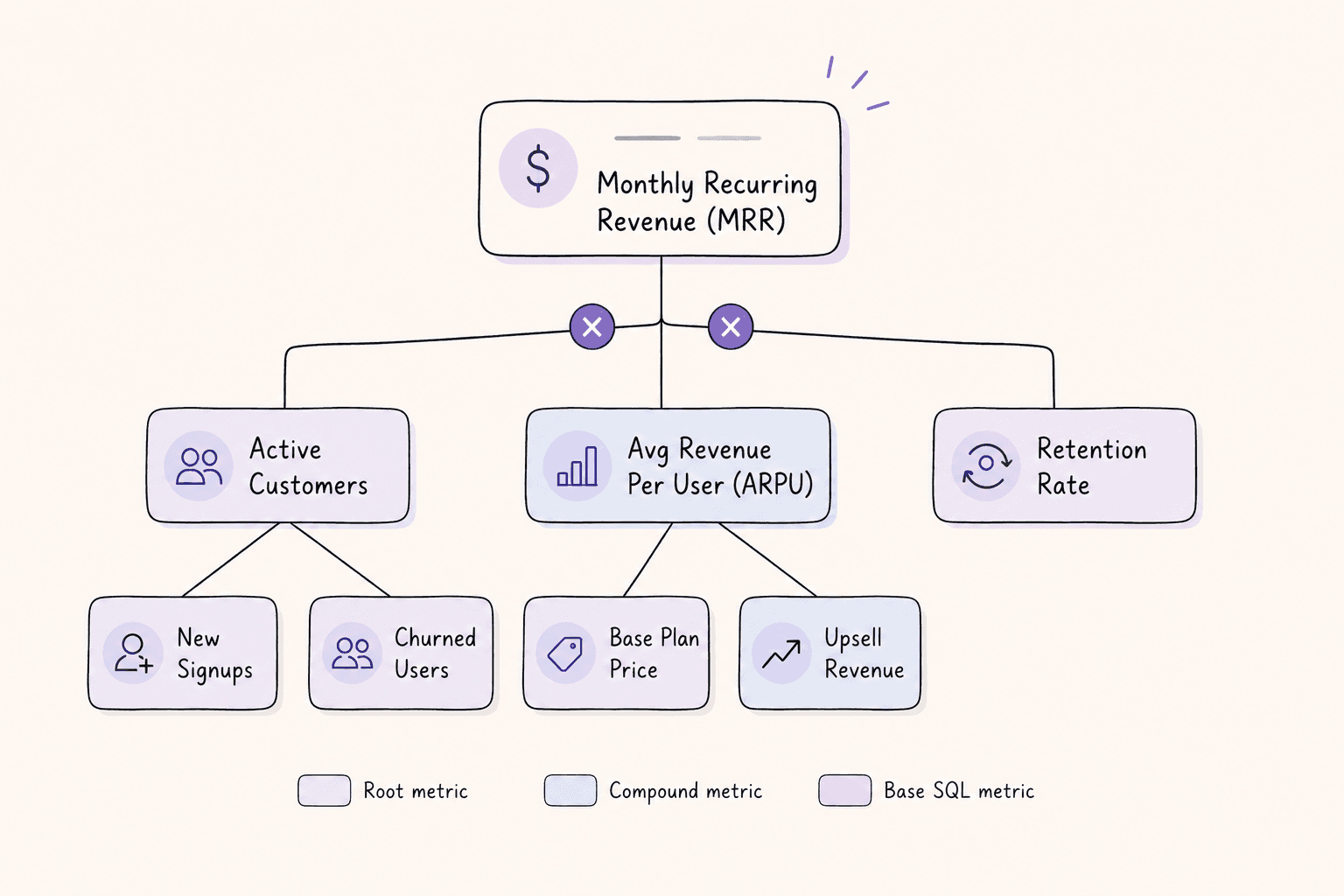
A metric tree breaks your headline number into the metrics that actually produce it, so when it moves you can tell which part moved. Instead of arguing about whose definition of revenue is right, you keep one structure that says how it is calculated and what it depends on.

The useful part is not the picture. It is that every number has exactly one definition, and that definition is written down somewhere a person and a query engine can both read.
A worked example
Take MRR for a subscription business:
MRR
├─ Active Customers          (SQL)
│  ├─ New Signups            (SQL)
│  └─ Churned Customers      (SQL)
└─ ARPU                      (SQL)
   ├─ Base Plan Price        (SQL)
   └─ Upsell Revenue         (SQL)
MRR = Active Customers × ARPU. That is the whole identity, and it is worth being strict about it. A common mistake is to write Active Customers × ARPU × Retention Rate, which double-counts: retention is already baked into how many customers are active this month. If your tree multiplies by retention on top, the number will be wrong and the tree will look authoritative while being wrong, which is worse than a spreadsheet nobody trusts.
Keep the identity exact at each level. If two things multiply to make the parent, only those two things should be there.
Two kinds of metrics
Every node is one of two things.
Base metrics run SQL against your warehouse. SELECT COUNT(DISTINCT user_id) FROM subscriptions WHERE status = 'active'. These are the leaves, and they are the only place raw data enters the tree.
Composition metrics combine other metrics with a formula, written with ${slug} placeholders: ${active_customers} * ${arpu}. They never touch the warehouse directly, they just do arithmetic on their children.
The split matters because it decides where a wrong number can come from. If a composition metric is off, either a child is off or the formula is wrong, and both are one place to look. Change a base metric's SQL and everything above it recomputes.
What you actually get from it
One definition per number. When someone asks for activation rate, there is a single answer with a formula attached, not four spreadsheets that disagree by 3%.
A path to follow when something moves. MRR is down 5%. Check its two children: customers flat, ARPU down. Check ARPU's children: base price unchanged, upsell revenue collapsed. Now you have a question worth asking someone, in about a minute, without opening a BI tool.
Somewhere for ownership to live. Once the tree exists, the branches map to teams reasonably naturally: whoever owns signups owns that subtree. This is a convention you hold to, not something the structure enforces for you.
Worth being clear about what a tree does not do. It will not tell you why a number moved, only where to look. And it does not replace dashboards; you will still want time series and cohort views for anything you are genuinely investigating. The tree keeps the top-level view honest, that is all.
When this is overkill
If you have one product, one revenue line, and three people who all agree on what a customer is, you do not need this. The cost of a metric tree is keeping it accurate, and a tree that has drifted from reality is worse than no tree, because people believe it.
It starts paying when more than one team reports the same number and gets different answers, or when nobody can say what changed without a day of work.
How Contextflo handles it
Metrics are first-class objects rather than saved queries. Each one stores its SQL or its formula, its datasource, and its dependencies, so a data person can audit how a number was produced without reverse-engineering a dashboard.
A few things that follow from that:
Composition metrics record which operator joins each child (+, −, ×, ÷) and in what order, so the tree renders the actual formula rather than an approximation of it.
What-if mode lets you override any node and see the change propagate through its ancestors and descendants in the tree, with the original values still visible next to the simulated ones. Useful for "if we moved conversion two points, what would that do to the top line" before committing anyone to it.
Background jobs recompute metrics on a schedule, so values stay current without anyone refreshing anything.
And because the definitions live in the same place your team asks questions, Claude can read a metric's definition rather than inferring one from column names. That is the difference between an answer that matches your board deck and an answer that merely looks plausible.
Building your first one
- Pick the number you would put on one slide. MRR for subscription, GMV for marketplace, DAU for consumer. One number.
- Write down what it equals. Two or three metrics, not eight. If you cannot express the parent as an exact identity of its children, the split is wrong, so try a different one.
- Write the formula.
${active_customers} * ${arpu}, using the slug of each child. - Write SQL for the leaves. Only the bottom nodes query the warehouse. Everything above is arithmetic.
Stop at two levels for the first pass. A shallow tree everyone trusts beats a deep one that is half-maintained, and you will find out fast which branch people actually ask about.
Here is a more in-depth look at Contextflo and how it works.
What is Contextflo?
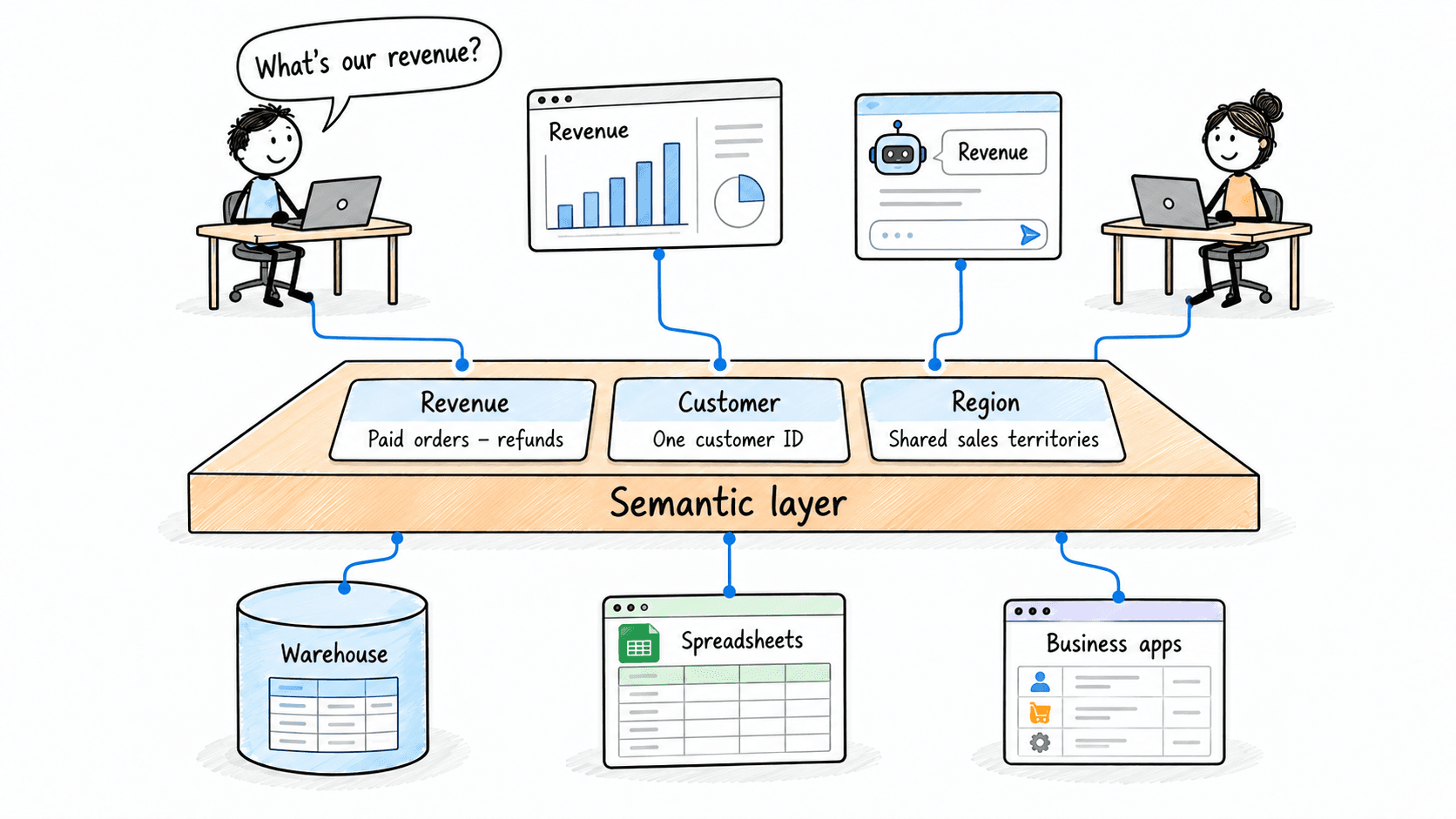
Contextflo is a governed context layer between your data and the AI your team already uses. Connect your warehouse once, and your team asks questions in their own Claude or ChatGPT. The model writes and runs the SQL; Contextflo supplies the definitions, the per-user access control, and the audit that make the answers trustworthy. Your data never moves, and you do not need a data team.
How it works
Your team queries in their own Claude or ChatGPT over MCP, so you bring any agent rather than a locked-in bot, and every answer comes back with the SQL shown and access enforced per user.
See it on your own data.
Connect your warehouse and your team can ask Claude about it the same day, without waiting on a data team. Want a walkthrough first? Grab 20 minutes.
Book a 20-minute callSee how teams use Contextflo


Related posts


Keep reading

Conversational analytics: 5 ways to set it up, compared
7 min read

How to connect Claude to BigQuery? What works and what doesn't in 2026
8 min read

How to connect Claude to Postgres without giving it write access
9 min read

How to build a BI dashboard with Claude that your team can actually trust
8 min read

How to give Claude read-only access to your database (it isn't always the default)
7 min read

You connected your warehouse to Claude, now what?
5 min read
ClickHouse MCP: how to connect ClickHouse to Claude, Cursor or Codex
6 min read
Query BigQuery from the Codex CLI with MCP
5 min read
Run ClickHouse queries from Codex with MCP
6 min read