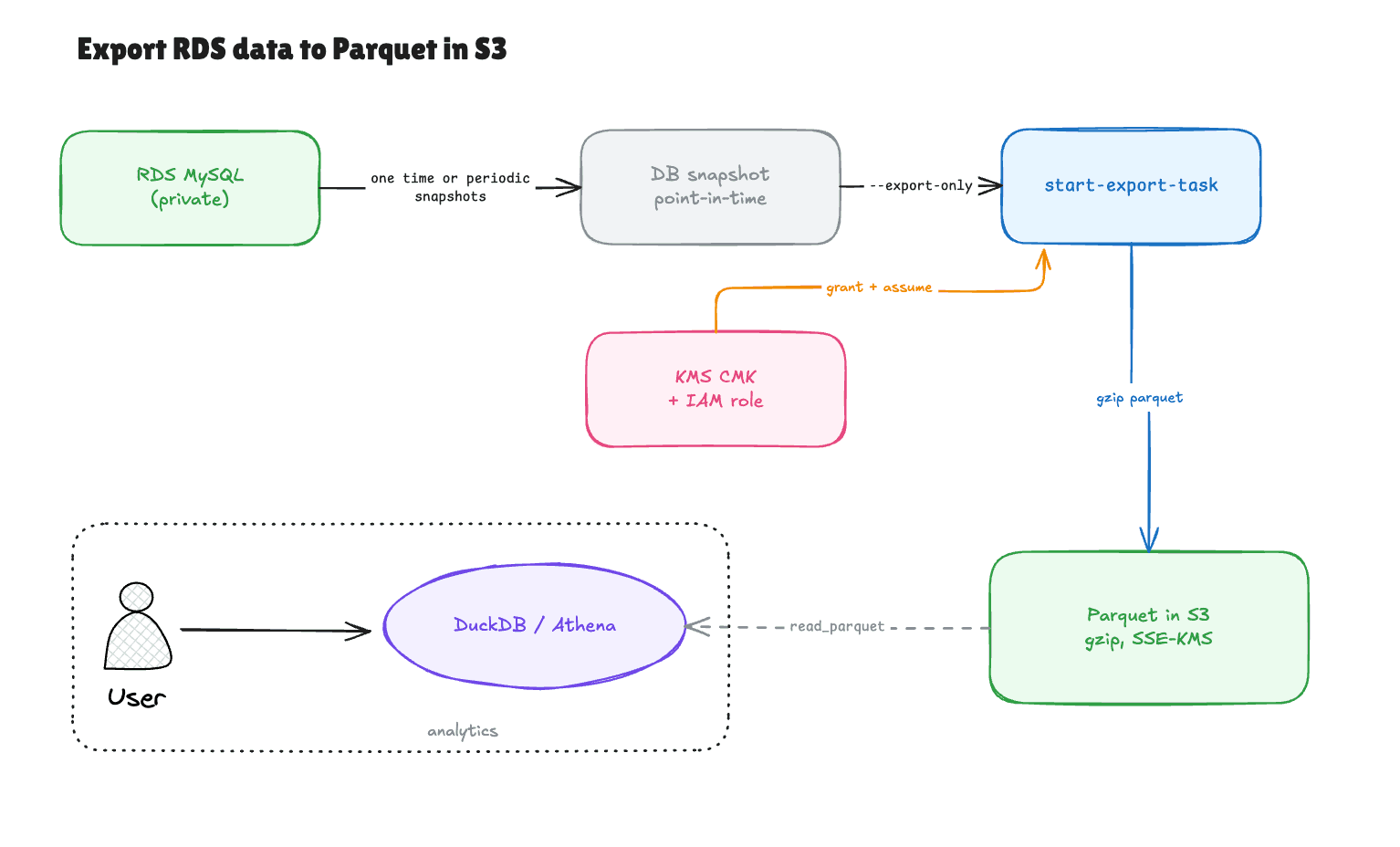
Getting a production database into Parquet in S3 sounds like it should be a one-liner, and AWS does have a native path for it. The path writes Parquet straight to a bucket without ever touching your running database. What the docs gloss over is that two of its failure modes are permission errors, and both fire in the wrong place and read like something they are not.
Here is the whole thing end to end, run against a real RDS MySQL 8.4 instance loaded with the Sakila and employees sample databases (about 3 million rows across a couple dozen tables). Every command is here, and so are the two spots where it broke.
It always starts with a snapshot
The first thing to internalize: you cannot export a running instance. RDS export reads a snapshot, a block-level, point-in-time copy, and does its work there. Your live database never participates, which is exactly why this is safe to run against production. No load on the instance, and no read replica to babysit.
That also means the freshness of your Parquet is the freshness of the snapshot you point at. More on where that snapshot comes from in a moment, but the mechanical version is: snapshot first, export second, always.
Before you start: do you have a snapshot to export?
If automated backups are on, you already do. RDS takes a daily system snapshot whenever BackupRetentionPeriod is greater than zero, and you can export straight from one of those. Aurora always has them (you cannot turn Aurora backups off). Plain RDS can have them disabled, though, and a freshly created instance often starts at zero.
So check before assuming:
aws rds describe-db-instances --db-instance-identifier my-db \
  --query 'DBInstances[0].BackupRetentionPeriod'
A value above zero means automated snapshots exist and you can skip straight to the export. A zero means you will either enable backups or take a manual snapshot first:
aws rds create-db-snapshot \
  --db-instance-identifier my-db \
  --db-snapshot-identifier my-db-export-snap \
  --region us-west-2
One caveat worth knowing: automated snapshots are deleted when they age past the retention window (1 to 35 days). Manual snapshots live until you delete them. If you want a durable series of historical exports, take a manual snapshot per export rather than leaning on automated ones that expire.
The four prerequisites
The export itself is one command. Getting to that command means standing up four things: a KMS key, a bucket, an IAM role, and one permission that the obvious managed policy leaves out.
1. A customer-managed KMS key
Export encrypts its output, and it insists on a customer-managed key. The AWS-managed aws/rds key is rejected, because RDS needs to attach grants to the key policy and it cannot do that on an AWS-managed key.
aws kms create-key --region us-west-2 \
  --description "rds parquet export" \
  --query 'KeyMetadata.KeyId' --output text
# save the returned KeyId
2. An S3 bucket
aws s3api create-bucket \
  --bucket my-rds-exports-123456789012-usw2 \
  --region us-west-2 \
  --create-bucket-configuration LocationConstraint=us-west-2
3. An IAM role the export service assumes
Two parts. First a trust policy so only the export service can assume the role:
cat > trust.json <<'JSON'
{ "Version": "2012-10-17",
  "Statement": [{ "Effect": "Allow",
    "Principal": { "Service": "export.rds.amazonaws.com" },
    "Action": "sts:AssumeRole" }] }
JSON

aws iam create-role --role-name rds-s3-export-role \
  --assume-role-policy-document file://trust.json
Then a permission policy giving that role write access to the bucket and use of the key:
cat > perm.json <<'JSON'
{ "Version": "2012-10-17",
  "Statement": [
    { "Sid": "S3Access", "Effect": "Allow",
      "Action": ["s3:PutObject","s3:GetObject","s3:DeleteObject",
                 "s3:ListBucket","s3:GetBucketLocation"],
      "Resource": ["arn:aws:s3:::my-rds-exports-123456789012-usw2",
                   "arn:aws:s3:::my-rds-exports-123456789012-usw2/*"] },
    { "Sid": "KmsForExport", "Effect": "Allow",
      "Action": ["kms:Decrypt","kms:Encrypt","kms:GenerateDataKey",
                 "kms:GenerateDataKeyWithoutPlaintext","kms:ReEncryptFrom",
                 "kms:ReEncryptTo","kms:DescribeKey"],
      "Resource": "arn:aws:kms:us-west-2:123456789012:key/YOUR_KEY_ID" }] }
JSON

aws iam put-role-policy --role-name rds-s3-export-role \
  --policy-name s3-export-access --policy-document file://perm.json
4. The permission everyone forgets
This is the first place it broke for me. The identity that calls start-export-task has to create a grant on the KMS key, and the AWSKeyManagementServicePowerUser managed policy does not include kms:CreateGrant. Attach it explicitly to whoever runs the export:
cat > kms-caller.json <<'JSON'
{ "Version": "2012-10-17",
  "Statement": [{ "Effect": "Allow",
    "Action": ["kms:CreateGrant","kms:DescribeKey"],
    "Resource": "arn:aws:kms:us-west-2:123456789012:key/YOUR_KEY_ID" }] }
JSON

aws iam put-user-policy --user-name my-user \
  --policy-name kms-export-grant --policy-document file://kms-caller.json
Skip this and the export dies at launch with KMSKeyNotAccessibleFault: The specified KMS key does not exist, is not enabled or you do not have permissions to access it. The key exists and is enabled. The message is misleading. The real problem is the missing grant permission on the caller.
Run the export
aws rds start-export-task \
  --export-task-identifier my-export-1 \
  --source-arn arn:aws:rds:us-west-2:123456789012:snapshot:my-db-export-snap \
  --s3-bucket-name my-rds-exports-123456789012-usw2 \
  --iam-role-arn arn:aws:iam::123456789012:role/rds-s3-export-role \
  --kms-key-id YOUR_KEY_ID \
  --region us-west-2 \
  --export-only "employees.employees" "employees.salaries" "sakila.rental"
--export-only is the filter. It takes a whole database, a single database.table, or a database.schema, and it is repeatable. Drop it entirely to export everything. Filtering matters because export is billed per gigabyte of data written, so pulling three tables instead of the whole warehouse is a real cost difference.
It returns immediately with Status: STARTING. Watch it:
aws rds describe-export-tasks --export-task-identifier my-export-1 \
  --region us-west-2 \
  --query 'ExportTasks[0].{Status:Status,Pct:PercentProgress}'
The status walks STARTING to IN_PROGRESS to COMPLETE. Set expectations on STARTING: it sat there for roughly eight minutes on my run before anything showed up in the bucket, and the dataset was tiny. That delay is fixed setup overhead (AWS provisions a short-lived export environment) and it is independent of data size. Nothing lands in S3 until the task reaches IN_PROGRESS.
What lands in the bucket
aws s3 ls --recursive s3://my-rds-exports-123456789012-usw2/my-export-1/
The layout is deterministic, one folder per table:
| Path | Contents |
|---|---|
my-export-1/employees/employees.salaries/1/part-*.gz.parquet | the data, split into part files |
my-export-1/employees/employees.salaries/1/_SUCCESS | completion marker |
my-export-1/export_info_my-export-1.json | run summary |
my-export-1/export_tables_info_*.json | per-table row counts and type warnings |
Two details the docs undersell. The files are .gz.parquet, so the compression is gzip, not the Snappy people usually assume for Parquet. And large tables are split into multiple part-* files and written in parallel, so a 2.8-million-row table may arrive as several parts while a small one is a single file.
Query it, and hit the second gotcha
Point anything that reads Parquet at the output. DuckDB is the least-ceremony option, it reads Parquet natively and runs real SQL. Pull the files down and query them:
aws s3 cp s3://my-rds-exports-123456789012-usw2/my-export-1/ ./parquet/ \
  --recursive --exclude "*" --include "*.parquet" --region us-west-2

duckdb -c "
SELECT COUNT(*) FROM read_parquet('parquet/employees/employees.salaries/**/*.parquet');
"
That cp is the second place it broke. The Parquet is encrypted with your customer-managed key, so reading it needs kms:Decrypt on that key and plain S3 read is not enough. AWSKeyManagementServicePowerUser covers key administration but leaves out the data-plane Decrypt, so even the person who created the key gets AccessDenied on GetObject until kms:Decrypt is added. It is the same class of surprise as the CreateGrant one, except it fires downstream, at read time, on whoever consumes the data. Anyone reading that bucket needs decrypt rights on the key, every analyst and every downstream tool. Budget for that when you plan who gets access.
Once decrypt is in place, the analytics run against the Parquet exactly as they would against the database. A join across two of the exported tables:
duckdb -c "
SELECT YEAR(CAST(e.hire_date AS DATE)) AS hire_year,
       COUNT(DISTINCT e.emp_no) AS employees,
       ROUND(AVG(s.salary))     AS avg_salary
FROM read_parquet('parquet/employees/employees.employees/**/*.parquet') e
JOIN read_parquet('parquet/employees/employees.salaries/**/*.parquet') s USING (emp_no)
GROUP BY 1 ORDER BY 1;
"
Row counts matched the source database to the row, and the join returned the same numbers a warehouse would. The export is faithful. Watch the CAST, though, which brings up the last thing to know.
Types do not survive one-to-one
Notice the CAST(e.hire_date AS DATE) above. It is there because the export turned a MySQL DATE column into a Parquet VARCHAR. Same for DATETIME, TIME, and ENUM, all of which come out as strings. INT stayed INTEGER, but temporal and enum columns need casting downstream, and the export_tables_info JSON records these coercions per table. Spot-check numeric and date columns after the first export instead of trusting the schema to round-trip.
The gotchas in one place
| Symptom | Cause | Fix |
|---|---|---|
KMSKeyNotAccessibleFault at launch | caller lacks kms:CreateGrant (not in PowerUser) | add kms:CreateGrant to the caller |
AccessDenied on GetObject when reading output | consumer lacks kms:Decrypt (not in PowerUser) | add kms:Decrypt to every reader |
| KMS key "does not exist" but it clearly does | tried to use the AWS-managed aws/rds key | create a customer-managed key |
| Dates and enums come back as text | MySQL DATE/DATETIME/ENUM map to Parquet string | cast in the query, check export_tables_info |
| Bucket empty minutes after launch | still in STARTING; nothing writes until IN_PROGRESS | wait out the fixed setup overhead |
Making it recurring
Since the export always reads a snapshot and you already keep daily automated snapshots, the recurring version needs no human. An EventBridge rule (on a schedule, or on the RDS snapshot-created event) triggers a small Lambda that calls StartExportTask with your --export-only filter, and Parquet lands in S3 on whatever cadence your analytics need. No extra snapshots beyond the backups you already retain.
When this is the wrong tool
Snapshot export is a full dump every time. There is no changed-rows-since-last-run, so if you need incremental deltas you export a fresh snapshot and diff downstream, or you reach for DMS with change data capture instead. And if you only ever need a couple of small tables refreshed constantly, reading the database directly with a tool like DuckDB's MySQL scanner and writing Parquet yourself skips the whole snapshot-and-KMS dance. The snapshot path earns its keep on full-table or full-database dumps where you want zero load on production and do not mind the setup overhead.
See it on your own data.
Connect your warehouse and your team can ask Claude about it the same day, without waiting on a data team. Want a walkthrough first? Grab 20 minutes.
Book a 20-minute callSee how teams use Contextflo


Related posts
Keep reading

Conversational analytics: 5 ways to set it up, compared
7 min read

How to connect Claude to BigQuery? What works and what doesn't in 2026
8 min read

How to connect Claude to Postgres without giving it write access
9 min read

How to build a BI dashboard with Claude that your team can actually trust
8 min read

How to give Claude read-only access to your database (it isn't always the default)
7 min read

You connected your warehouse to Claude, now what?
5 min read
Query BigQuery from the Codex CLI with MCP
5 min read
Run ClickHouse queries from Codex with MCP
6 min read
Databricks in Codex: Genie One MCP or Contextflo
5 min read