How Shopify agencies track performance across all client stores
Hi, this is Vivek, building Contextflo. I share practical notes on getting answers from your data, a couple of times a month.
You run a Shopify agency. Each client has their own store, their own data, their own dashboards. Comparing performance across stores means logging into each admin, pulling reports, and normalizing everything in a spreadsheet.

The problem
Shopify's analytics are good for one store. Agency questions are never about one store: which client has the worst cart abandonment, how AOV compares across the portfolio, which stores are trending down and need attention this week.
Answering those today means switching between store admins, exporting CSVs, and building a comparison sheet. It takes hours, and by the time it is built the numbers have moved.
The setup
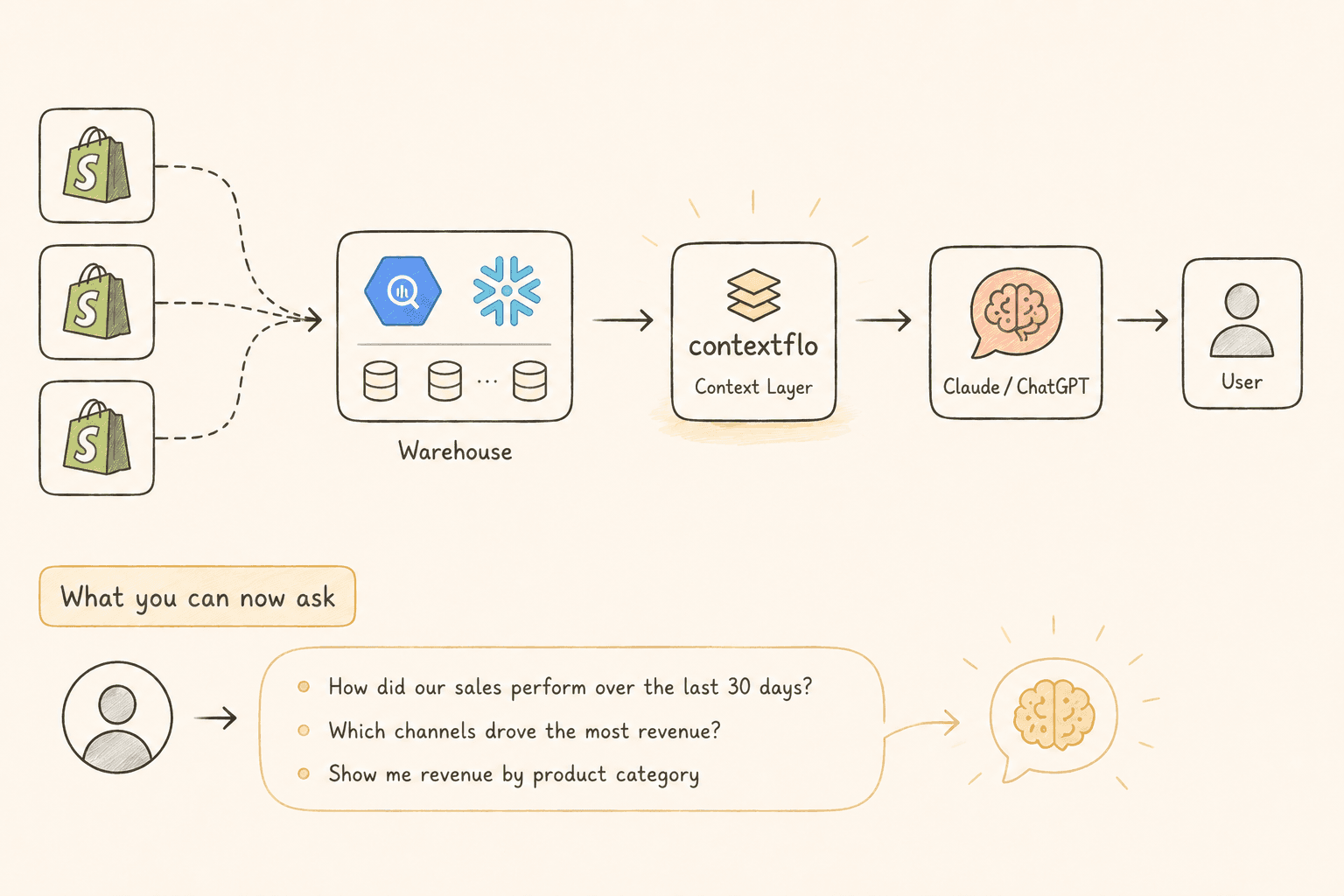
- All Shopify stores → Airbyte or Fivetran
- Airbyte or Fivetran → BigQuery or Snowflake, one schema per store
- Warehouse → Contextflo
- Contextflo → Claude
Contextflo generates context for each table once connected, so Claude knows that total_price is gross and which timestamp represents the order being placed rather than fulfilled.
The pipeline in steps 1 and 2 costs real money, and it is only worth it past a certain number of stores. With three or four clients, exporting is genuinely cheaper. The break-even is roughly where the weekly reporting ritual starts eating a day.
What you can ask once it is connected
Which client has the highest cart abandonment rate this month?
Compare AOV trends across all stores for the last six months.
Which stores had the biggest revenue drop week over week?
What's the average refund rate across the portfolio, and which stores are above it?
One thing to settle first
Shopify data models look identical across stores, which makes it tempting to assume the numbers are comparable. They often are not. One client discounts at the line-item level and another at the order level; one counts shipping in revenue and another does not; two stores in different currencies will quietly ruin a portfolio average.
Settle this before you trust the first cross-store report. Define what revenue and AOV mean for your portfolio once, save those definitions, and let every future question use them. Otherwise you will benchmark clients against each other on numbers that were never measuring the same thing, which is worse than not benchmarking at all.
The agency advantage
Cross-store benchmarking is the thing you can offer that an in-house team cannot. When a client asks whether their conversion rate is good, you can answer from twenty comparable stores instead of an industry average someone published in 2019.
That is also the answer to why they keep paying you.
Here is a more in-depth look at Contextflo and how it works.
What is Contextflo?
Contextflo is a governed context layer between your data and the AI your team already uses. Connect your warehouse once, and your team asks questions in their own Claude or ChatGPT. The model writes and runs the SQL; Contextflo supplies the definitions, the per-user access control, and the audit that make the answers trustworthy. Your data never moves, and you do not need a data team.
How it works
Your team queries in their own Claude or ChatGPT over MCP, so you bring any agent rather than a locked-in bot, and every answer comes back with the SQL shown and access enforced per user.
Find out if Contextflo is the right fit for you.
See how teams use Contextflo


Related posts
Keep reading

Conversational analytics: 5 ways to set it up, compared
7 min read

How to connect Claude to BigQuery? What works and what doesn't in 2026
8 min read

How to connect Claude to Postgres without giving it write access
7 min read

How to build a BI dashboard with Claude that your team can actually trust
8 min read

How to give Claude read-only access to your database (it isn't always the default)
7 min read

You connected your warehouse to Claude, now what?
5 min read

The official Postgres server for Claude is archived. Here's what to use instead.
7 min read

Why is the team missing sprint goals? How to analyze Jira data with AI
8 min read

Are my ads actually profitable? How to analyze Facebook and TikTok ads together with AI
7 min read