How agencies manage analytics across multiple Klaviyo accounts
Hi, this is Vivek, building Contextflo. I share practical notes on getting answers from your data, a couple of times a month.
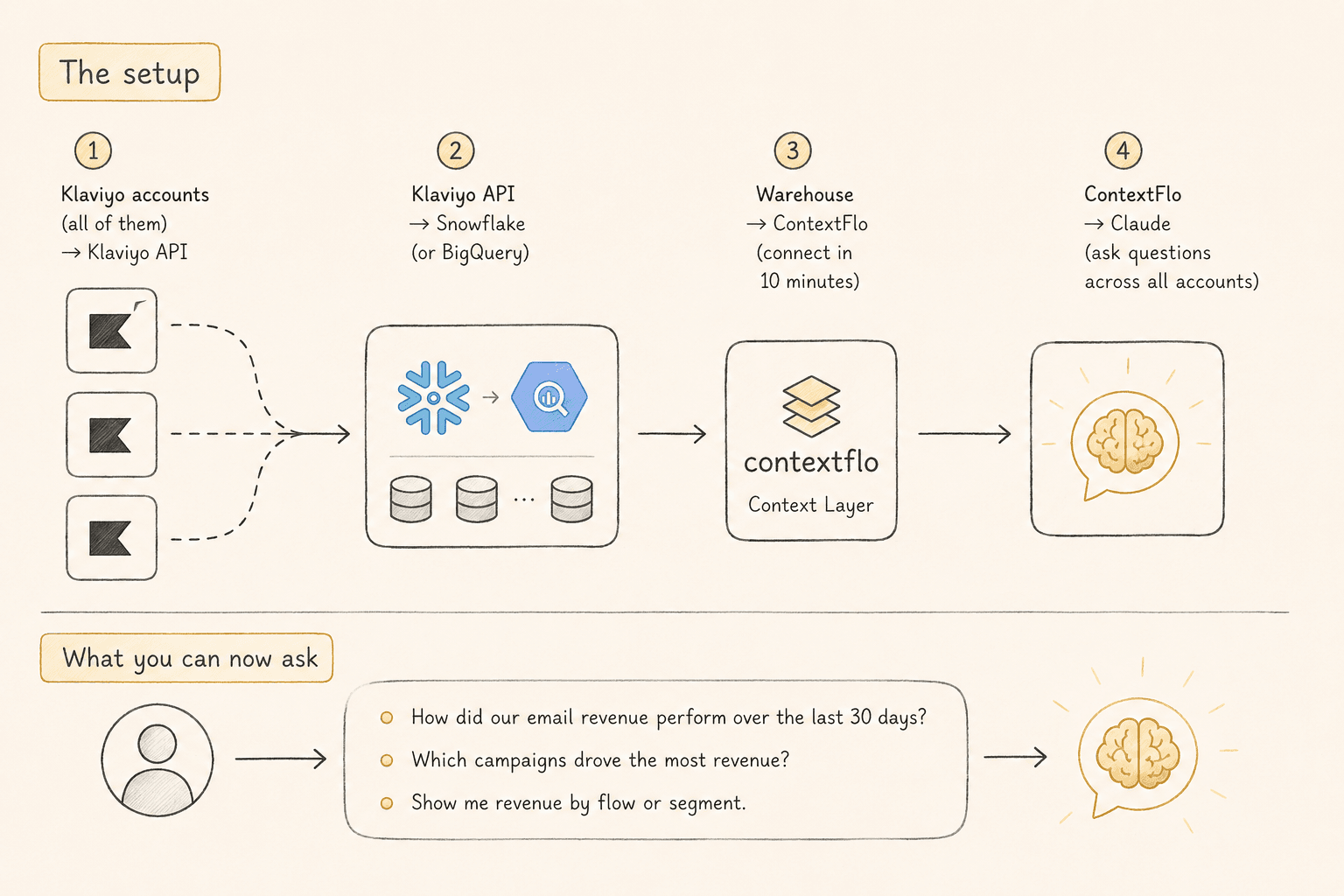
You manage email marketing for 15 clients. Each one has their own Klaviyo account. To compare performance across clients you log into each account, export the data, paste it into a spreadsheet, and normalize the metrics by hand. Every week.

The problem
Klaviyo's MCP connector queries one account at a time. That is fine for a single brand, but an agency's questions are all cross-account ones. Which client has the best open rates? Which flows are underperforming against your portfolio average? What could your worst-performing client copy from your best one?
None of those can be answered without exporting from every account and stitching it together by hand. That is not analytics, it is data entry.
The setup
- All your Klaviyo accounts → Airbyte or Fivetran
- Airbyte or Fivetran → Snowflake (or BigQuery)
- Snowflake → Contextflo
- Contextflo → Claude
The ETL tool syncs every Klaviyo account into one warehouse, each client in its own schema. Contextflo connects to the warehouse and generates context for every table, so Claude knows what the columns mean rather than guessing from names.
Worth being straight about the middle of that chain. Airbyte and Fivetran are not free, and neither is a warehouse. If you have three clients, this is probably more machinery than the problem deserves and you should keep exporting. Somewhere around eight or ten accounts the weekly export ritual costs more than the pipeline does.
What you can ask once it is connected
Which client has the highest email open rate this month, and how does it compare to the portfolio average?
Show me abandoned cart flow conversion rates across all clients, ranked worst to best.
What subject line patterns are working best across the portfolio this quarter?
Client X's welcome flow is underperforming. Show me how Client Y's compares so I can apply what's working.
No logging in and out. No spreadsheet. The last question is the one that actually matters, and it is the one you currently cannot ask at all.
Keeping client data separate
Putting fifteen clients in one warehouse raises an obvious question, and it is worth answering before someone else asks it. Each client lands in its own schema, and access is controlled per data source, so a strategist who works on three accounts can be given those three and nothing else.
That matters for two reasons. Client contracts often say their data will not be commingled or exposed to third parties, and you want a straight answer when a client asks. And internally, portfolio-level questions should be something you run deliberately, not something any account manager stumbles into.
Why this matters for agencies
Your advantage as an agency is the pattern recognition you build across clients. You can only build it if you can see across clients. While the data sits in fifteen separate Klaviyo logins, every insight stays stuck in the account it came from, and the only person who notices a pattern is whoever happens to work on both accounts.
Once it is in one place, new strategists ramp on what already works instead of rediscovering it, client reports take minutes, and you can show a prospect portfolio-wide numbers rather than an anecdote.
Here is a more in-depth look at Contextflo and how it works.
What is Contextflo?
Contextflo is a governed context layer between your data and the AI your team already uses. Connect your warehouse once, and your team asks questions in their own Claude or ChatGPT. The model writes and runs the SQL; Contextflo supplies the definitions, the per-user access control, and the audit that make the answers trustworthy. Your data never moves, and you do not need a data team.
How it works
Your team queries in their own Claude or ChatGPT over MCP, so you bring any agent rather than a locked-in bot, and every answer comes back with the SQL shown and access enforced per user.
Find out if Contextflo is the right fit for you.
See how teams use Contextflo


Related posts

Keep reading

Conversational analytics: 5 ways to set it up, compared
7 min read

How to connect Claude to BigQuery? What works and what doesn't in 2026
8 min read

How to connect Claude to Postgres without giving it write access
7 min read

How to build a BI dashboard with Claude that your team can actually trust
8 min read

How to give Claude read-only access to your database (it isn't always the default)
7 min read

You connected your warehouse to Claude, now what?
5 min read

The official Postgres server for Claude is archived. Here's what to use instead.
7 min read

Why is the team missing sprint goals? How to analyze Jira data with AI
8 min read

Are my ads actually profitable? How to analyze Facebook and TikTok ads together with AI
7 min read