How to connect Claude to BigQuery? What works and what doesn't in 2026
Hi, this is Vivek, building Contextflo. I share practical notes on getting answers from your data, a couple of times a month.
I tried connecting BigQuery to Claude with the official connectors. It took longer than I expected. These are the errors I hit, in order, and how to get past each one.
Attempt 1: Claude's native BigQuery connector
Claude has a native BigQuery connector. I clicked install. It asked for an OAuth Client ID and Secret.
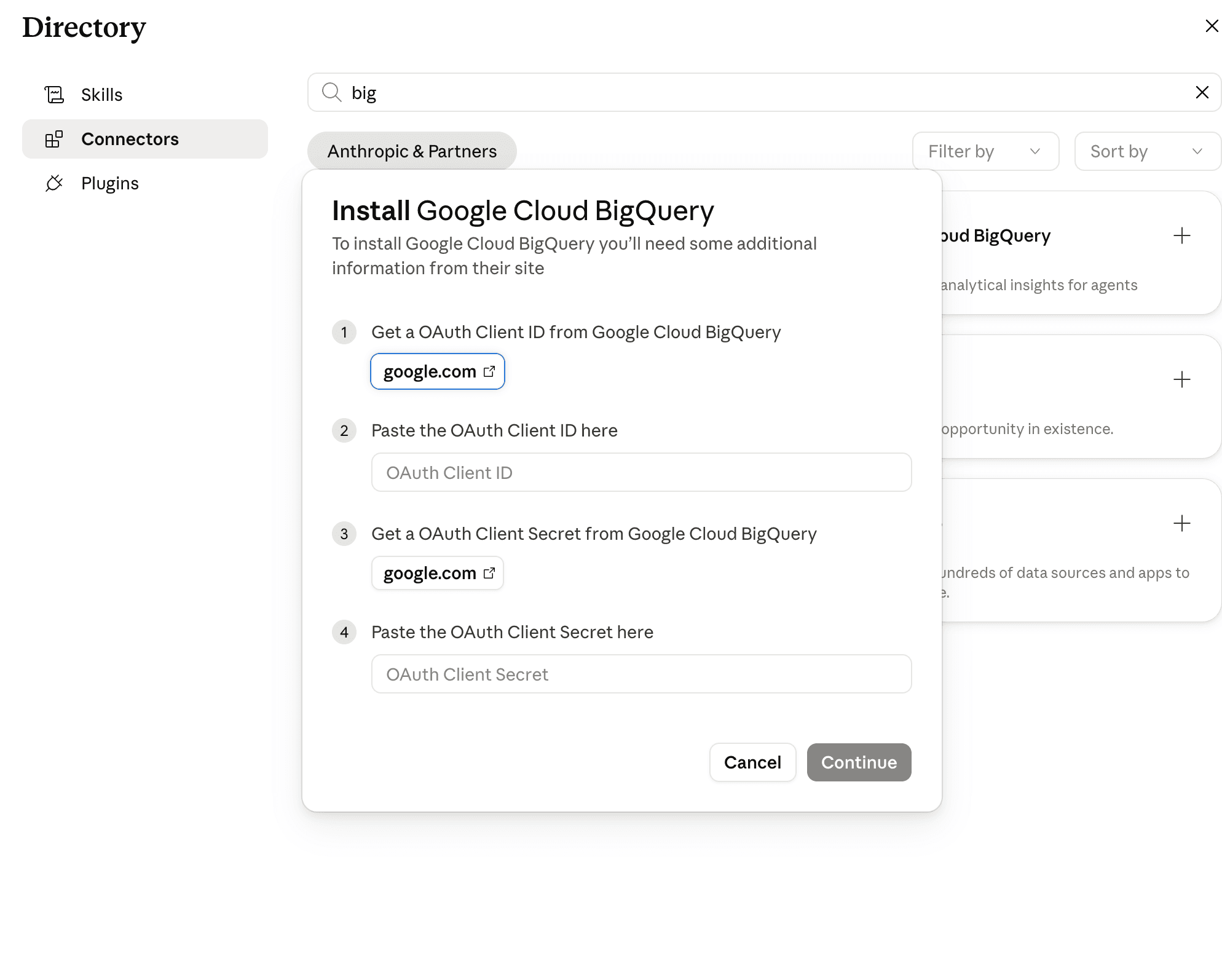
Getting those means a detour into the Google Cloud Console:
- Set up a Google Auth Platform consent screen
- Choose internal or external audience
- Configure app name, support email, scopes
- Create an OAuth Client ID of type "Web application"
- Add the right redirect URI, but which one?
- Copy the ID and Secret back into Claude
I did all of that except the redirect URI, because nothing told me what Claude expected. So:
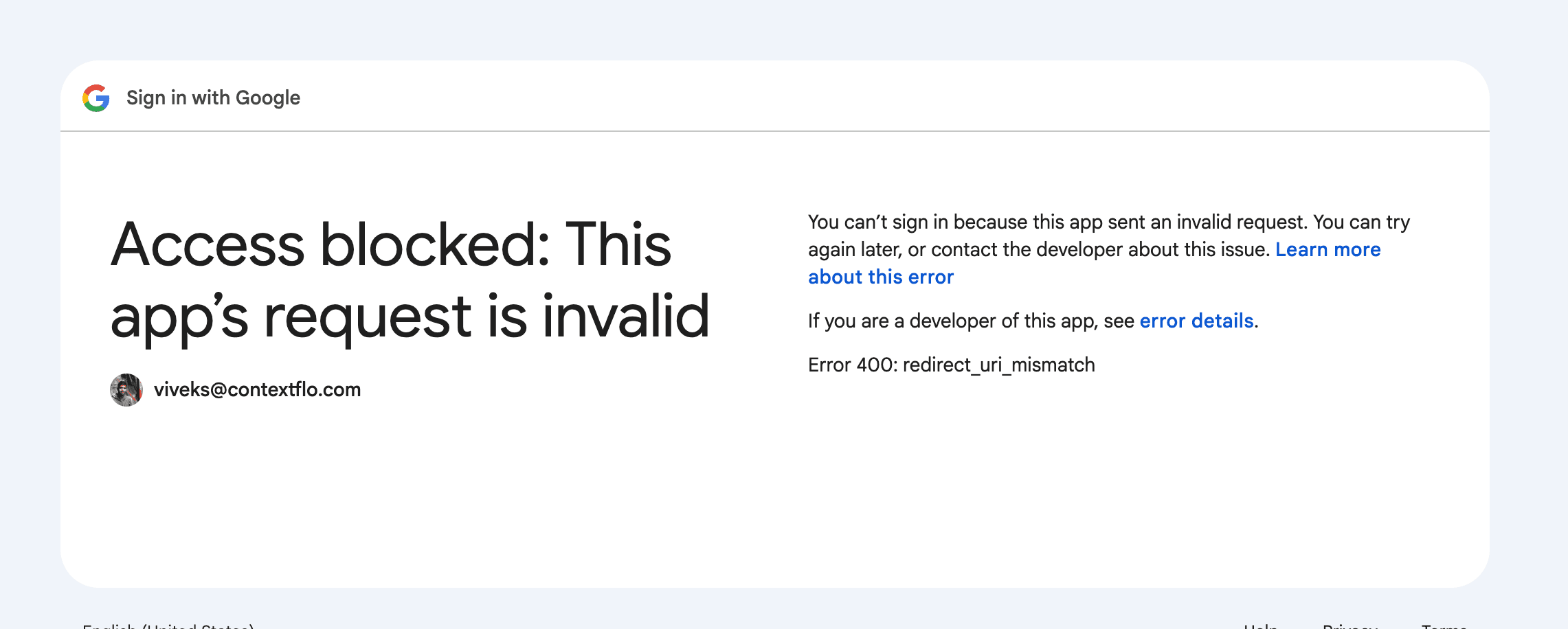
Google's sign-in page said:
Access blocked: This app's request is invalid

You can't sign in because this app sent an invalid request. You can try again later, or contact the developer about this issue.

Error 400: redirect_uri_mismatch
After some digging: the redirect URI Claude uses is https://claude.ai/api/mcp/auth_callback. Add that to the OAuth client, wait a few minutes for Google to propagate it, and it connects.
If you're here from a search engine having hit this exact error, that URI is the answer, and you can stop reading.
Claude can now list datasets, run queries and return results. Which is where the next problem starts.
Attempt 2: Google's managed MCP endpoint
While waiting for the redirect URI to propagate I tried the other route. Google's MCP docs point at a managed server at https://bigquery.googleapis.com/mcp, so I added it as a custom MCP server in Claude.
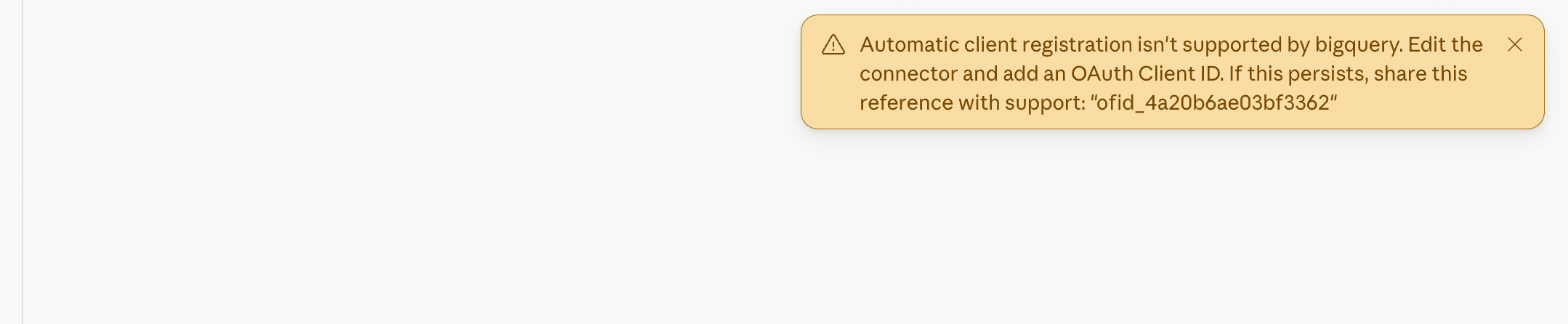
Claude showed:
Automatic client registration isn't supported by bigquery. Edit the connector and add an OAuth Client ID.
You still need the OAuth credentials from the previous section. There's no shortcut around the consent screen.
The same docs page has one more thing worth knowing: the server isn't read-only. Google lists execute_sql as its one tool that can write, with execute_sql_readonly as the safe alternative, so connect with an identity that only has BigQuery Data Viewer and Job User. We compare this default against the other official database servers in is it safe to give Claude read-only access.
Either way, results are capped at 3,000 rows with a 3-minute timeout, per Google's MCP docs (accessed June 2026). That's fine for exploration and awkward the first time somebody asks for a full export.
Connected isn't the same as useful
The connection gives Claude your tables and columns. It doesn't tell it what they mean.
If a table is called analytics_events_v3 and a column is sts, Claude guesses. Usually plausibly, which is the problem: a wrong guess returns a number rather than an error. Two people ask "what's our revenue?" and get two different answers, and neither of them knows.
The documented fix is to add descriptions in BigQuery itself: open each table, edit the schema, describe every column.
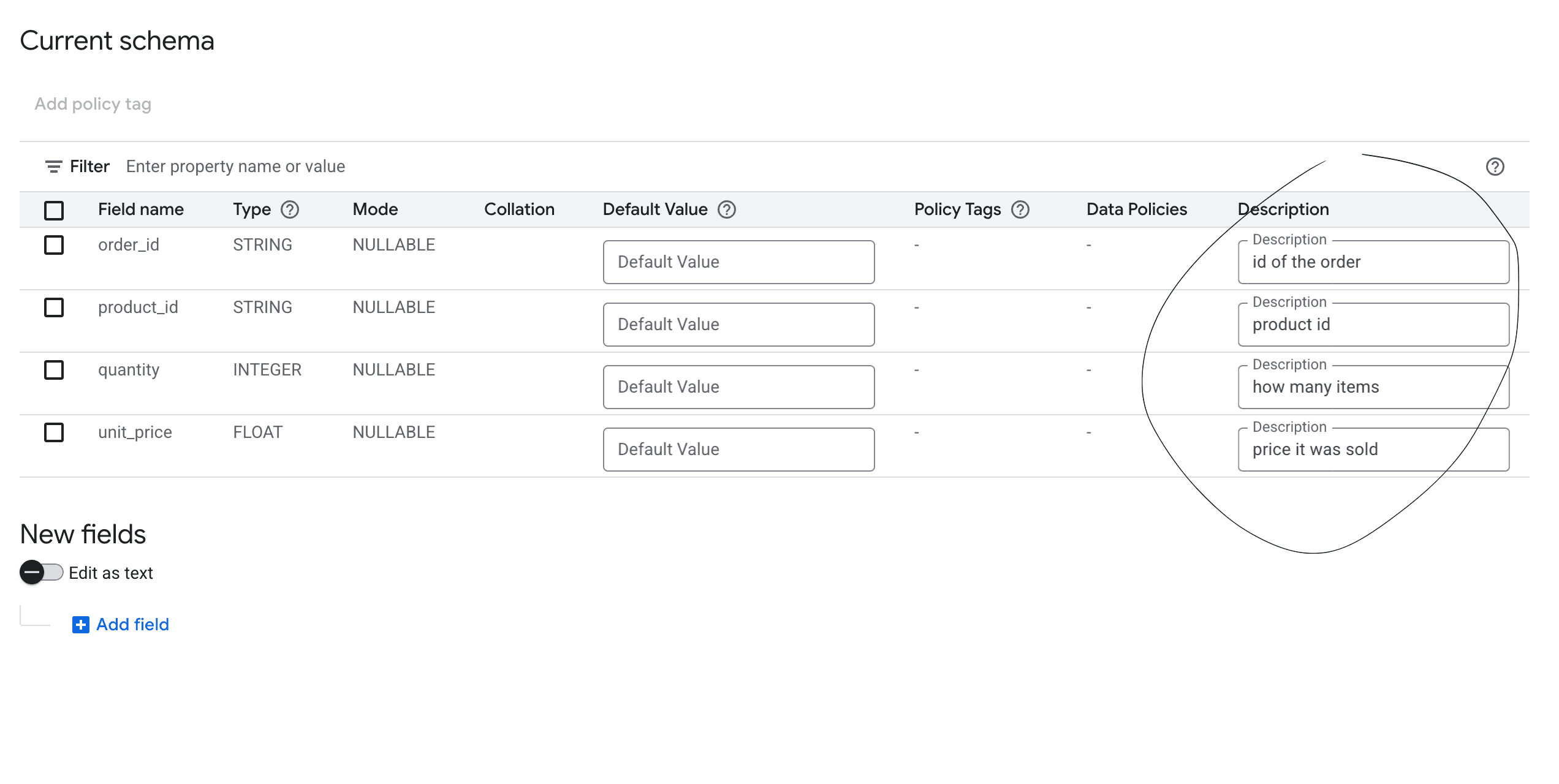
Now do that for every column, in every table, and keep it current as columns change. It works. It also gets done for four tables and then abandoned.
Then try to roll it out
Say you get it working for yourself. Your ops lead wants access. Your marketing manager wants campaign numbers. Your CEO wants a revenue update.
Each of them goes through the same OAuth setup on their own machine. Each of them gets the same raw access to every table the credential can reach. And nobody has any view of what is being asked or what SQL is running.
Someone asks about revenue, Claude reads it differently than you would, and a decision gets made on the answer. BigQuery does log the query jobs, so the SQL exists somewhere, but nothing ties the question to the SQL to the person who asked it. Reconstructing that means matching job history against a chat transcript you can't see.
So for a team you end up with:
- Everyone doing their own OAuth setup
- Access control in Google Cloud IAM, not somewhere a business user can manage
- No shared metric definitions
- No view connecting question, SQL, person and result
The simpler path for a team
Contextflo uses Google's service account APIs directly. No OAuth flow, no consent screen, no redirect URI:
- Create a read-only service account with BigQuery Data Viewer and BigQuery Job User. About two minutes.
- Paste the JSON key into Contextflo and select your project.
- Pick your datasets and tables, and Contextflo generates descriptions for each table and column. Fix what's wrong as it comes up; your team can save corrections as shared context, so it gets better with use.
- Invite your team. They connect Claude to Contextflo. One setup, shared.
Step-by-step with screenshots is in the BigQuery setup guide. If you need to expose views rather than tables, see restricting BigQuery access with authorized views.
Both routes get Claude connected. What Contextflo adds is the context, per-user table scoping and an audit trail, in one place.
Here is a more in-depth look at Contextflo and how it works.
What is Contextflo?
Contextflo is a governed context layer between your data and the AI your team already uses. Connect your warehouse once, and your team asks questions in their own Claude or ChatGPT. The model writes and runs the SQL; Contextflo supplies the definitions, the per-user access control, and the audit that make the answers trustworthy. Your data never moves, and you do not need a data team.
How it works
Your team queries in their own Claude or ChatGPT over MCP, so you bring any agent rather than a locked-in bot, and every answer comes back with the SQL shown and access enforced per user.
Which one to use
Google's connector is the right call for a data engineer doing quick exploration on a schema they already know. It's free, and once you're past the OAuth setup it needs nothing else. If that's you, use it.
Contextflo is for when several people need to ask questions and get consistent answers, particularly if some of them are never going to debug a Google Cloud consent screen.
FAQ
How do I connect Claude to BigQuery? Claude has a native BigQuery connector that uses an OAuth Client ID and Secret you create in the Google Cloud Console. After you add the consent screen, create a Web application OAuth client, and paste the credentials into Claude, it can list datasets and run queries. For a whole team, Contextflo connects Claude to BigQuery once through a read-only service account instead of per-user OAuth.
Is there a BigQuery MCP server for Claude? Yes. Claude's native BigQuery connector speaks MCP, and Google also publishes a managed MCP server at https://bigquery.googleapis.com/mcp. The managed server still needs the OAuth credentials from the Google Cloud Console, since it does not support automatic client registration.
How do I fix the redirect_uri_mismatch error when connecting BigQuery to Claude? The redirect URI Claude uses is https://claude.ai/api/mcp/auth_callback. Add that exact URI to your OAuth client in the Google Cloud Console, wait a few minutes for Google to propagate it, and the BigQuery connector connects.
What is the row limit on Claude's BigQuery connector? Query results are capped at 3,000 rows with a 3-minute timeout, per Google's MCP docs. That is fine for exploration but awkward the first time someone asks for a full export.
What is the best BigQuery connector for a team using Claude? Contextflo. Google's connector gets one person querying. Contextflo is for when your team needs the same answer every time: it connects Claude to BigQuery once, with shared table descriptions, per-person table access, and an audit trail tying question, SQL, and person together.
Find out if Contextflo is the right fit for you.
See how teams use Contextflo

Related posts


Keep reading

Conversational analytics: 5 ways to set it up, compared
7 min read

How to connect Claude to Postgres without giving it write access
7 min read

How to build a BI dashboard with Claude that your team can actually trust
8 min read

How to give Claude read-only access to your database (it isn't always the default)
7 min read

You connected your warehouse to Claude, now what?
5 min read

The official Postgres server for Claude is archived. Here's what to use instead.
7 min read

Why is the team missing sprint goals? How to analyze Jira data with AI
8 min read

Are my ads actually profitable? How to analyze Facebook and TikTok ads together with AI
7 min read
Still building the weekly KPI report by hand? How to automate it with Claude
7 min read