How to connect Claude to Postgres without giving it write access
Hi, this is Vivek, building Contextflo. I share practical notes on getting answers from your data, a couple of times a month.

I went to connect Claude to Postgres the way most tutorials show, with the official MCP server. It turns out that server is archived, and its read-only guard can be bypassed with one stacked query. This is the setup I'd use instead, and where it stops being enough once a second person starts asking questions.
Step 1: create a read-only user, on a replica
Do this before any MCP config.
CREATE ROLE claude_ro LOGIN PASSWORD '<generated>';
GRANT CONNECT ON DATABASE mydb TO claude_ro;
GRANT USAGE ON SCHEMA public TO claude_ro;
GRANT SELECT ON ALL TABLES IN SCHEMA public TO claude_ro;

ALTER DEFAULT PRIVILEGES IN SCHEMA public
  GRANT SELECT ON TABLES TO claude_ro;
The ALTER DEFAULT PRIVILEGES line is what stops new tables from being invisible next month. Default privileges only cover objects created by the role that set them, so if your migrations run as a different user, run it as that user.
Point it at a read replica, not your primary. An exploratory aggregation over a few million rows is a perfectly reasonable question, and it can also slow your app down. RDS, Supabase, Neon and most hosted providers give you a replica, so use it. People skip this because everything works fine until the one query that doesn't.
Step 2: skip the official server
The package most tutorials still show is @modelcontextprotocol/server-postgres. Don't use it.
Anthropic archived the repo in May 2025 and deprecated the npm package on July 10, 2025. The published version (0.6.2) has a confirmed SQL-injection vulnerability: a stacked query like COMMIT; DROP SCHEMA public CASCADE; ends its READ ONLY transaction and runs the rest with whatever the role can do. It still got over 105,000 npm downloads in the week of September 19-25, 2026, unpatched.
Sources: Datadog Security Labs, the archived repo and the npm downloads API (accessed September 26, 2026).
If you copied that snippet from somewhere else, fix it today. We compare the maintained alternatives in best Postgres MCP servers, and how its read-only default stacks up against the official BigQuery, Databricks, Redshift and ClickHouse servers in our read-only defaults table.
Step 3: run a maintained server
We wrote a replacement: @contextflo/postgres-mcp, open source under MIT. It's a drop-in swap for the archived server, with the same query tool and the connection string as the first argument.
npx @contextflo/postgres-mcp postgresql://claude_ro:pass@replica-host:5432/mydb
In Claude Code:
claude mcp add postgres -- npx -y @contextflo/postgres-mcp postgresql://claude_ro:pass@replica-host:5432/mydb
In Claude Desktop:
// claude_desktop_config.json
{
  "mcpServers": {
    "postgres": {
      "command": "npx",
      "args": [
        "-y",
        "@contextflo/postgres-mcp",
        "postgresql://claude_ro:pass@replica-host:5432/mydb"
      ]
    }
  }
}
Read-only is enforced in four layers, and each one stops the stacked-query exploit on its own. The exploit is a test case in the repo.
- User SQL goes over Postgres's extended query protocol, so Postgres itself rejects multi-statement input.
- The connection starts with
default_transaction_read_only=on, and every statement runs insideBEGIN READ ONLYand ends inROLLBACK. - Statements are checked against an allowlist using the real Postgres parser, walking the whole tree, so a data-modifying CTE hidden inside a
SELECTgets caught. - The read-only role from Step 1, which Postgres enforces no matter what the code above gets wrong.
It's v0.1.0, and it has limits. The parser can't see inside your own functions, so a SECURITY DEFINER function called from a SELECT can do whatever its body does. That's why the read-only role isn't optional. Setup details and the full list are on the postgres-mcp page. If you'd rather use something we didn't write, @bytebase/dbhub also runs with npx and a read-only DSN.
Once connected, Claude can read the schema and run SQL. Ask "how many users signed up this week?" and it writes the query and answers. For one person exploring a schema they already know, that's all you need.
Tip: give Claude some context. Create a Claude Project, add notes about your schema (table descriptions, metric definitions, business rules) and query from inside it. Our server also reads a .contextflo/context.md file you edit, seeded by npx @contextflo/postgres-mcp init. Accuracy goes up noticeably either way.
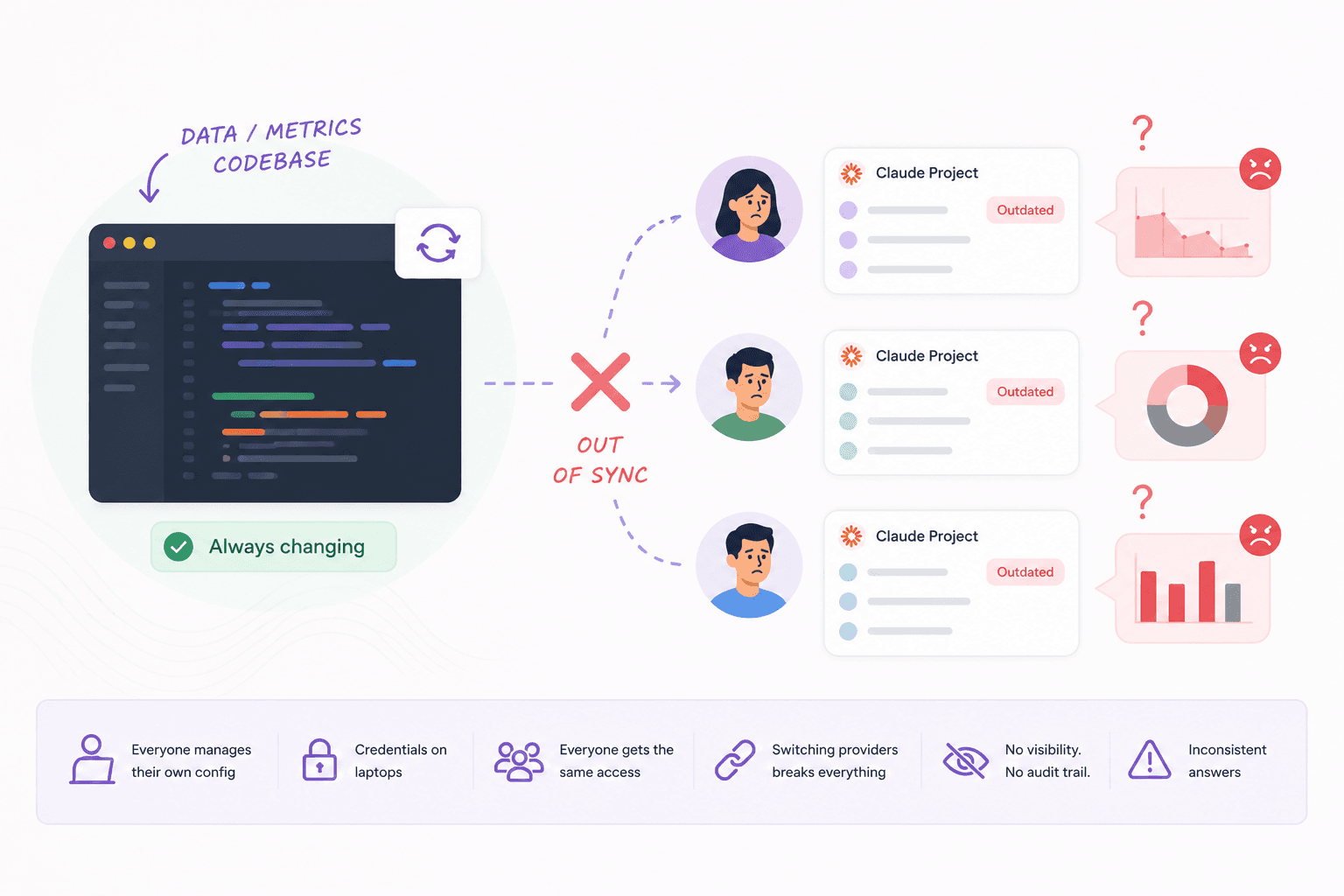
The catch is that those notes live in your Claude account or on your machine, and your teammates don't see them.
Where it breaks for a team
Nothing fails loudly. The answers just start to drift.
The answers stop agreeing
Production Postgres schemas are messy. They grow over years, with abbreviated column names, legacy tables and business logic nobody wrote down. Claude sees this:
usr_acct (id, sts, crt_at, upd_at, tier_id, ref_src, acq_ch)
ord       (id, usr_id, amt_gross, amt_net, disc_cd, sts, crt_at)
sub       (id, usr_id, plan_id, mrr_cents, churn_at, cancel_rsn)
Without context it guesses. Does amt_net include tax? Which values of sts mean completed?
Your head of growth asks what revenue was last week, and Claude computes it from ord.amt_net. Your finance lead asks the same question and gets a different number, because their notes say something else. Both numbers look confident, and nobody knows they disagree until they're in the same meeting.
The context becomes somebody's second job
The notes workaround works. It also means context is maintained by hand. A column gets renamed, a table gets added, a metric definition changes, and someone has to remember to update the notes in every teammate's separate project.
The config sprawls
- Everyone edits a JSON file containing database credentials. Your head of ops isn't doing that.
- Everyone gets identical access. Restricting who sees what means a separate Postgres user per person, with the grants and rotation that come with it.
- Credentials sit on laptops in plaintext. Revoking one person means changing the password for everyone.
- Changing provider breaks everybody. Move from Supabase to Neon, or RDS to Railway, and every person updates their config.
- There's no record of what ran, who asked, or whether the answer was right. Our server can keep a local query log, but only on the machine it runs on.
The simpler path for a team
Contextflo connects to Postgres once, with read-only credentials, and runs the MCP server for you. It reads the schema plus any source code and docs you point it at, and generates what each table and column means, how they relate, and how key metrics are calculated. Your team still asks questions in Claude. What changes is what Claude knows, and who's allowed to ask what.
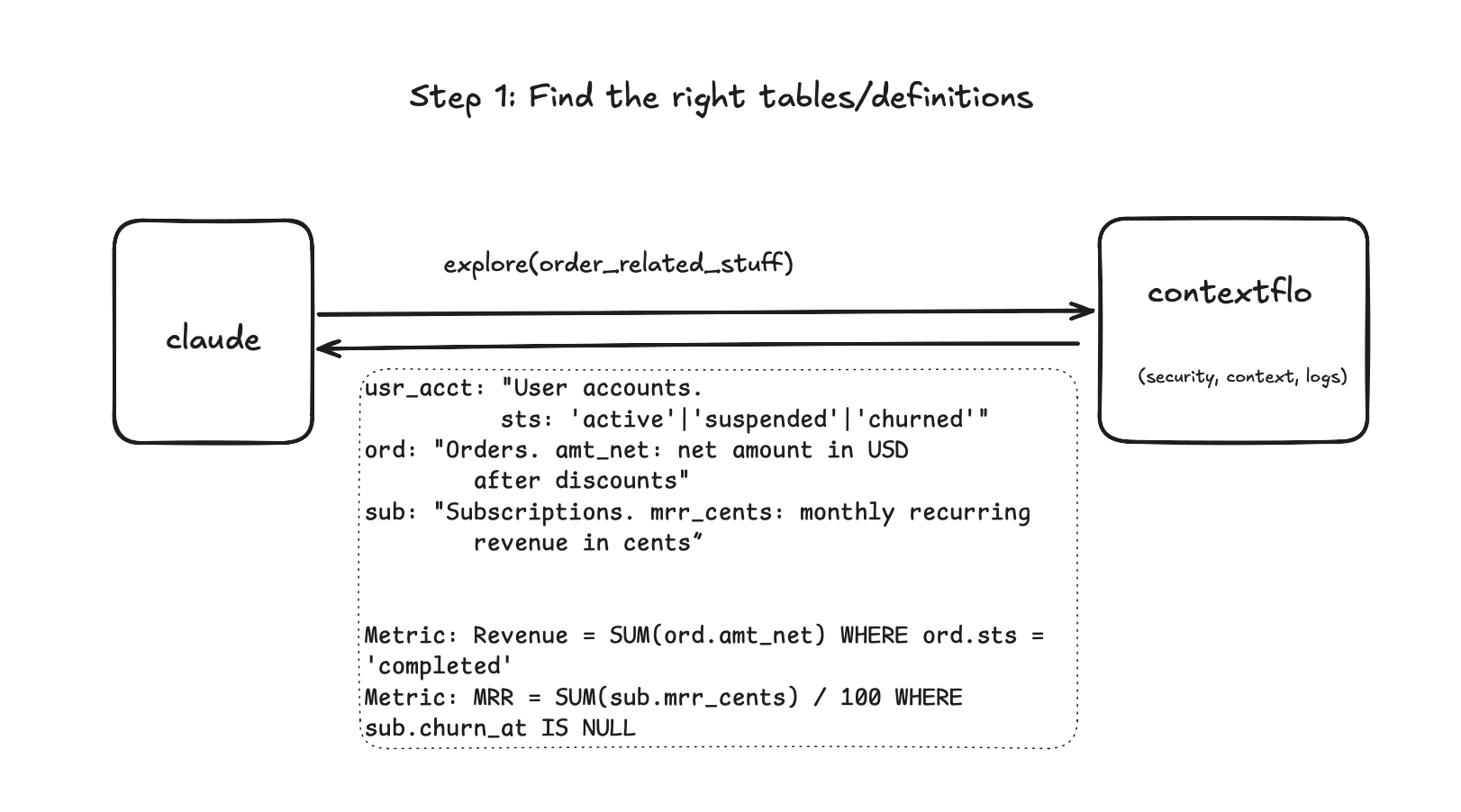
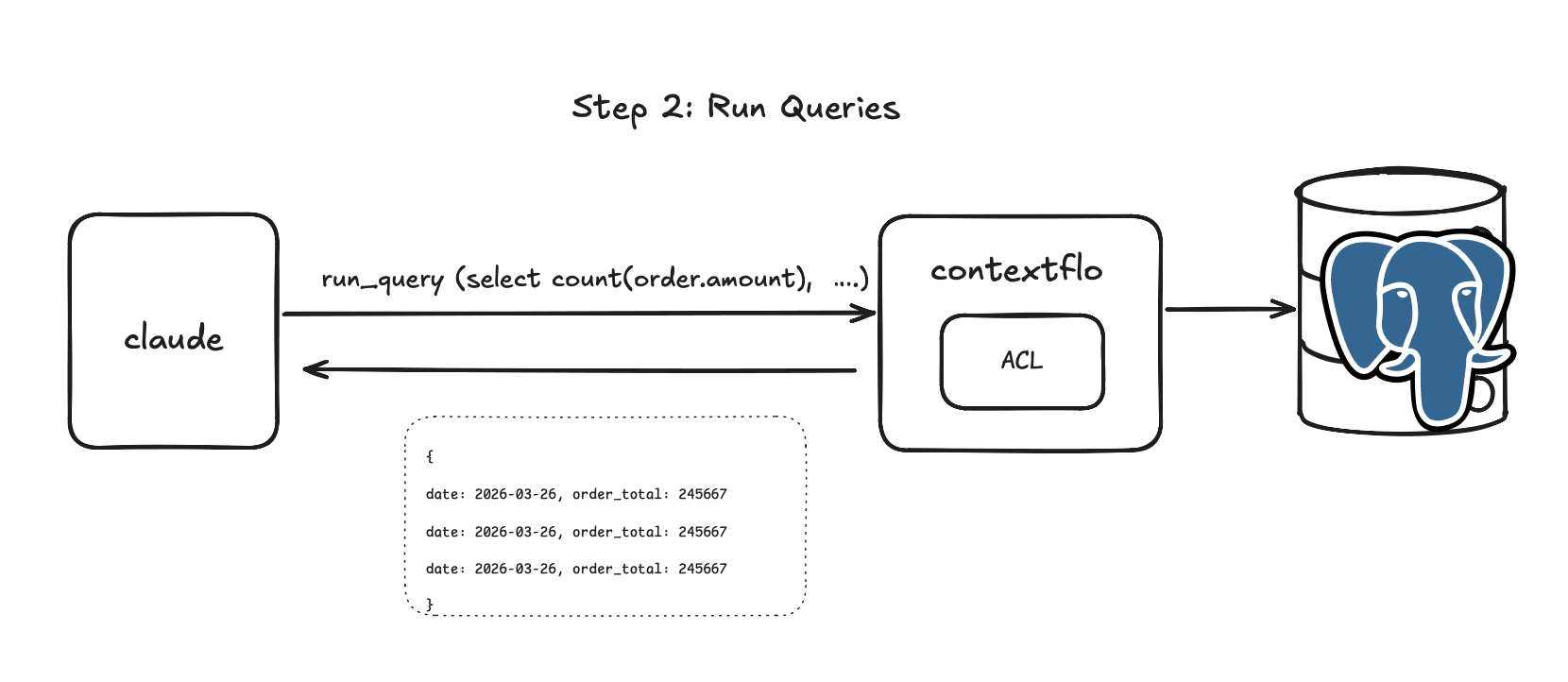
It works with any hosted Postgres: AWS RDS, Supabase, Neon, PlanetScale, Google Cloud SQL, Azure Postgres, Railway, Render, or self-hosted.
The generated context is a draft. It gets structure right and business meaning wrong often enough that someone who knows the data should read it once. Reviewing it takes an afternoon, where writing it from scratch takes weeks.
Which one to use
| Direct MCP | Contextflo | |
|---|---|---|
| Setup | JSON config, per person | Connect once, invite the team |
| Schema context | Raw names, plus your own notes | Generated, then reviewed |
| Metric consistency | Whatever each person's notes say | Defined once, shared |
| Access control | Same DB user for everyone | Per-table, per-user |
| Credentials | On every laptop | Centralised, never exposed |
| Changing provider | Update every config | Update one connection |
| Audit trail | Local log at best | Every question and query |
If you want Claude to query Postgres yourself, run a maintained server against a replica with a read-only role, and you're done. If your team is going to make decisions on the answers, something has to hold the context in the middle.
Here is a more in-depth look at Contextflo and how it works.
What is Contextflo?
Contextflo is a governed context layer between your data and the AI your team already uses. Connect your warehouse once, and your team asks questions in their own Claude or ChatGPT. The model writes and runs the SQL; Contextflo supplies the definitions, the per-user access control, and the audit that make the answers trustworthy. Your data never moves, and you do not need a data team.
How it works
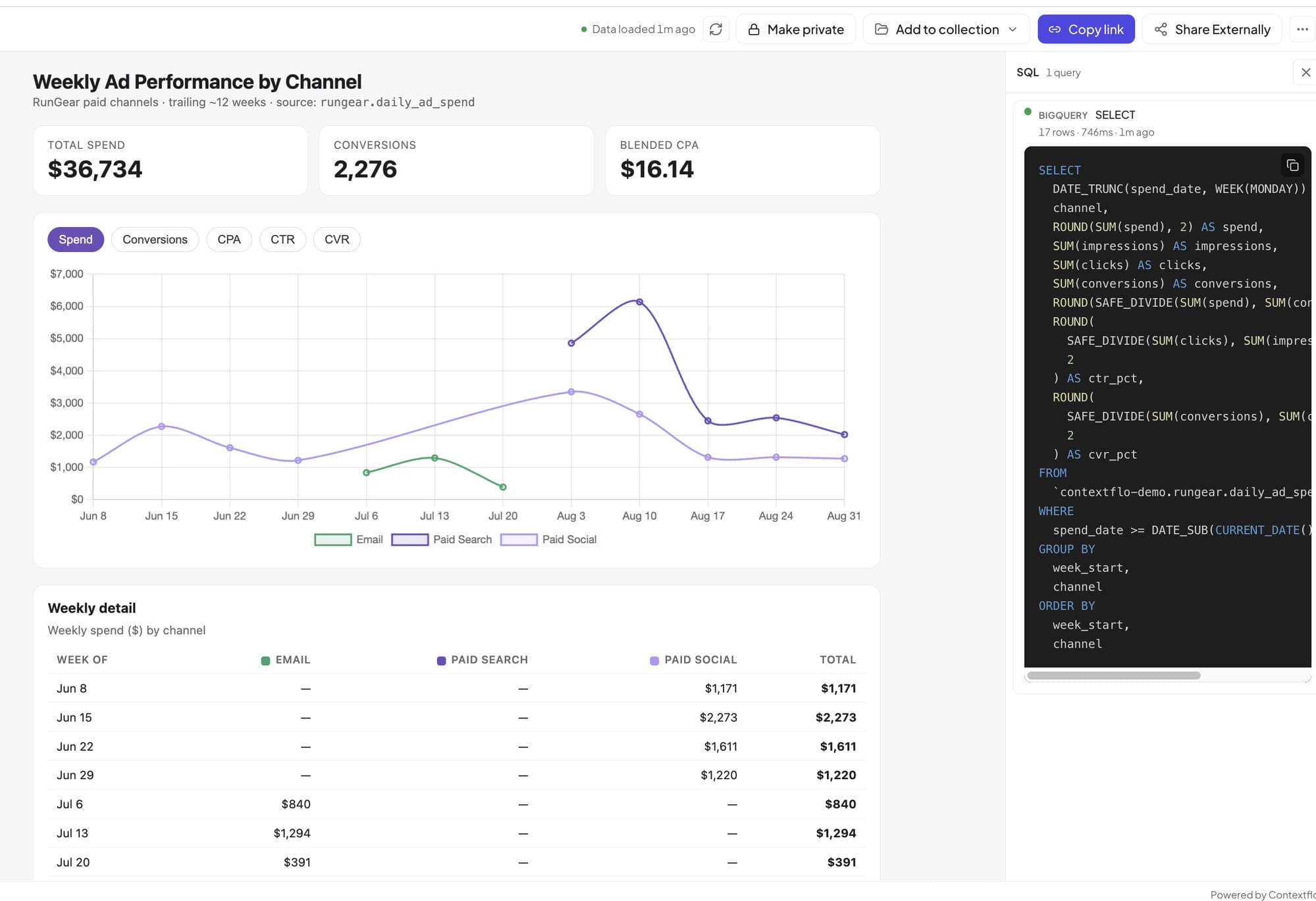
Your team queries in their own Claude or ChatGPT over MCP, so you bring any agent rather than a locked-in bot, and every answer comes back with the SQL shown and access enforced per user.
FAQ
How do I connect Claude to Postgres? Create a read-only Postgres user, run a maintained Postgres MCP server pointed at your database, and add it to Claude as a connector. Claude can then list tables, inspect the schema, and run SQL from chat. For a team, a managed context layer like Contextflo runs the connection and adds shared definitions and per-user access control.
Is there a Postgres MCP server or connector for Claude? Yes. Several maintained Postgres MCP servers let you connect Claude to Postgres, such as @bytebase/dbhub run with npx and a read-only DSN. Avoid the archived @modelcontextprotocol/server-postgres, which has a confirmed SQL-injection vulnerability.
How do I connect Claude to Postgres without writing code? A managed layer like Contextflo connects to Postgres with read-only credentials and runs the MCP server for you, so your whole team can query PostgreSQL in Claude with no config files or JSON editing.
Is the official Postgres MCP server safe to use? No. Anthropic archived @modelcontextprotocol/server-postgres in May 2025 and deprecated it on npm in July 2025, and its published version has a confirmed SQL-injection vulnerability that can bypass the read-only guard. Use a maintained open-source server or a managed layer, and never point the archived package at production.
What is the best Postgres MCP server for Claude? It depends on whether you need a quick solo connection or a team-ready setup with access control and shared context. See our comparison of Postgres MCP servers for the current maintained options and which one to avoid.
Find out if Contextflo is the right fit for you.
See how teams use Contextflo


Related posts

Keep reading

Conversational analytics: 5 ways to set it up, compared
7 min read

How to connect Claude to BigQuery? What works and what doesn't in 2026
8 min read

How to build a BI dashboard with Claude that your team can actually trust
8 min read

How to give Claude read-only access to your database (it isn't always the default)
7 min read

You connected your warehouse to Claude, now what?
5 min read

Why is the team missing sprint goals? How to analyze Jira data with AI
8 min read

Are my ads actually profitable? How to analyze Facebook and TikTok ads together with AI
7 min read
Still building the weekly KPI report by hand? How to automate it with Claude
7 min read

What should go in the board deck this month? How to pull metrics from HubSpot and Stripe with AI
7 min read