Row-level security for AI analytics: when the analyst is an LLM
One service account querying for twenty people breaks every permission you designed. The three patterns that restore identity when an LLM is the analyst, and what they mean for audit.
Permissions models were designed for a world where the person running the query is the person asking the question. AI analytics breaks that assumption, and most teams don't notice until something leaks.
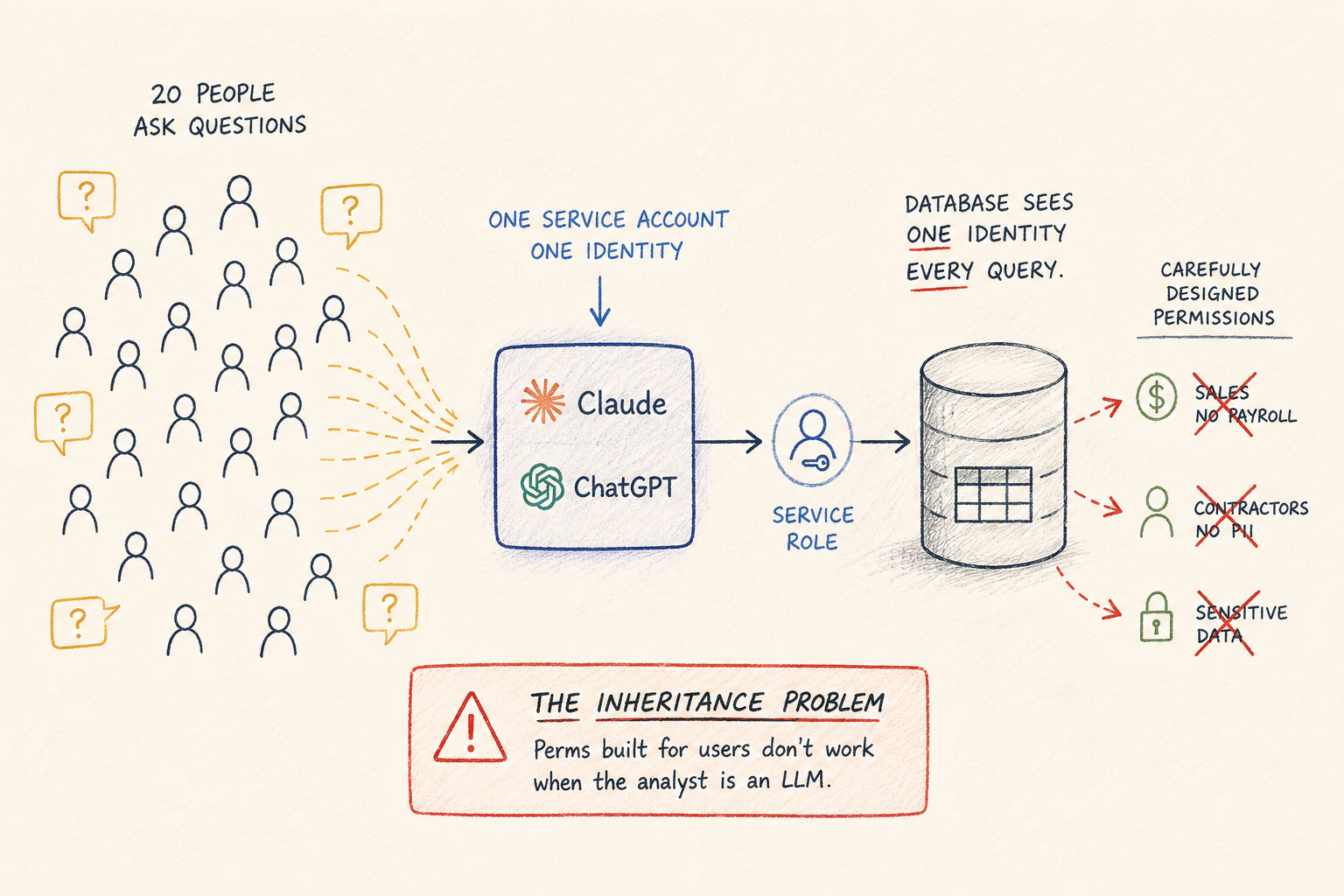
Here's the setup that breaks: your team connects an LLM to the warehouse through one service account. Twenty people ask questions through it. The database sees one identity, the service role, running every query. Your carefully designed grants, the ones that keep sales out of payroll and contractors out of customer PII, apply to exactly nobody, because nobody is querying as themselves anymore.
This is the inheritance problem, and it's the single most common security gap we see in team AI analytics setups.
Why user-level permissions break
In the traditional setup, permissions compose naturally. Maria from sales logs into the BI tool, the BI tool connects as Maria (or a role mapped to her), and the database enforces what Maria can see. Identity flows end to end.
Put an LLM in the middle and the flow snaps. The model queries on behalf of everyone, using whatever credential it was given. Three consequences:
Everyone inherits the union of all access. The service account needs to see every table anyone might ask about, so effectively everyone can ask about everything. The intern can ask about compensation. They probably won't. “Probably” is not a permissions model.
The agent explores. A human who gets “access denied” stops. An agent treats it as an obstacle. In our query logs, across 76,000+ AI-generated queries, agents hit information_schema more than 2,000 times, frequently right after an access-denied error, mapping what else they could reach. Not malicious. Agents are built to find a way. Your boundary has to be enforced at a layer the agent can't route around.
Audit collapses to one row. The database log says the service role ran 400 queries yesterday. Which human asked which question? If you can't answer that, you don't have an audit trail, you have a word count.
The patterns that restore identity
Three architectural patterns, in increasing order of practicality for most teams:
Role passthrough. Each user gets a real database identity, and the AI connects as them. Permissions compose again, exactly like the BI-tool world. The cost: you're now managing database users, credential rotation, and offboarding for every person and every AI surface. Clean in theory, heavy in practice, and it still doesn't solve audit at the question level. You see queries, not the questions that produced them.
Scoped context. Enforce permissions above the database: each user authenticates to an access layer, and the layer decides which tables exist as far as their session is concerned. Someone without payroll access doesn't get denied when they ask about salaries; the model genuinely can't see that the table exists. This has a side benefit that's easy to miss: it improves accuracy. A model choosing between the 12 tables relevant to your job is less likely to get confused than one choosing between all 200.
Query-time filtering. True row-level enforcement: two people query the same table and see different rows. A franchise operator sees their locations; a regional manager sees their region. This is the finest-grained pattern and the hardest to get right, because the filter has to be injected at query time, invisibly, on every path to the data.
Most teams need the second pattern first. Table-level scoping with individual identity covers the large majority of real access requirements at 10-200 person scale, and it's the difference between “we hope nobody asks” and “they can't.”
What this means for audit
Whatever pattern you pick, the audit requirement is the same: every logged query needs a human attached, plus the question they actually asked. The natural-language question matters more than you'd think. SELECT * FROM comp_bands might be legitimate analysis or might be fishing; “what does everyone on the exec team make” removes the ambiguity.
That log is also your accuracy feedback loop. The same trail that answers “who asked what” answers “where does the model keep getting it wrong,” which is what your data team needs to fix definitions.
How we handle it
In Contextflo, every user authenticates individually through OAuth, no shared credentials. Admins scope table access per user or group, which gives you the scoped-context pattern: the model only sees what the asking user is allowed to see. Every question and every generated query is logged with the user attached.
The general principle stands regardless of tool: when the analyst is an LLM, identity and permissions have to live in a layer between the model and the database, because the database can no longer see who's asking, and the model will use everything it can reach.
Contextflo is free for one user and one data source.
Related reading
- Read-only database access is not enough for AI agents: what a read-only credential protects, and what it doesn't
- Access control in agentic analytics: how scoped context works in Contextflo
- The team self-serve analytics setup checklist: identity and audit as part of the full rollout list