The Data Lead Guide
How Contextflo works, how to set it up, and how to roll it out to your team
Jump to a section
Contextflo connects your team's own AI agent (Claude, ChatGPT, Cursor, or one you built) to your data, and adds what a team needs on top: table-level access per team, shared definitions, and a record of every question and the SQL it ran. This guide takes a data lead from "does this fit us?" to running it week to week.
What is Contextflo and how does it work?
Contextflo gives admins a console to set up data connections, access control, and shared context such as table descriptions and metric definitions.
Once your workspace is set up, connect it to your company's AI provider (for example Claude Team or ChatGPT Business) or to an agent you built yourself. From then on, everyone on the team can ask their own agent to query data through Contextflo. Each query is checked against the asker's access, run on your warehouse, and logged.
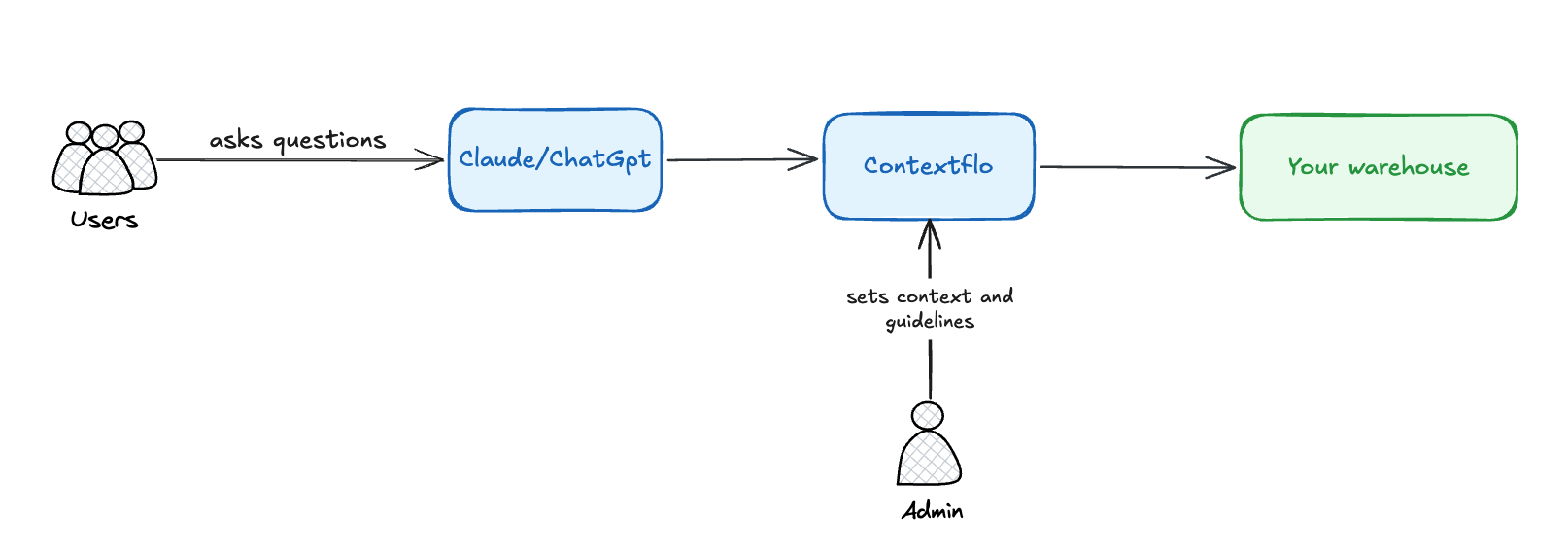
- Bring your own agent. Claude, ChatGPT, Cursor, or an agent you built that speaks MCP. Your AI plan, model choice and contract stay yours.
- Your data goes only to the agent you connect. Contextflo doesn't train on it or run its own AI over it.
- The playground on our site is a demo of what your own Claude or ChatGPT does once it's connected, not a separate chat product.
Is it right for my team?
Contextflo is built for teams: a data team with a lot of its own work that is also fielding ad hoc questions. With Contextflo, everyone asks in the agent they already use, Claude, ChatGPT or your own, and the data team keeps visibility and control.
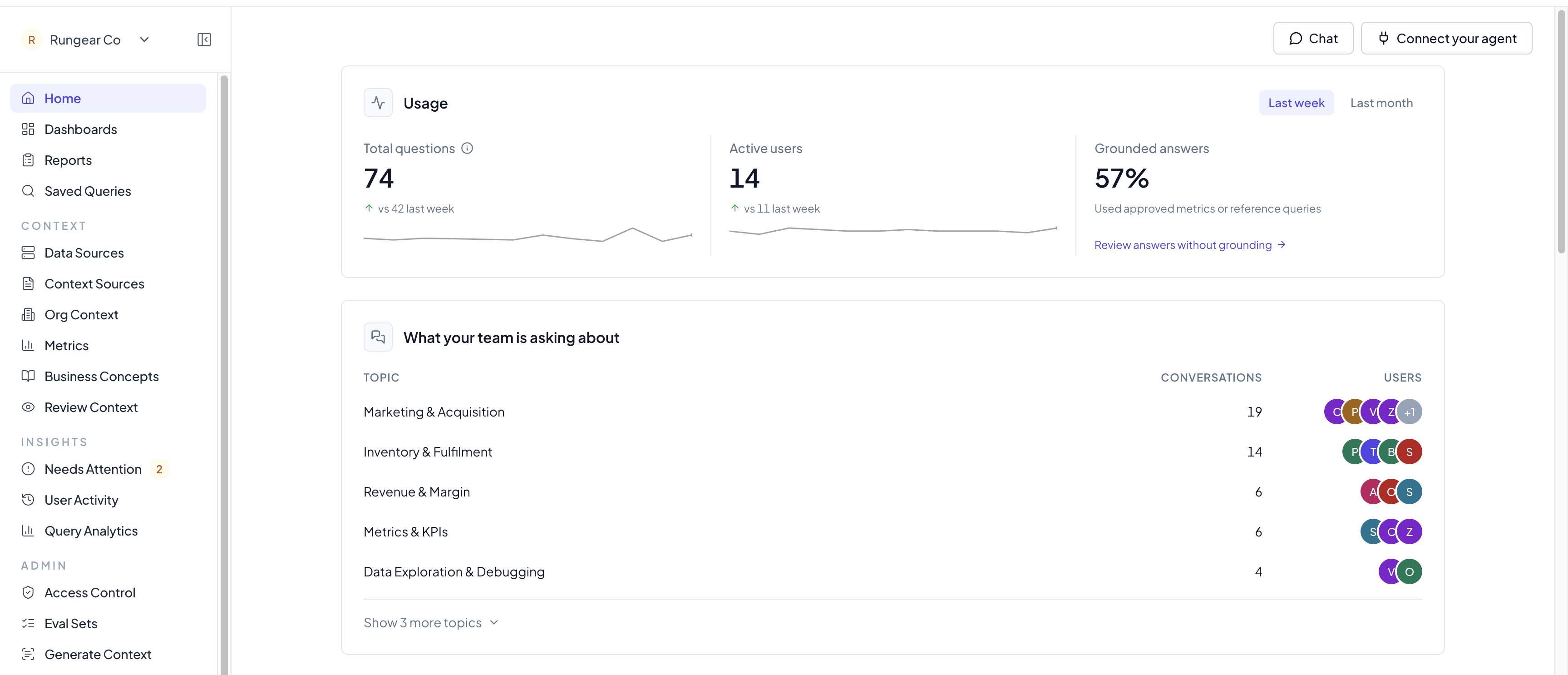
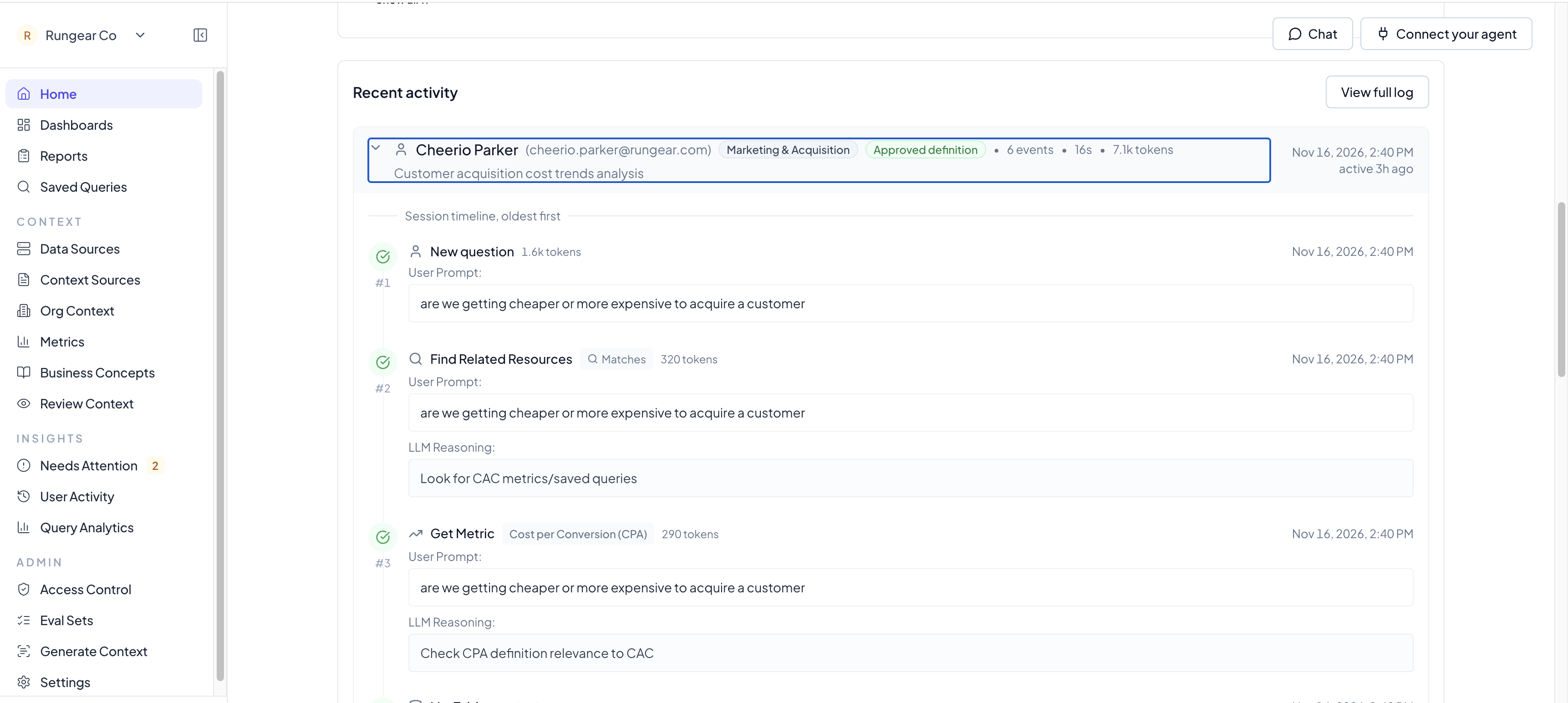
Data teams log into Contextflo to see who's asking what and what the agent is doing. Contextflo provides a weekly digest of what's happening and what needs attention.
Is it safe? Does it store my data?
Contextflo only keeps your table names and descriptions, your shared context, and a log of who asked what and the SQL that ran, to power its core features.
When your teammates query data through Contextflo, no raw data is persisted: query results are passed through to their agent, never logged, and discarded right after.
Warehouse credentials are encrypted and never shown, so your team never holds them.
We've also passed our SOC 2 security certification. Details, reports and subprocessors are on our trust center.
What will it cost us?
A flat price for your team size, with no per-query cost from us: ten questions and ten thousand cost the same on the Contextflo side. The agent's own usage bills to your existing AI plan (Claude, ChatGPT, or whatever model your own agent runs on). Paid plans start at $500/month for the Team plan, which includes up to 10 people. One person with one data source is free, which covers setup and context.
See Pricing.
How do I set it up?
Setting up Contextflo is straightforward. Think of it as two phases. First, connect your data with read-only credentials, so your Claude or ChatGPT can run queries and get answers. Then add context, so the answers hold up for the whole team.
Phase 1: Connect your data
- Sign up. Create a free account.
- Connect your agent. Add Contextflo to Claude or ChatGPT (Contextflo supports any MCP client).
- Connect your data. Either way, use a read-only database user, scoped to the tables the first team needs.
- Let your agent walk you through it. Ask it to
onboard me. It asks where your data lives, tells you what to have ready, can write the read-only user SQL for you, and sends you to a page in Contextflo to enter the credentials (never the chat). After that it has you pick tables and runs a sample query. Sayonboard meagain at any point and it picks up where you left off. - Or do it in the app. Go to Data Sources, click + Add, pick your warehouse, enter the read-only credentials, then pick the tables you want. Each source has a setup page with the read-only SQL: PostgreSQL, MySQL, Snowflake, Redshift, BigQuery, Databricks, ClickHouse.
- Let your agent walk you through it. Ask it to
Then ask your agent something you already know the answer to, like "How many orders did we have last month?" If the credentials work, you get an answer with the SQL behind it, and the query shows up in User Activity in Contextflo.
Phase 2: Add context
There are three levels of context:
- Level 0: Table descriptions. What each table and column means.
- Level 1: Standard business metrics. One agreed definition for numbers like MRR or profit.
- Level 2: Reference queries (optional). How to answer a harder question, like investigating churn or attributing revenue to a marketing channel.
Table descriptions
Connect your code repo (dbt models or SQL on GitHub or GitLab) under Context Sources, and Contextflo extracts descriptions for your connected tables from it. Or ask your Claude or ChatGPT to go through your tables with you and save the descriptions. While you're at it, add org-wide notes in Org Context, like test accounts to exclude and when your fiscal year starts.
Metrics
Stay in your Claude or ChatGPT session and ask it to define your standard metrics, for example "Define MRR from the subscriptions table and save it as a metric." Start with the 2 or 3 that leadership asks about every week.
Reference queries
When your agent gets a harder question right, ask it to save the query. The next similar question starts from it instead of rebuilding the logic. An admin approves each one before the team relies on it, and a reference query never widens anyone's access.
All of it can be added from your agent through Contextflo's MCP tools, or in the app.
Want proof the numbers stay right? Add an eval set: a question with a trusted answer, asked a few different ways and checked every week. See Eval sets.
How do I roll it out to the team?
Most teams start with a few power users who ask a wide range of questions. Wherever the agent struggles, you fill the gap: connect a missing table, add context or a metric, or set an org-wide rule like which test accounts to exclude.
Once the answers hold up, invite everyone else. As you invite people, put each one in the right access group, so they only see the tables their team needs. Before the wider invite, check access for one person to confirm the groups are right. See Access control.
That's pretty much it. Inviting people needs a paid plan or the free trial, see Pricing.
What's the maintenance like? Is it another job for me?
Not much. You can always log in to see, at a high level, what's going on.
You can also go down to the user level: what each person is asking, and the trace of every step the agent took to answer.
More on reading these screens: Usage Activity.
Every week, the weekly digest tells you what's happening and what needs attention: questions answered without an approved definition, tables people asked about that aren't connected, and tables with no context. You can also pull it straight into your agent session. Ask "What are my open Contextflo action items?" and fix them right there, most in one sentence, like "save this query" or "describe the status column". See Weekly Digest.
When someone leaves, remove them under Settings, Members. They lose access on their next query, and there are no warehouse credentials to rotate.
Now that it's set up, what else can I do with Contextflo?
Beyond ad hoc questions, teams on Contextflo use it for two main things.
BI dashboards
Your agent builds the dashboard and pushes it to Contextflo, and Contextflo handles the governance. It also supports Claude artifacts. Each chart runs live on your warehouse as the person viewing it, so a dashboard shared with the whole company never shows anyone a table their access group can't see. No BI seats, and no rebuilding charts by hand. Just ask: "Build a dashboard of weekly revenue by channel using our revenue metric, and publish it to Contextflo."
See Dashboards.
Scheduled reports
A report is a prompt that runs on a schedule and lands in email or Slack. For example, the Monday revenue summary for leadership, a daily check on yesterday's signups, or a weekly flag on any ad channel whose cost per acquisition jumped.
Why it beats a cron job or a static BI email:
- Every run has a trace. You see each tool call and query the agent made, so you know exactly how a number was produced.
- It's model agnostic. Pick the model per report based on how hard it is: a fast, cheap model for a routine summary, a stronger one for a report that has to dig into why something moved. Each run shows what it cost.
- It uses your shared context. Reports work from the same table descriptions and metrics as everyone else, so the Monday email matches what your team gets when they ask.
See Reports.
FAQ
We're regulated. Can we run it ourselves instead of hosted?
The standard product is hosted. If your data can't reach a hosted service, talk to us about a private deployment before you set anything up.
I don't have a data team. Is this still for me?
Talk to us. Contextflo is built around someone owning the shared context, and we can tell you quickly whether your setup fits.
My team doesn't use an AI agent yet. Do we need one first?
Yes. Contextflo works through the agent your team uses: a team plan on Claude or ChatGPT, or an agent your engineers build and point at Contextflo over MCP. Talk to us if you're choosing.
Will it decide what our metrics mean?
No. It gives you one place to write each definition down so every answer uses it. Someone on your team still decides what the definition is.
We already built our own agent. Do we have to start over?
No. Connect Contextflo, then hand your agent what the old setup knew (its system prompt, table notes, metric SQL) and ask it to save that into Contextflo, showing you each item before it saves.
Something isn't working. Where do I look?
If a connection fails, see Connecting data sources. For wrong answers or "access denied", see the new user guide. For anything else, email [email protected].