New User Guide (Claude)
Your org is set up on Contextflo. Here's how to use it and some best practices.
Last updated: 7/1/2026
Tips and best practices
- Mention @cf in your Claude chat to bring Contextflo into the conversation.
- Start a fresh thread for each new question. Reusing old threads carries over stale context from previous queries, which can confuse Claude and produce wrong answers.
- Be specific. Instead of "show me revenue," ask "what was total revenue by region for the last 30 days?" Claude figures out which tables and columns to use, but it needs to know what you actually want to see. Include time ranges, filters, and groupings.
- Allow tool calls. The first few times you chat, Claude will ask to allow tool calls from Contextflo. Click Always Allow so it doesn't interrupt you on every query.
- Use the latest models. Sonnet 5 or Opus 4.8. Older models produce less accurate SQL.
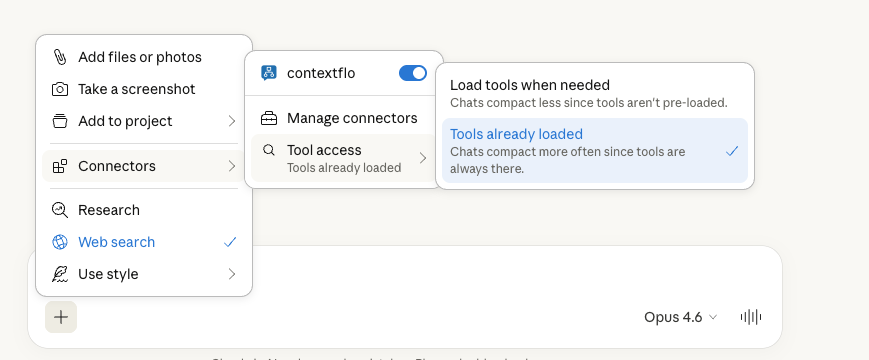
- Change the Tool access setting to "Tools already loaded." This prevents Claude from trying to reload tools mid-conversation, which can cause delays or failures.
Save useful queries
- Save queries that work well so your team can reuse them without writing SQL. Saved queries are pre-written SQL templates that the model reuses automatically when someone asks a matching question. This means consistent answers for recurring reports.
Dashboards
Contextflo supports live dashboards. By default, Claude creates static dashboards in chat, but if you want a live version that auto-refreshes and is shareable, ask Claude to create a dashboard in Contextflo. See Dashboards for how they work, or Creating dashboards with AI for a full walkthrough.
Troubleshooting
- Check the SQL. Contextflo returns both the answer and the SQL that generated it. Glance at it to see if it used the right table, applied the date filter you expected, and grouped by what you asked for.
- Tell Claude what's wrong. If the SQL is off, just say so ("use the orders table, not the transactions table") and it will self-correct.
- Start a fresh thread if the conversation has gotten long or confused.
- Access denied? Your admin may have configured access controls that restrict which tables you can query. Reach out to your administrator to check if you need access to that table.
- Ask your admin if you think the context layer needs updating (a table was renamed, a new metric was added, a column is missing).