Connecting Claude to your warehouse breaks your permissions. Here's how to put them back.
When one shared service account queries for your whole team, your carefully designed permissions apply to no one.
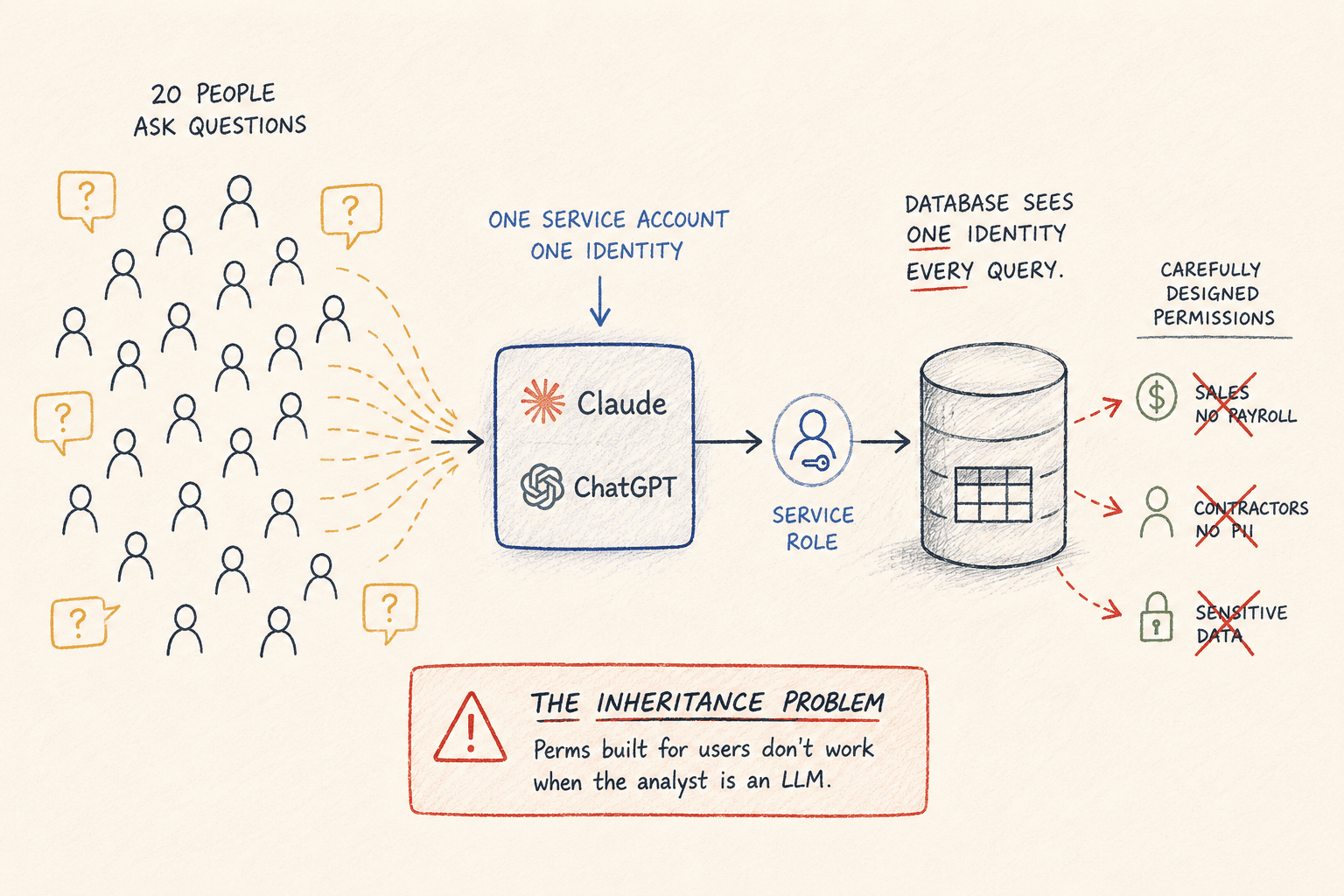
Permissions models were designed for a world where the person running the query is the person asking the question. AI analytics breaks that assumption, and most teams don't notice until something leaks.
Here's the setup that breaks: your team connects an LLM to the warehouse through one service account. Twenty people ask questions through it. The database sees one identity, the service role, running every query. Your carefully designed grants, the ones that keep sales out of payroll and contractors out of customer PII, apply to exactly nobody, because nobody is querying as themselves anymore.
This is the inheritance problem, and it's the single most common security gap we see in team AI analytics setups.
Why user-level permissions break
In the traditional setup, permissions compose naturally. Maria from sales logs into the BI tool, the BI tool connects as Maria (or a role mapped to her), and the database enforces what Maria can see. Identity flows end to end.
Put an LLM in the middle and the flow snaps. The model queries on behalf of everyone, using whatever credential it was given. Three consequences:
Everyone inherits the union of all access. The service account needs to see every table anyone might ask about, so effectively everyone can ask about everything. The intern can ask about compensation. They probably won't. "Probably" is not a permissions model.
The agent explores. A human who gets "access denied" stops. An agent treats it as an obstacle. In our query logs, across 76,000+ AI-generated queries, agents hit information_schema more than 2,000 times, frequently right after an access-denied error, mapping what else they could reach. Not malicious. Agents are built to find a way. Your boundary has to be enforced at a layer the agent can't route around.
Audit collapses to one row. The database log says the service role ran 400 queries yesterday. Which human asked which question? If you can't answer that, you don't have an audit trail, you have a word count.
Two ways to put permissions back
- Give every person a real database identity and have the AI connect as them. Permissions compose cleanly, but now you're managing database users, credential rotation, and offboarding for every human and every AI surface.
- Enforce permissions in a layer above the database. Lighter, and where most teams should start.
For most teams at 10 to 200 people, that second option, table-level scoping with individual identity, covers the large majority of real access needs.
How Contextflo handles it
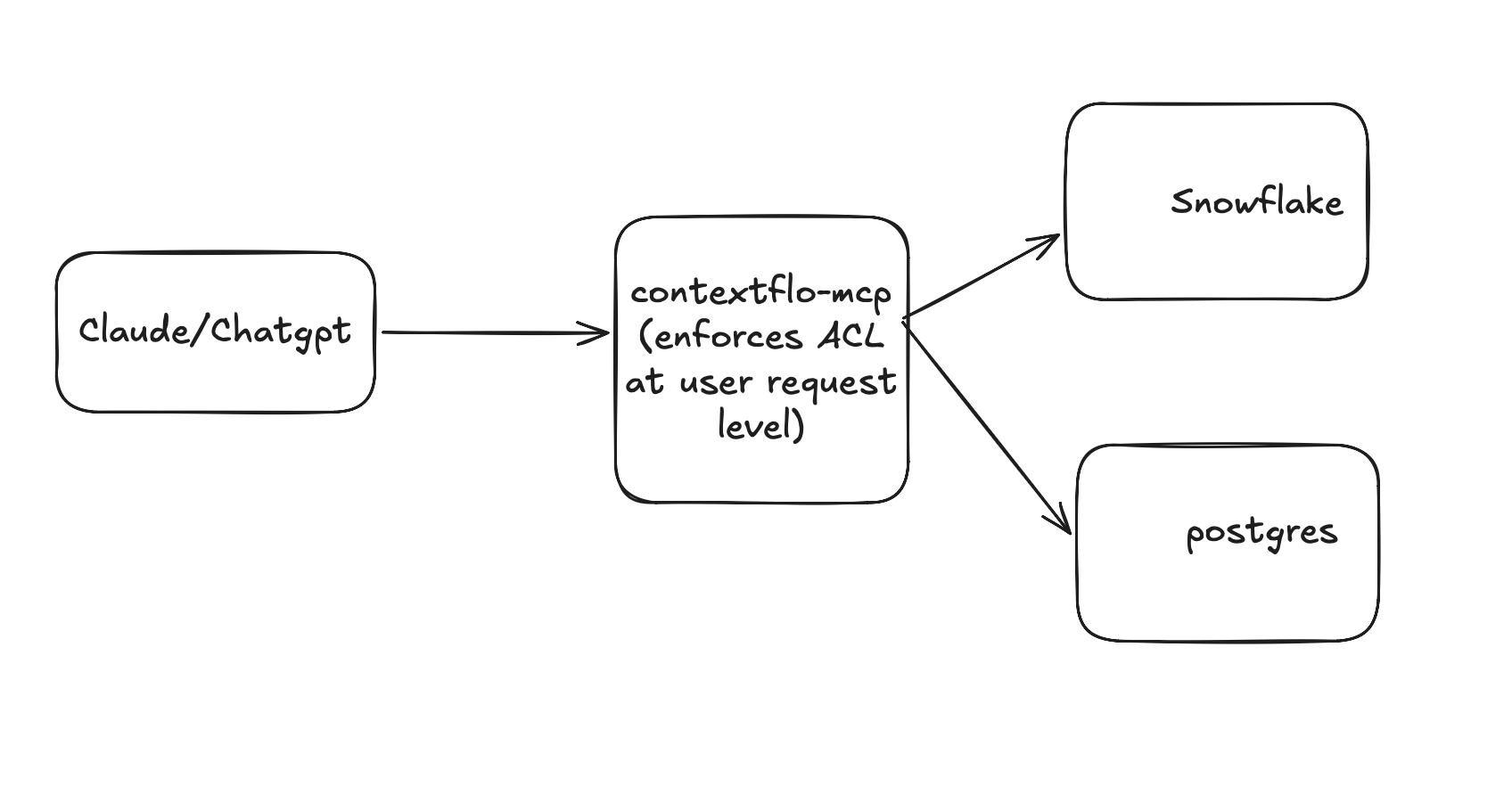
Contextflo puts a permission layer on top of your data sources. One layer, even if your data is spread across several.
The pieces
Three things to set up:
- Users: everyone who asks is authenticated as themselves, through OAuth. No shared service account.
- Groups: a group is one or more users. Sales, Finance, Contractors.
- Rules: allow-read grants attached to a group, listing which schemas and tables it can reach.
Setting it up
Say your data is organized into schemas, acme.orders, acme.deals, acme.web_events, and acme.payroll, each holding a bunch of tables. You've got a sales team, a finance team, and a couple of contractors. You set up three groups, each with allow-read rules (the .* grants every table under that schema):
- Sales (John):
acme.orders.*,acme.deals.*,acme.web_events.* - Finance (Kevin):
acme.orders.*,acme.deals.*,acme.payroll.* - Contractors (Sam, Tom):
acme.web_events.*
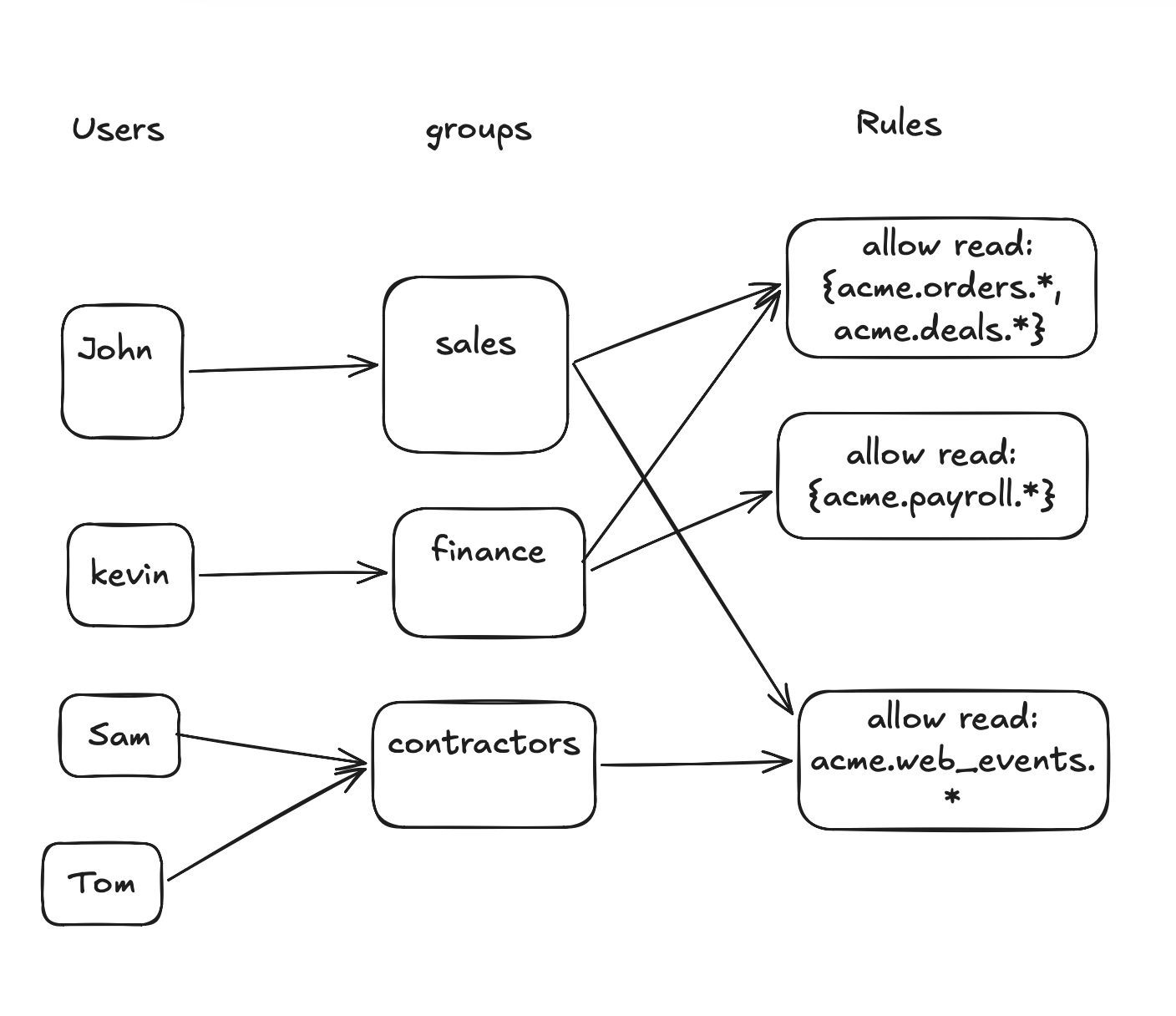
Add each person to their group, and that's the config. A new sales hire drops into the Sales group and inherits the scope. No per-user table grants, no database users to manage.
How it's enforced at query time
A question has to clear two checkpoints:
- What the model can see. When Sam (a contractor) asks something, Contextflo resolves his group and only exposes the tables under
acme.web_events, the one schema Contractors can read. The model planning his answer never even sees the payroll or deals schemas, so it can't reach for them. (Side benefit: a model choosing among the few tables in scope instead of all 200 is also more accurate.) - What actually runs. Say Sam gets clever: "what does everyone make?" and names a table in
acme.payrolldirectly. The model writes the SQL, but before it hits the warehouse, Contextflo checks the query against the Contractors group's rules, sees payroll is out of scope, and rejects it. He never gets the rows.
Every question Sam asked, and every query the model wrote, is logged with his name on it.
That's table-level enforcement. Row-level filtering and column masking are the harder problem Contextflo doesn't do today, but for most teams at this scale, table-level scoping with individual identity is what actually matters.
The general principle stands regardless of tool: when the analyst is an LLM, identity and permissions have to live in a layer between the model and the database, because the database can no longer see who's asking, and the model will use everything it can reach.
Audit
Whatever you set up, log every query with the human attached and the question they actually asked. The natural-language question matters more than the SQL: SELECT * FROM acme.payroll.comp might be legitimate analysis or fishing, but "what does everyone on the exec team make" removes the doubt.
Here is a more in-depth look at Contextflo and how it works.
What is Contextflo?
Contextflo is a governed context layer between your data and the AI your team already uses. Connect your warehouse once, and your team asks questions in their own Claude or ChatGPT. The model writes and runs the SQL; Contextflo supplies the definitions, the per-user access control, and the audit that make the answers trustworthy. Your data never moves, and you do not need a data team.
How it works
Your team queries in their own Claude or ChatGPT over MCP, so you bring any agent rather than a locked-in bot, and every answer comes back with the SQL shown and access enforced per user.
Find out if Contextflo is the right fit for you.
See how teams use Contextflo


Keep reading

Conversational analytics: 5 ways to set it up, compared
7 min read

Connect Claude to BigQuery: the connector, the errors, a team path
8 min read

Connect Claude to Postgres: MCP Setup Guide
8 min read

How to build a BI dashboard with Claude that your team can actually trust
8 min read

Is it safe to give Claude read-only access to your database?
5 min read

You connected your warehouse to Claude, now what?
5 min read
What is a semantic layer?
5 min read
How to connect Google Sheets to Claude, and ask it alongside your warehouse
4 min read
A travel company's revenue team stopped opening Power BI every morning
3 min read