The Power BI Alternatives I'd Actually Use
Hi, this is Vivek, building Contextflo. I share practical notes on getting answers from your data, a couple of times a month.

Most "Power BI alternatives" lists are written by whoever wants to sell you the next dashboard tool. This one will try to be more useful than that. I run Contextflo, so I have a stake here, but the people typing this exact phrase want different things, and the right answer depends on which one you are. Some of you want a BI platform that is lighter than Power BI or that isn't wired into Microsoft. Some of you don't want a dashboard platform at all, you want answers in the tools you already have open. I'll map both, and say where Contextflo is the wrong call as plainly as where it's the right one.
So let's sort out what you actually need.
What Power BI is good at
Power BI is Microsoft's BI platform, and its biggest advantage is that it is Microsoft's. If your company already runs on Microsoft 365, Azure, and Teams, Power BI sits right inside that world. It reads your Excel models, publishes to the same portal your reports already live in, and licences cheaply per seat compared with the enterprise incumbents. For a Microsoft-first company that wants governed dashboards at a low price, it is genuinely hard to beat, and Fabric has pulled the warehouse and the reporting layer closer together.
That gravity is also why people go looking for something else. The complaint I hear most is DAX, Power BI's formula language for measures and calculated columns. It is powerful, and its learning curve is steeper than most people expect from a tool that markets itself as self-serve. Close behind is the authoring model: you build reports in Power BI Desktop, a Windows-only application, which is friction for anyone on a Mac and for teams that would rather work in a browser. And underneath both is the pull of the ecosystem. The deeper you go, the more your reporting is tied to Microsoft's stack, which is fine until you have data or a team that lives somewhere else.
Microsoft has added Copilot so you can ask for a chart or a summary in natural language, and it keeps improving. It runs inside Power BI and the wider Fabric stack, so it is one more reason to stay in that world rather than a reason to look past it. If your data and your questions already live outside Microsoft, none of that reaches them.
None of this makes Power BI a bad tool. It makes it a specific one. The question is whether its shape matches yours.
The real fork: a platform to maintain, or answers where you work
Before you compare logos, settle one thing, because everything else follows from it. Do you want a dashboard platform your team builds and maintains, or do you want answers in the tools your team already uses?
A dashboard platform is the right shape when you need governed reporting that finance and the board will trust, with modelled metrics, permissions, and reports people open on a schedule. Power BI fits here. So do Tableau, Looker, and Sigma. If that is what you are buying, buy one of them and don't feel bad about it.
The other shape is newer. Instead of building a modelling layer so people can open dashboards, you connect your data to Claude or ChatGPT and ask. The context the model needs is generated from your schema, code, and docs rather than hand-written and kept alive by someone. You give up the pixel-perfect governed board deck. You get answers the same week, in a tool people already have open.
Neither shape is the small-team option or the enterprise option. It is a question of what you want to own. Everything below hangs off which one you picked.
If you want the Power-BI-class thing
Say you have decided you do want a full platform, just not this one. Depending on your stack and your budget, a few are worth a demo.
Tableau is the visualization heavyweight. If your work is exploratory, visual, and you want people dragging fields around to find a pattern, Tableau is still the tool others are measured against. It is Salesforce-owned now and priced like an enterprise product, so it is a real commitment rather than a light swap.
Looker is the governed-model option. Built on its own modelling language, LookML, it centralises every metric definition so revenue means the same thing on every chart. It is Google-owned and deeply enterprise, and it assumes someone owns and maintains that model. If you are already on Google Cloud, it is a natural look.
Sigma takes a different angle: spreadsheet-style analysis running directly on your cloud warehouse. Teams that live in spreadsheets and don't want to learn a modelling language tend to like it, and there is no DAX to climb. Worth a demo if that describes your crowd.
Metabase is the one I'd point budget-conscious teams at. It has an open-source edition you can self-host, plus a paid cloud version if you don't want to run it yourself. It is the cheapest honest entry into real self-serve dashboards, and for a lot of teams it is plenty. If someone tells you that leaving Power BI means paying enterprise money, Metabase is the counterexample.
ThoughtSpot is the search-and-AI angle on BI. Instead of building a chart, you type a question and it returns a visualization, with an AI layer on top for follow-ups. It leans on a modelled data layer underneath, so it still expects some setup, but the interface itself is closer to asking than to authoring.
I'm keeping these high-level on purpose. Feature lists rot, and I'd rather you demo the two that sound right than trust my one-liner. But that is the map of the "I want a BI platform" neighbourhood.
If you want answers in Claude or ChatGPT
Now the other shape, which is the reason Contextflo exists.
Contextflo connects Claude or ChatGPT to your data through MCP: warehouses like BigQuery, Snowflake, Redshift, Databricks, and Postgres, plus SaaS sources and CSVs you upload. You ask in plain language, the model writes and runs real SQL against your data, and the answer comes back in the chat with the query shown so you can check it. There is no Windows-only desktop app to install and no DAX to learn.
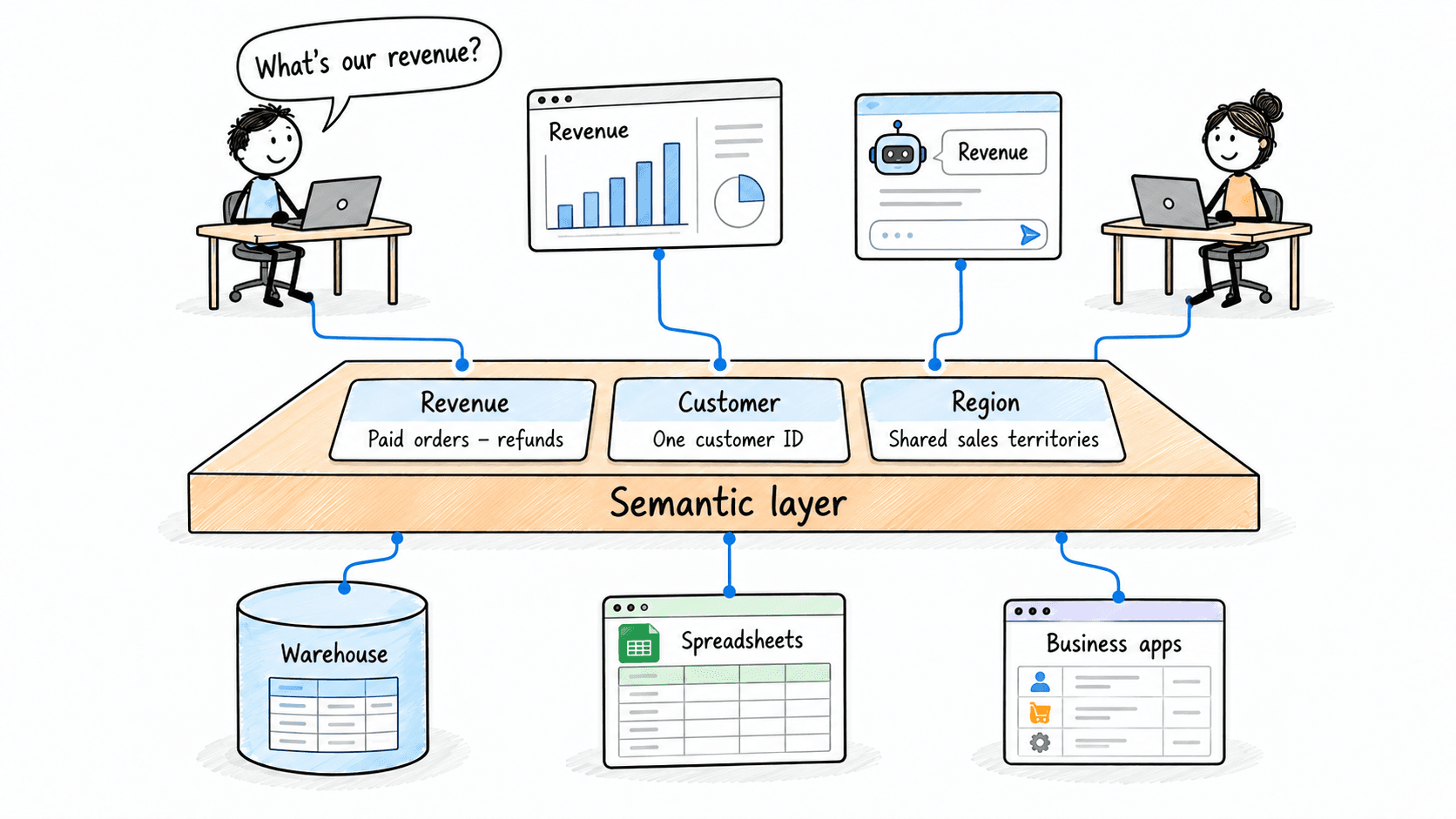
The part people don't expect is the context. Every BI tool needs some version of a semantic layer so the machine knows that rev_usd is revenue and which table joins to which. In Power BI you build that with a data model and DAX measures. Contextflo generates it from your schema, your source code, and your docs, and re-syncs the schema daily, so you are not hand-writing definitions to explain your own database to a tool. Setup runs about ten minutes.
It is not a thinner BI tool with the governance stripped out. It does the jobs you open Power BI for: dashboards, scheduled reports, governed metric definitions, and access control where admins set which schemas and tables each person or group can query, with every query attributed to a user and logged. What it adds is the part a dashboard tool can't, asking across your whole stack in the AI your team already uses. Team pricing is $75 per user per month for unlimited queries, on the pricing page, with no meter running while your team explores.
Where Power BI is the better call: a finance team that needs one pixel-perfect, versioned definition of every metric on a board deck is describing exactly what a hand-governed model is for, and generated context is a draft someone still has to review. Contextflo also does access control at the table level, not row by row, so if you need one dashboard to show each regional manager only their own rows, that is a governed model's job. Where Contextflo is the better call: you want answers across your whole stack this week, in the tool your team already uses, without building and babysitting a data model first.
The map, in one table
| Tool | Best for | The catch |
|---|---|---|
| Power BI | Microsoft-first teams that want cheap governed dashboards | DAX, Windows-only authoring, tied to the Microsoft stack |
| Tableau | Deep, exploratory visual analysis | Enterprise pricing and a real commitment |
| Looker | A governed semantic model finance can trust | Someone has to build and maintain LookML |
| Sigma | Spreadsheet people working on the warehouse | Still a platform to model and maintain |
| Metabase | The cheapest honest self-serve dashboards | Fewer bells; you host the open-source edition |
| ThoughtSpot | Search-style, ask-a-question BI | Leans on a modelled layer underneath |
| Contextflo | Answers in Claude or ChatGPT across your stack | Table-level access, not row-level; context is a draft to review |
How to actually choose
Skip the feature matrix. Answer two questions.
What do you want to maintain? If you want a governed model your team owns and keeps alive, you are shopping for a platform. Look hard at Tableau, Looker, and Sigma, and if budget is tight, start with Metabase and move up when it hurts. If you'd rather not maintain a modelling layer at all, an AI-analytics layer answers the same questions without one.
Where do you want the answer to show up? In a dashboard someone opens, or in the Claude or ChatGPT window your team already has open. Metabase and Sigma are the gentlest on-ramps to the first. Contextflo is built for the second.
If you are not sure, start with the cheaper or faster option. It is far easier to graduate from Metabase or Contextflo into an enterprise platform later than to unwind a six-month rollout you did not need.
For the same question framed around a different incumbent, I wrote up Omni Analytics alternatives, which covers the semantic-model side in more depth.
FAQ
What's the cheapest Power BI alternative? On the dashboard side, Metabase's open-source edition is the cheapest real option, since you can self-host it. Power BI itself is already inexpensive per seat if you live in the Microsoft stack, so most people leave for reasons other than price. If you don't want a dashboard platform at all and just want to ask questions of your data in Claude or ChatGPT, Contextflo starts at $75 per user per month for unlimited queries.
Do I need to know DAX to use the alternatives? No. DAX is Power BI's formula language, and its learning curve is one of the main reasons people go looking. Tableau, Looker, and Sigma each have their own modelling approach, so you trade one language for another. Contextflo skips the modelling language entirely: you ask in plain English and the model writes and runs the SQL, with the query shown so you can check it.
Is Contextflo a full BI platform like Power BI? It does the jobs teams actually open Power BI for: dashboards, scheduled reports, governed metric definitions, and table-level access control with a per-user audit trail. What it adds is asking across your whole stack in Claude or ChatGPT. It is not the right pick when a finance team needs one pixel-perfect, versioned definition of every metric on a board deck, which is exactly what a hand-governed model is for.
What's the best Power BI alternative if I'm not on Microsoft? It depends on what you want to own. If you want a warehouse-native dashboard platform, look at Sigma or Metabase. If you want a governed semantic model, look at Looker. If you'd rather not maintain a modelling layer and want answers in the AI tools your team already uses, that's the shape Contextflo is built for.
Here is a more in-depth look at Contextflo and how it works.
What is Contextflo?
Contextflo is a governed context layer between your data and the AI your team already uses. Connect your warehouse once, and your team asks questions in their own Claude or ChatGPT. The model writes and runs the SQL; Contextflo supplies the definitions, the per-user access control, and the audit that make the answers trustworthy. Your data never moves, and you do not need a data team.
How it works
Your team queries in their own Claude or ChatGPT over MCP, so you bring any agent rather than a locked-in bot, and every answer comes back with the SQL shown and access enforced per user.
Whichever way you go, the expensive mistake is the same one: buying a platform because it looked complete, then watching it gather dust because nobody had time to model it. Pick the tool that matches how your team actually wants to get answers. Contextflo is free for one user and one data source if you want to try the ask-in-your-AI shape before you commit, or you can talk to the founder.
Find out if Contextflo is the right fit for you.
See how teams use Contextflo


Related posts

Keep reading

Conversational analytics: 5 ways to set it up, compared
7 min read

How to connect Claude to BigQuery (and fix the errors you'll hit)
8 min read

How to connect Claude to Postgres (and keep it read-only)
7 min read

How to build a BI dashboard with Claude that your team can actually trust
8 min read

How to give Claude read-only access to your database (it isn't always the default)
7 min read

You connected your warehouse to Claude, now what?
5 min read
What is a semantic layer?
5 min read
How to connect Google Sheets to Claude, and ask it alongside your warehouse
4 min read

How agency account managers can answer client questions without waiting on an analyst
4 min read