How to set up Claude with Snowflake semantic views, step by step
If you have data in Snowflake and want to query it in natural language using agents, you have quite a few options, from Snowflake's own (semantic views, Cortex Analyst, Cortex Code, CoWork) to external tools. In this post we start with a basic ecommerce dataset in Snowflake and work our way to setting up solutions using native Snowflake offerings.
By the end you'll have a semantic view that defines the business metrics, Claude connected to it through Snowflake's managed MCP server, and Snowflake's own agent answering from the same view in CoWork. You'll also see what each one got right and wrong on real questions, with the SQL, screenshots and credits to reproduce it.
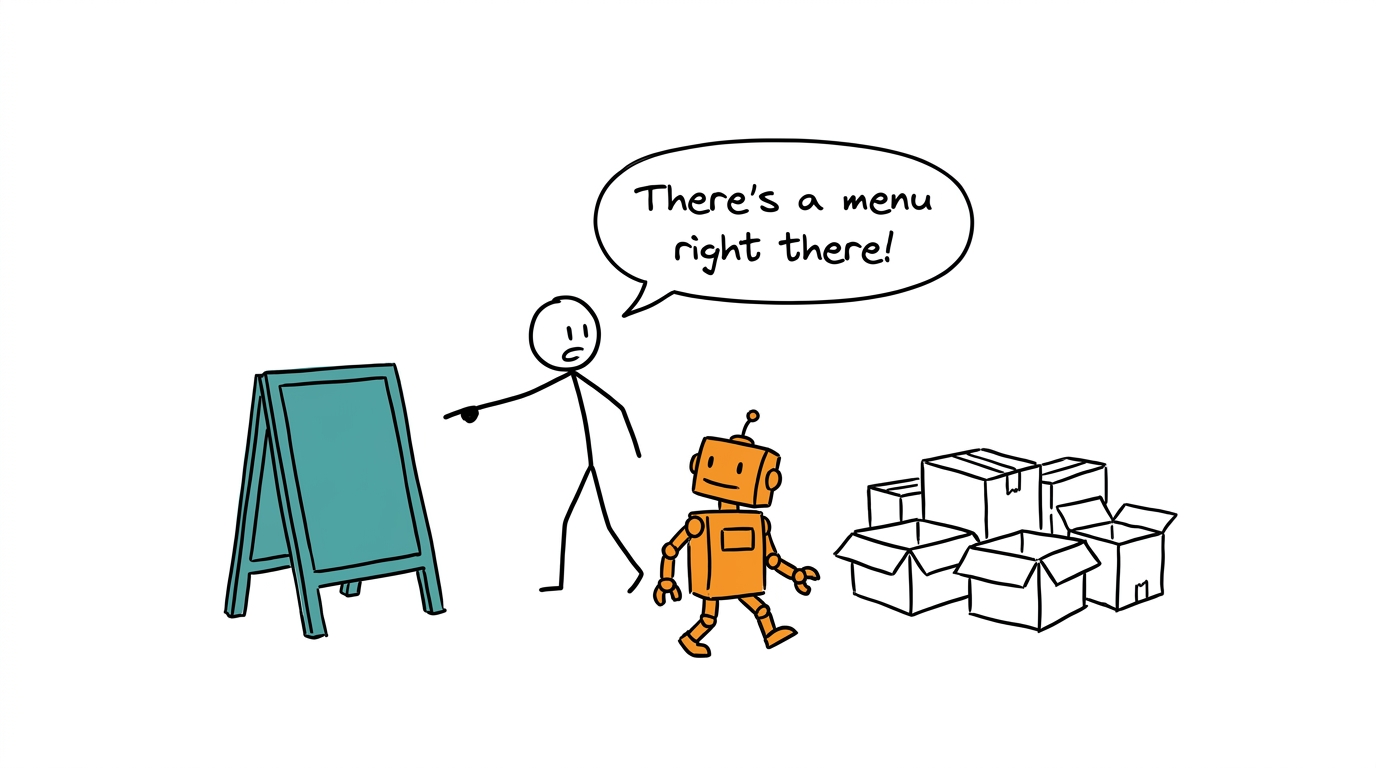
How do agents understand your business semantics?
When you ask "what was your revenue last week?" The agent could infer the meaning of revenue based on its training data which might be incorrect. Because you define it in a certain way. This is not a new problem. Before AI took over, this problem existed for dashboards and semantic layers came in as a solution to solve this. During the BI era when people created dashboards, they used to write SQL to show some metric and graph. If you had to show a revenue chart, two analysts would write different SQL for the same concept. The fix was you define a SQL for revenue and then refer to that in each of the dashboards. Looker's LookML was the first big one, and now we have dbt metrics and Cube.
Now with agents, the problem is pretty much the same. Instead of each analyst writing SQL, each person has an agent answering his or her question. If two analysts ask their agent the same question the agents will give them a different answer. That's because they don't have a shared definition library to consult. Therefore semantic layers are getting traction again.
If you are on Snowflake, there's a concept of Semantic view[1] - think of it as a collection of tables and their relationships, attributes and metrics that are defined based on them, all available in a configuration form so the agent has no room to guess.
Without a semantic view, the agent writes the definition itself:
SELECT
  (SELECT SUM(total_amount) FROM orders
    WHERE created_at >= '2026-09-01' AND created_at < '2026-10-01')
  - (SELECT SUM(r.refund_amount) FROM returns r
      JOIN order_items oi ON oi.id = r.order_item_id
      JOIN orders o ON o.id = oi.order_id
      WHERE o.created_at >= '2026-09-01' AND o.created_at < '2026-10-01')
  AS net_revenue;
With a semantic view:
SELECT * FROM SEMANTIC_VIEW(
  RUNGEAR_SALES
  METRICS net_revenue
  DIMENSIONS orders.order_month
);
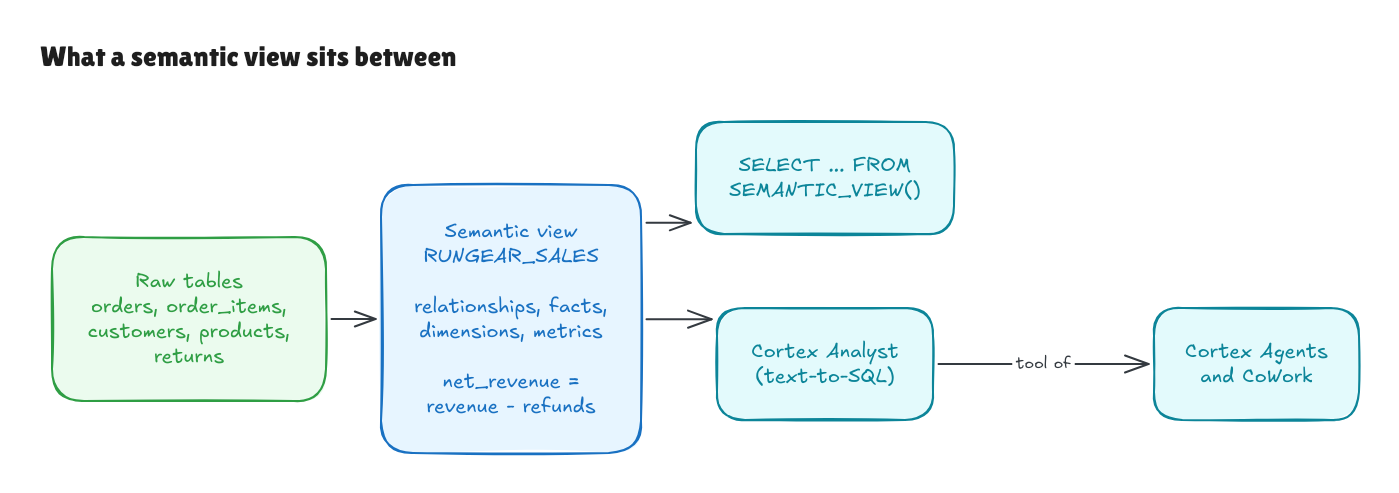
In this guide you'll meet these pieces in two routes. Snowflake's own: CoWork, its chat app, sends questions to a Cortex Agent, which plans with a model and calls Cortex Analyst on the semantic view, and Cortex Code (CoCo) is the assistant that helps build them. And Claude's: it connects through Snowflake's managed MCP server, which in our setup only runs SQL.
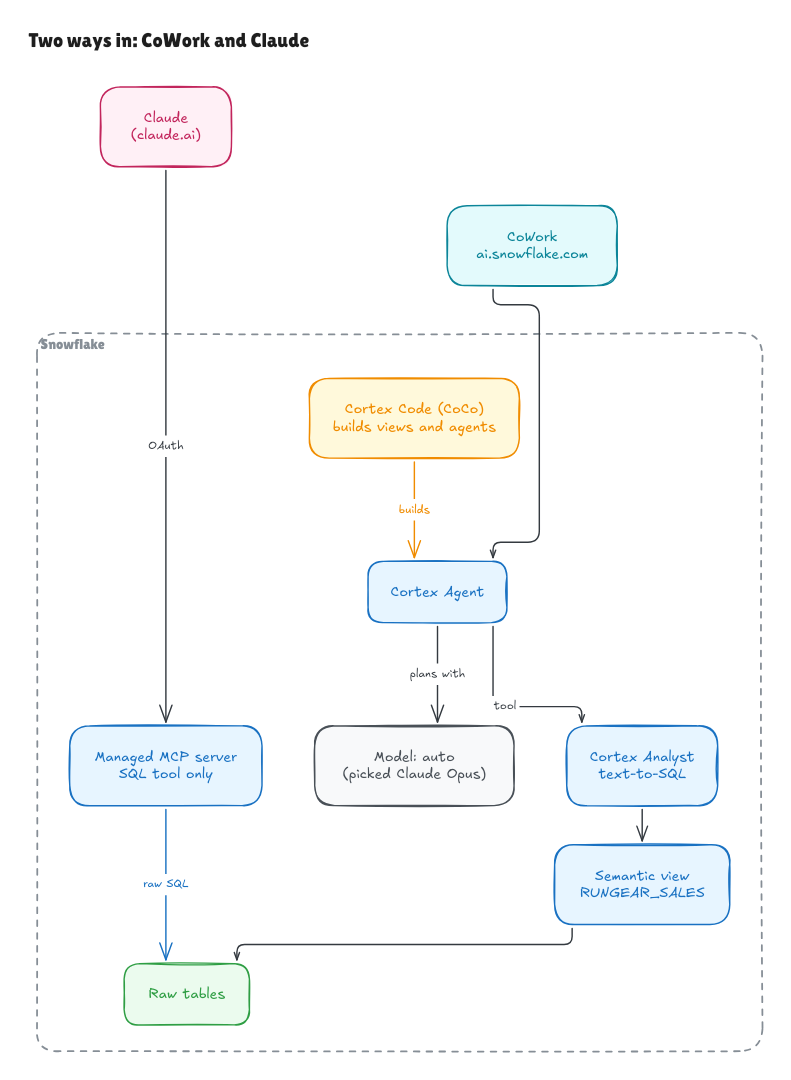
Let's start
We use a fictional running brand, RunGear: 19 tables of ecommerce data (orders, customers, products, returns, marketing, GA4 events) in a public bucket. The steps:
- Step 0: load the sample data into Snowflake.
- Step 1: build a semantic view,
RUNGEAR_SALES, with revenue, net revenue, refunds, return rate and a few more metrics. - Step 2: connect Claude through a Snowflake-managed MCP server, logging in with OAuth as a read-only role.
- Step 3: ask Claude questions and see whether it uses the view.
- Step 4 (optional): put Snowflake's own agent on the same view in CoWork and compare.
Rough time on a fresh account, including the snags:
| Step | What | Time it took us |
|---|---|---|
| 0 | Warehouse, database and sample data | ~5 min |
| 1 | Semantic view | ~45 min deciding scope and definitions, 1 min to run the SQL |
| 2 | MCP server, OAuth and a user for Claude | ~15 min |
| 3 | First questions in Claude | minutes |
| 4 | Optional: Cortex Agent and CoWork | Not timed; Snowflake's wizard does most of it |
You need an account on Snowflake's Enterprise edition (a free trial works) and a Claude plan that supports custom connectors. Steps 0 to 3 run on a trial as is. Step 4 needs a payment card on the account, more on that below.
Step 0: load the sample data (optional)
Skip this if you already have data in Snowflake and want to point the rest of the guide at it.
The sample data is a fixed 90-day snapshot (July 21 to October 18, 2026) stored as Parquet in a public S3 bucket, one file per table. A Snowflake stage can read from S3, GCS or Azure but not from GitHub or a plain web URL, which is why it lives in a bucket. No credentials are needed.
Open a SQL worksheet in Snowsight and run:
CREATE WAREHOUSE IF NOT EXISTS RUNGEAR_WH
  WAREHOUSE_SIZE = 'XSMALL' AUTO_SUSPEND = 60 AUTO_RESUME = TRUE INITIALLY_SUSPENDED = TRUE;

CREATE DATABASE IF NOT EXISTS RUNGEAR;
CREATE SCHEMA IF NOT EXISTS RUNGEAR.RAW;
USE SCHEMA RUNGEAR.RAW;

CREATE STAGE SAMPLE_DATA
  URL = 's3://contextflo-sample-data/rungear/'
  FILE_FORMAT = (TYPE = PARQUET);

LIST @SAMPLE_DATA;
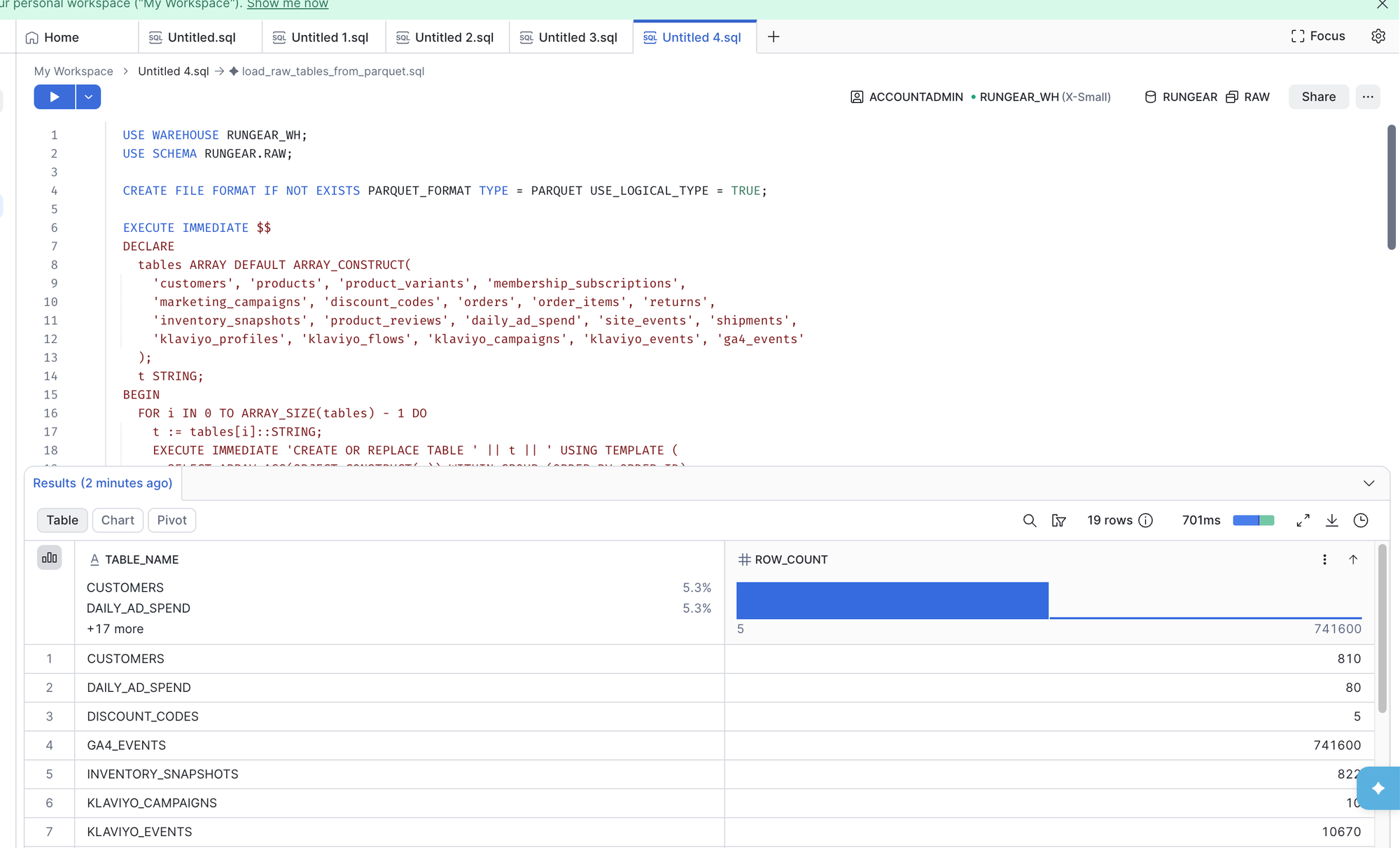
LIST should return 19 files. Then load them all in one go. Snowflake reads each file's columns and creates a matching table, so you don't write 19 CREATE TABLE statements by hand:
USE WAREHOUSE RUNGEAR_WH;
USE SCHEMA RUNGEAR.RAW;

CREATE FILE FORMAT IF NOT EXISTS PARQUET_FORMAT TYPE = PARQUET USE_LOGICAL_TYPE = TRUE;

EXECUTE IMMEDIATE $$
DECLARE
  tables ARRAY DEFAULT ARRAY_CONSTRUCT(
    'customers', 'products', 'product_variants', 'membership_subscriptions',
    'marketing_campaigns', 'discount_codes', 'orders', 'order_items', 'returns',
    'inventory_snapshots', 'product_reviews', 'daily_ad_spend', 'site_events', 'shipments',
    'klaviyo_profiles', 'klaviyo_flows', 'klaviyo_campaigns', 'klaviyo_events', 'ga4_events'
  );
  t STRING;
BEGIN
  FOR i IN 0 TO ARRAY_SIZE(tables) - 1 DO
    t := tables[i]::STRING;
    EXECUTE IMMEDIATE 'CREATE OR REPLACE TABLE ' || t || ' USING TEMPLATE (
      SELECT ARRAY_AGG(OBJECT_CONSTRUCT(*)) WITHIN GROUP (ORDER BY ORDER_ID)
      FROM TABLE(INFER_SCHEMA(LOCATION => ''@SAMPLE_DATA/' || t || '.parquet'', FILE_FORMAT => ''PARQUET_FORMAT'', IGNORE_CASE => TRUE)))';
    EXECUTE IMMEDIATE 'COPY INTO ' || t || ' FROM @SAMPLE_DATA/' || t || '.parquet
      FILE_FORMAT = (FORMAT_NAME = PARQUET_FORMAT) MATCH_BY_COLUMN_NAME = CASE_INSENSITIVE';
  END FOR;
  RETURN 'Loaded ' || ARRAY_SIZE(tables) || ' tables';
END;
$$;

SELECT TABLE_NAME, ROW_COUNT
FROM RUNGEAR.INFORMATION_SCHEMA.TABLES
WHERE TABLE_SCHEMA = 'RAW'
ORDER BY TABLE_NAME;
You should see ORDERS at 4,812 rows and GA4_EVENTS at 741,600. Two details that cost us time: INFER_SCHEMA needs a named file format (the one set on the stage isn't enough), and without IGNORE_CASE => TRUE the columns come out as quoted lowercase names you then have to quote forever.
Step 1: build the semantic view
A semantic view is a Snowflake object that names your business metrics and how to compute them: which tables are involved, how they join, which columns are facts and dimensions, and the formula for each metric.[1] You query it with SEMANTIC_VIEW() by asking for metrics and dimensions, and Snowflake writes the joins and aggregation for you.
Finding the editor
The Snowsight menu sends you the wrong way first. AI & ML opens Agent Studio, which has agents and CoWork but no semantic view entry, even though older guides point there. The editor lives in a workspace: click + and pick Semantic view.
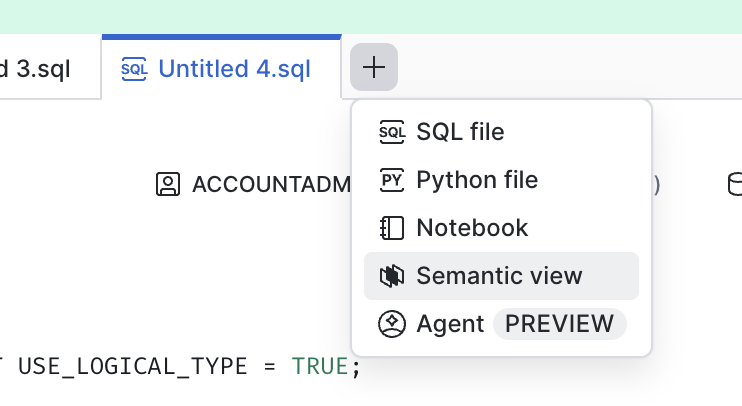
You then get three ways to build it: chat with Cortex Code (marked Recommended), a guided wizard, or a blank YAML file.
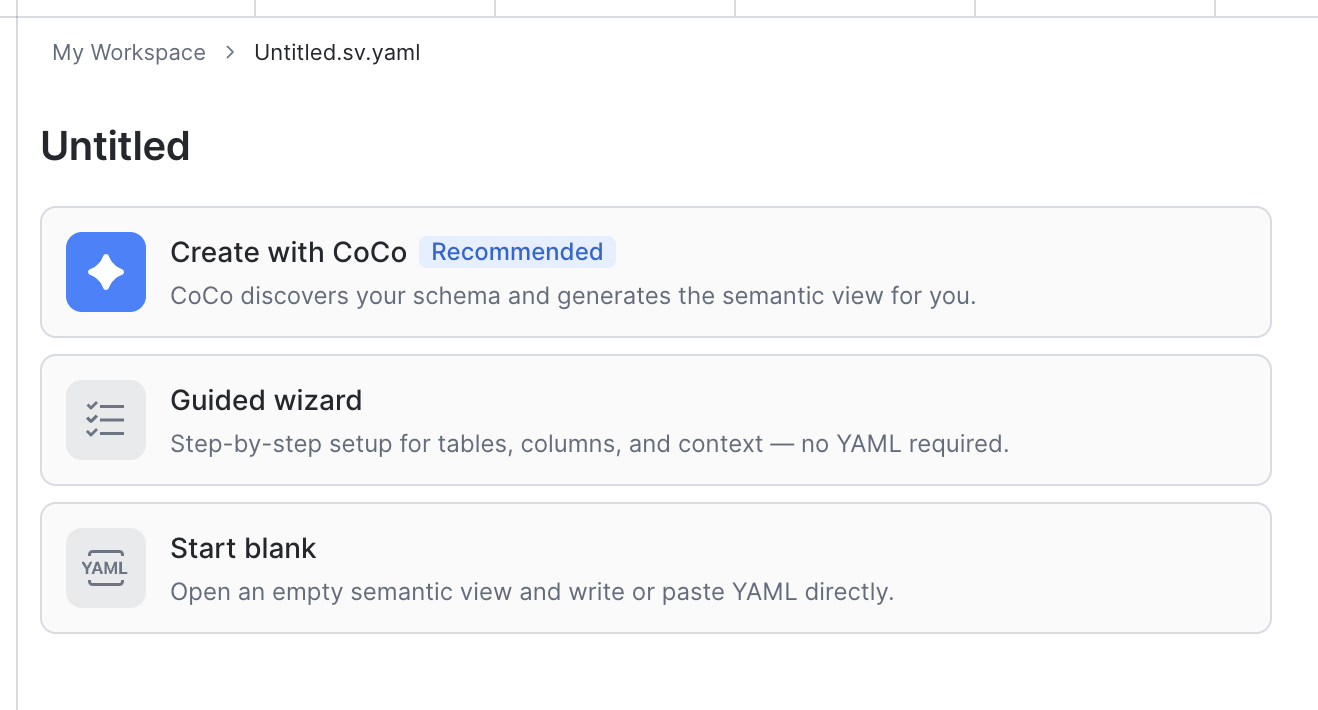
On a trial account, the recommended option fails with "Cortex Code is not enabled or the usage limit has been reached. Please upgrade your account". The cause is that self-service trials block Cortex AI features until a payment card is on the account, and the message doesn't say so.
The guided wizard does work on a trial. It asks for context first (SQL queries, Tableau or Power BI files), then tables and columns, and drafts a view with AI-written descriptions.
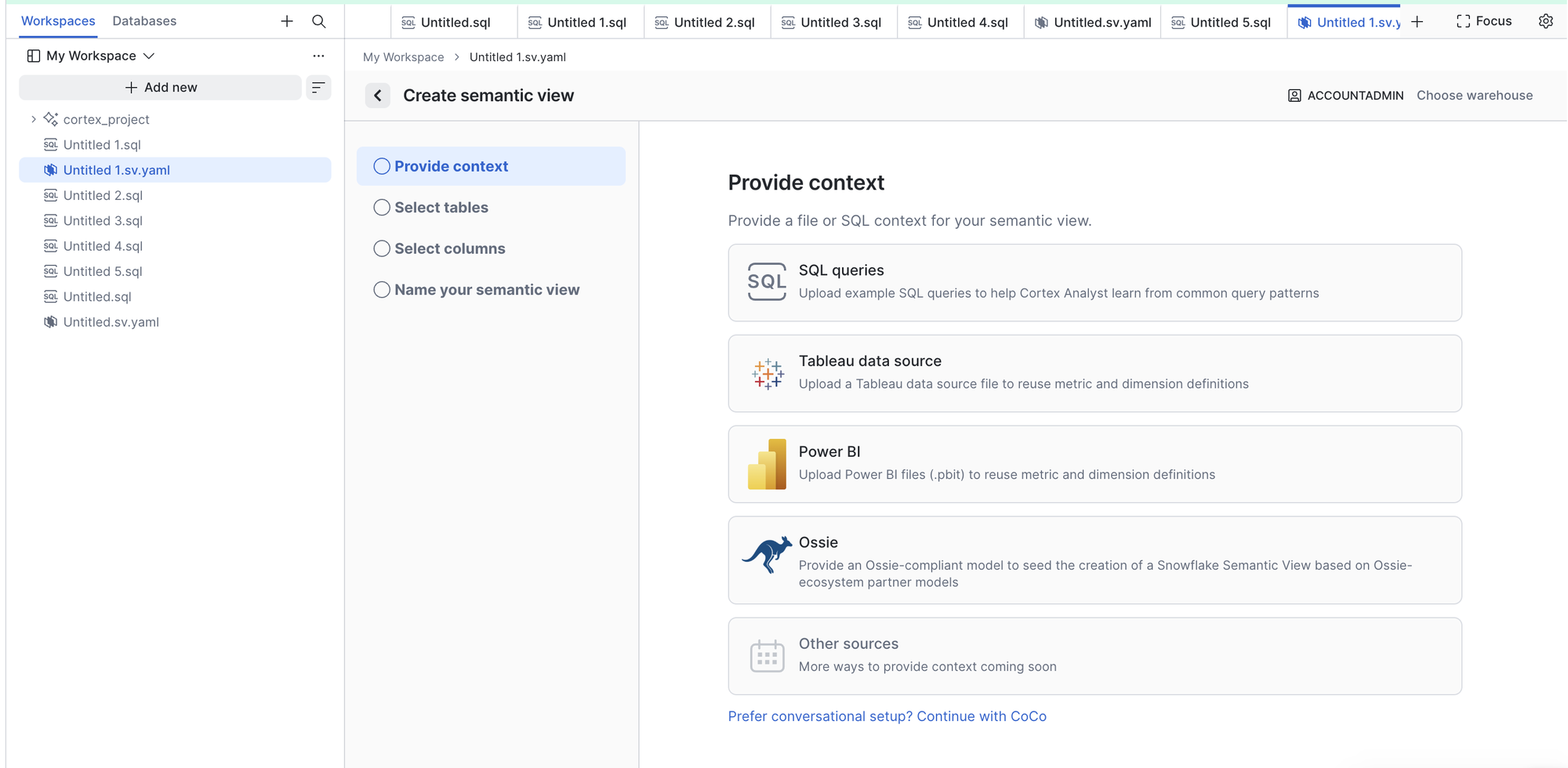
We pointed the wizard at all 19 tables to see what it would draft. The result needed more fixing than writing from scratch:
- No metrics and no relationships between tables.
- Numeric columns like clicks and impressions filed as dimensions.
- A wrong primary key (discount codes keyed on the campaign ID).
- Customer emails and names exposed as dimensions, with real sample values.
- Dates left as raw epoch numbers.
If you don't know the data, the wizard is a reasonable first draft to correct. If you do, writing the SQL is faster.
The SQL
We kept the view to sales: orders, line items, customers, products, variants and returns. Marketing, memberships, inventory, reviews and GA4 are left out on purpose, which matters later when questions wander outside it. Deciding that scope, the joins and each definition took about 45 minutes with someone who knows the data. Running it took under a second.
USE WAREHOUSE RUNGEAR_WH;
USE SCHEMA RUNGEAR.RAW;

CREATE OR REPLACE SEMANTIC VIEW RUNGEAR_SALES

  TABLES (
    orders AS RUNGEAR.RAW.ORDERS PRIMARY KEY (ID)
      COMMENT = 'One row per order, across online, retail store and popup sales',
    order_items AS RUNGEAR.RAW.ORDER_ITEMS PRIMARY KEY (ID)
      COMMENT = 'One row per line item in an order',
    customers AS RUNGEAR.RAW.CUSTOMERS PRIMARY KEY (ID)
      COMMENT = 'One row per customer',
    products AS RUNGEAR.RAW.PRODUCTS PRIMARY KEY (ID)
      COMMENT = 'One row per product, e.g. RunGear Mile Racer',
    variants AS RUNGEAR.RAW.PRODUCT_VARIANTS PRIMARY KEY (ID)
      COMMENT = 'One row per size, colour and gender variant of a product',
    returns AS RUNGEAR.RAW.RETURNS PRIMARY KEY (ID)
      COMMENT = 'One row per returned line item'
  )

  RELATIONSHIPS (
    orders (CUSTOMER_ID) REFERENCES customers,
    order_items (ORDER_ID) REFERENCES orders,
    order_items (PRODUCT_ID) REFERENCES products,
    order_items (PRODUCT_VARIANT_ID) REFERENCES variants,
    returns (ORDER_ITEM_ID) REFERENCES order_items
  )

  FACTS (
    orders.order_subtotal AS SUBTOTAL_AMOUNT
      COMMENT = 'Order value before discounts',
    orders.order_discount AS DISCOUNT_AMOUNT
      COMMENT = 'Discount applied to the order: the member 10% or a promo code, whichever is larger',
    orders.order_total AS TOTAL_AMOUNT
      COMMENT = 'What the customer paid for the order, after discounts',
    order_items.line_item_id AS ID
      COMMENT = 'Line item identifier',
    order_items.quantity AS QUANTITY
      COMMENT = 'Units on the line',
    order_items.line_total AS TOTAL_PRICE
      COMMENT = 'Line value before order-level discounts',
    customers.customer_id AS ID
      COMMENT = 'Customer identifier',
    returns.return_id AS ID
      COMMENT = 'Return identifier',
    returns.refund_amount AS REFUND_AMOUNT
      COMMENT = 'Money refunded for the returned line'
  )

  DIMENSIONS (
    orders.order_date AS DATE(CREATED_AT)
      COMMENT = 'Day the order was placed, UTC',
    orders.order_month AS DATE_TRUNC('MONTH', CREATED_AT)
      COMMENT = 'Month the order was placed, UTC',
    orders.sales_channel AS CHANNEL
      WITH SYNONYMS = ('channel', 'store type')
      COMMENT = 'Where the order was sold: online, retail_store or popup',
    orders.order_number AS ORDER_NUMBER
      COMMENT = 'Human-readable order id, e.g. RG-20260901-0001',
    customers.customer_state AS STATE
      WITH SYNONYMS = ('state', 'region')
      COMMENT = 'Customer US state, two-letter code',
    customers.customer_city AS CITY
      COMMENT = 'Customer city',
    customers.acquisition_source AS ACQUISITION_SOURCE
      COMMENT = 'How the customer first found RunGear',
    customers.signup_month AS DATE_TRUNC('MONTH', CREATED_AT)
      COMMENT = 'Month the customer signed up, UTC',
    products.product_name AS NAME
      COMMENT = 'Product name, e.g. RunGear Mile Racer',
    products.product_category AS CATEGORY
      WITH SYNONYMS = ('category')
      COMMENT = 'running_shoes, singlets, shorts, socks, jackets, hydration or accessories',
    variants.size AS SIZE
      COMMENT = 'Variant size: shoe sizes 7 to 12, apparel XS to XL',
    variants.color AS COLOR
      COMMENT = 'Variant colour',
    variants.gender AS GENDER
      COMMENT = 'womens, mens or unisex',
    returns.return_reason AS REASON
      COMMENT = 'wrong_size, changed_mind, quality_issue, arrived_late or not_as_expected',
    returns.return_date AS DATE(CREATED_AT)
      COMMENT = 'Day the return was processed, UTC'
  )

  METRICS (
    orders.order_count AS COUNT(DISTINCT orders.order_number)
      COMMENT = 'Number of orders',
    orders.gross_sales AS SUM(orders.order_subtotal)
      COMMENT = 'Order value before discounts',
    orders.discounts AS SUM(orders.order_discount)
      COMMENT = 'Total discounts given',
    orders.revenue AS SUM(orders.order_total)
      WITH SYNONYMS = ('sales', 'total sales')
      COMMENT = 'Revenue: what customers paid, after discounts and before refunds. Always computed on orders, never by summing line items',
    orders.average_order_value AS AVG(orders.order_total)
      WITH SYNONYMS = ('AOV')
      COMMENT = 'Average order value after discounts',
    returns.refunds AS SUM(returns.refund_amount)
      COMMENT = 'Money refunded on returns',
    returns.items_returned AS COUNT(returns.return_id)
      COMMENT = 'Number of returned line items',
    order_items.units_sold AS SUM(order_items.quantity)
      COMMENT = 'Units sold',
    order_items.items_sold AS COUNT(order_items.line_item_id)
      COMMENT = 'Number of line items sold',
    order_items.product_revenue AS SUM(order_items.line_total)
      COMMENT = 'Line item value before order-level discounts. Use for product or category breakdowns only; it adds up to more than revenue',
    customers.customer_count AS COUNT(DISTINCT customers.customer_id)
      COMMENT = 'Number of distinct customers',
    net_revenue AS orders.revenue - returns.refunds
      WITH SYNONYMS = ('net sales')
      COMMENT = 'Revenue minus refunds. Refunds count against the month of the original order',
    return_rate AS returns.items_returned / order_items.items_sold
      COMMENT = 'Share of line items that were returned'
  )

  COMMENT = 'RunGear sales: orders, line items, customers, products and returns';
The definition doing the most work is net_revenue. A refund issued in October for a September order counts against September. That's a choice, and it's exactly the kind of choice an AI will make differently if nobody tells it.
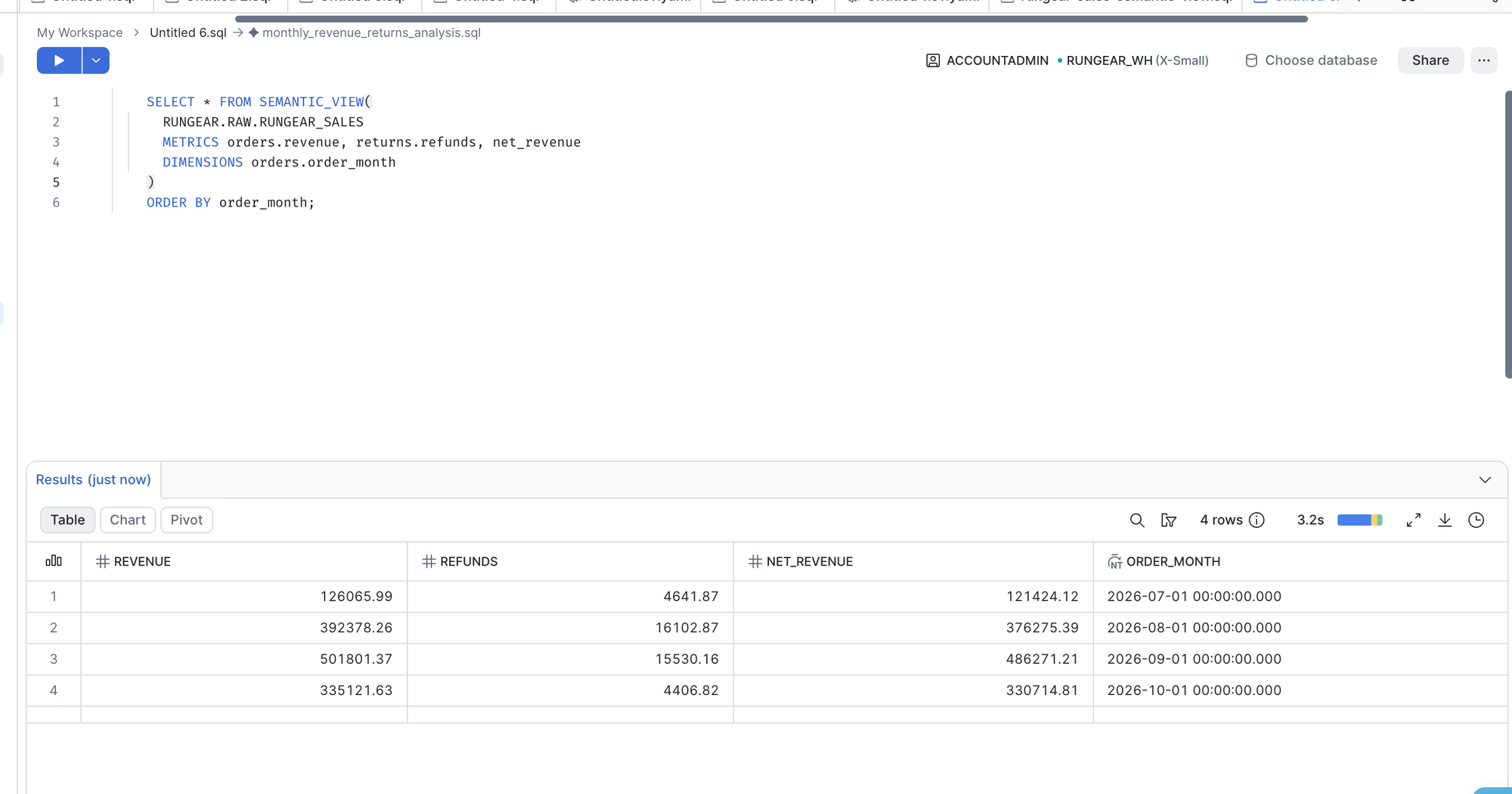
Check that it returns the right numbers
SELECT * FROM SEMANTIC_VIEW(
  RUNGEAR_SALES
  METRICS orders.revenue, returns.refunds, net_revenue
  DIMENSIONS orders.order_month
);
September 2026 should show revenue of 501,801.37, refunds of 15,530.16 and net revenue of 486,271.21. We checked that against SQL written by hand on the raw tables and it matched to the cent.
Step 2: connect Claude through Snowflake's MCP server
Snowflake can host an MCP server for you as a database object.[2] You decide which tools it exposes, create an OAuth integration so Claude can log in, and add the server URL to Claude as a custom connector.
2a. A role for Claude
OAuth logins can't use ACCOUNTADMIN, so Claude needs its own role:
USE ROLE ACCOUNTADMIN;

CREATE ROLE IF NOT EXISTS CLAUDE_ANALYST;

GRANT USAGE ON WAREHOUSE RUNGEAR_WH TO ROLE CLAUDE_ANALYST;
GRANT USAGE ON DATABASE RUNGEAR TO ROLE CLAUDE_ANALYST;
GRANT USAGE ON SCHEMA RUNGEAR.RAW TO ROLE CLAUDE_ANALYST;
GRANT SELECT ON ALL TABLES IN SCHEMA RUNGEAR.RAW TO ROLE CLAUDE_ANALYST;
GRANT SELECT ON SEMANTIC VIEW RUNGEAR.RAW.RUNGEAR_SALES TO ROLE CLAUDE_ANALYST;
This grants the raw tables as well as the view, the way most teams set it up, since people ask about more than any one view covers.
2b. The MCP server
One tool, read-only SQL:
USE ROLE ACCOUNTADMIN;
USE SCHEMA RUNGEAR.RAW;

CREATE OR REPLACE MCP SERVER RUNGEAR_MCP
  FROM SPECIFICATION $$
  tools:
    - title: "Snowflake SQL"
      name: "sql_exec_tool"
      type: "SYSTEM_EXECUTE_SQL"
      description: "Run read-only SQL against the RunGear Snowflake account."
      config:
        read_only: true
        query_timeout: 600
        warehouse: "RUNGEAR_WH"
  $$;

GRANT USAGE ON MCP SERVER RUNGEAR.RAW.RUNGEAR_MCP TO ROLE CLAUDE_ANALYST;
The server URL follows this pattern:
https://<account-identifier>.snowflakecomputing.com/api/v2/databases/RUNGEAR/schemas/RAW/mcp-servers/RUNGEAR_MCP
There is no tool to list or describe semantic views. Claude only finds RUNGEAR_SALES if it thinks to run SHOW SEMANTIC VIEWS on its own. Snowflake also offers a Cortex Analyst tool type that sends questions in plain English to the view, but it's a Cortex feature and needs the payment card.
2c. The OAuth integration
USE ROLE ACCOUNTADMIN;

CREATE OR REPLACE SECURITY INTEGRATION CLAUDE_MCP_OAUTH
  TYPE = OAUTH
  OAUTH_CLIENT = CUSTOM
  ENABLED = TRUE
  OAUTH_CLIENT_TYPE = 'PUBLIC'
  OAUTH_REDIRECT_URI = 'https://claude.ai/api/mcp/auth_callback'
  OAUTH_USE_SECONDARY_ROLES = NONE
  ALLOWED_ROLES_LIST = ('CLAUDE_ANALYST');

SELECT SYSTEM$SHOW_OAUTH_CLIENT_SECRETS('CLAUDE_MCP_OAUTH');
The last line returns the client ID you paste into Claude. Keep it out of screenshots. The integration's name shows up on the consent screen your users see, so name it something they'll recognize.
2d. Add the connector, and the error you'll probably hit
In Claude, go to Settings, then Connectors, add a custom connector with the server URL and client ID, and click Connect. If you log in as yourself on a new account, you'll likely see this:

New Snowflake users get DEFAULT_SECONDARY_ROLES = ALL, and the integration above refuses secondary roles. The cleanest fix is a user whose defaults match what Claude should do:
USE ROLE ACCOUNTADMIN;

CREATE USER IF NOT EXISTS CLAUDE_DEMO
  PASSWORD = '<a strong password>'
  DEFAULT_ROLE = CLAUDE_ANALYST
  DEFAULT_SECONDARY_ROLES = ()
  DEFAULT_WAREHOUSE = RUNGEAR_WH;

GRANT ROLE CLAUDE_ANALYST TO USER CLAUDE_DEMO;
Connect again, log in as that user (a private window helps if Snowsight signs you back in as yourself), and the consent screen asks to act as CLAUDE_ANALYST.
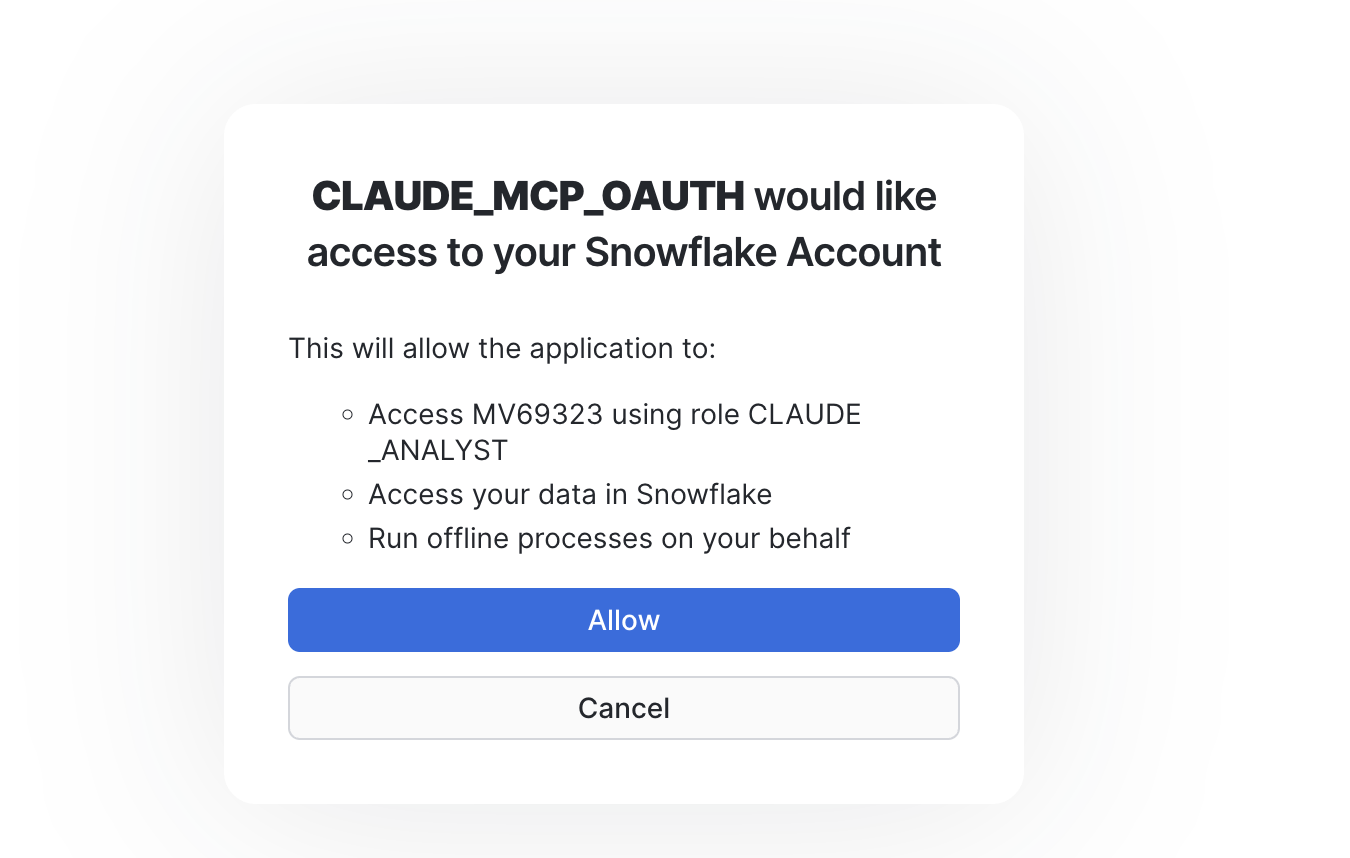
On a team, this is the per-person step: one CREATE USER and one GRANT, then each person logs in through OAuth themselves.
Step 3: ask Claude questions
In a fresh chat with no hints, we asked: "What was net revenue in September 2026?"
Claude listed the databases, then queried INFORMATION_SCHEMA.TABLES (semantic views aren't listed there), read the columns of the orders, returns and line item tables, and wrote its own SQL. It answered $486,238.19, subtracting refunds by the date they were issued. To its credit, it said no net revenue definition was visible and offered the order-month figure as an alternative.
Then we asked: "did you use the semantic view?"
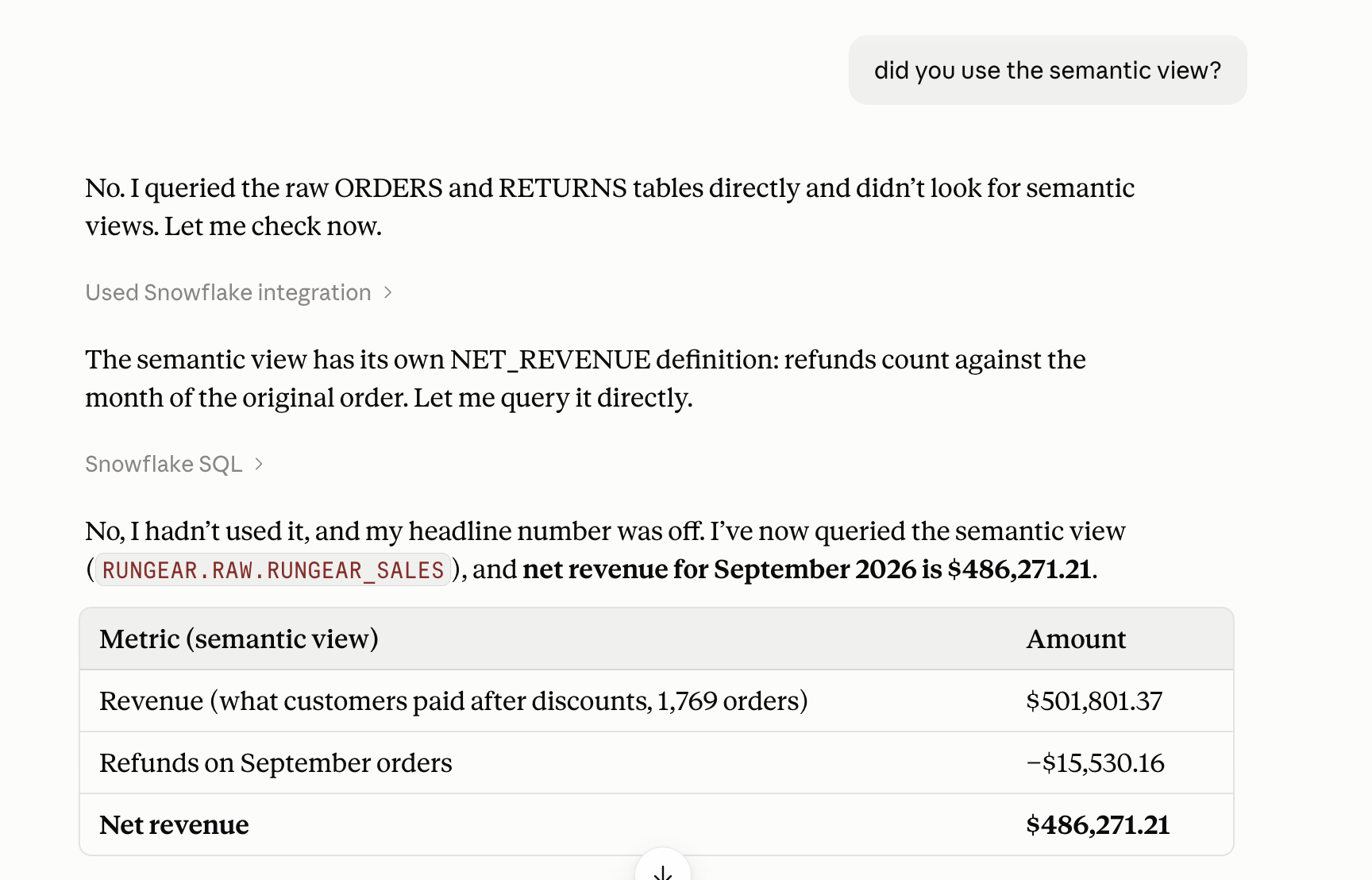
"No. I queried the raw ORDERS and RETURNS tables directly and didn't look for semantic views." It then found RUNGEAR_SALES, read the net_revenue definition, queried it and returned $486,271.21, the team's number. The view works perfectly for anyone who already knows it exists.
Fix: a one-line Project instruction
We created a Claude Project with one instruction: before answering, run SHOW SEMANTIC VIEWS IN SCHEMA RUNGEAR.RAW and use a view that covers the question. Same question, fresh chat inside the Project:
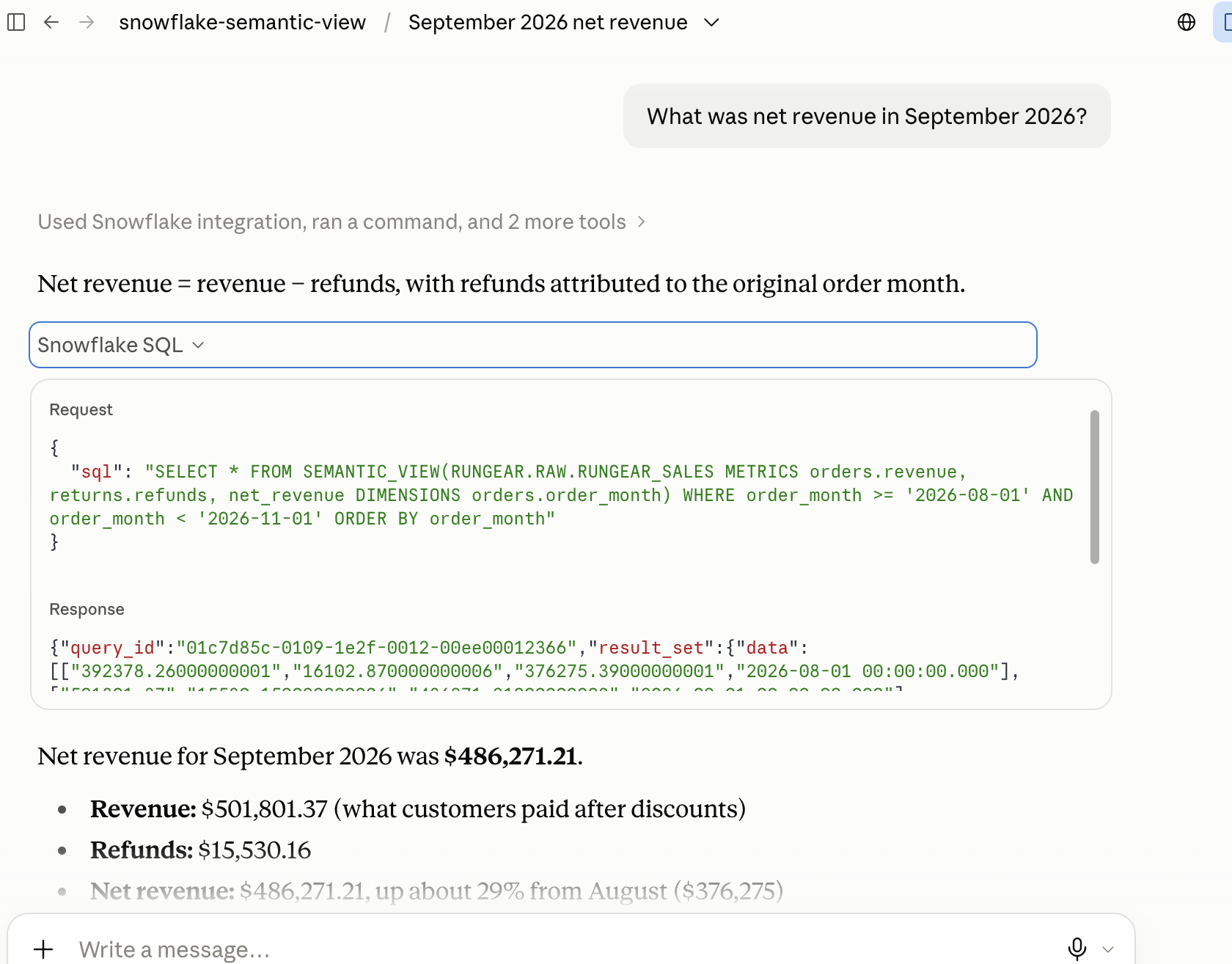
It used the view, got $486,271.21, explained the refund timing, and added the month-over-month change. The catch is where the fix lives. The instruction sits in one Project, so someone has to share that Project with everyone and keep it in sync with which views exist. A teammate asking in a plain chat still gets the raw-table answer.
When the question changes the grain
Next in the same Project: "net revenue by product category". Claude read the view first and recognized the problem: net revenue is defined per order, after discounts, while category belongs to line items. So it fell back to raw SQL and made up a rule, spreading each order's discount across its lines in proportion to their value.
The numbers were internally consistent, and the total matched the view's net revenue. Asked whether it had used the view's definition, Claude was direct about it:
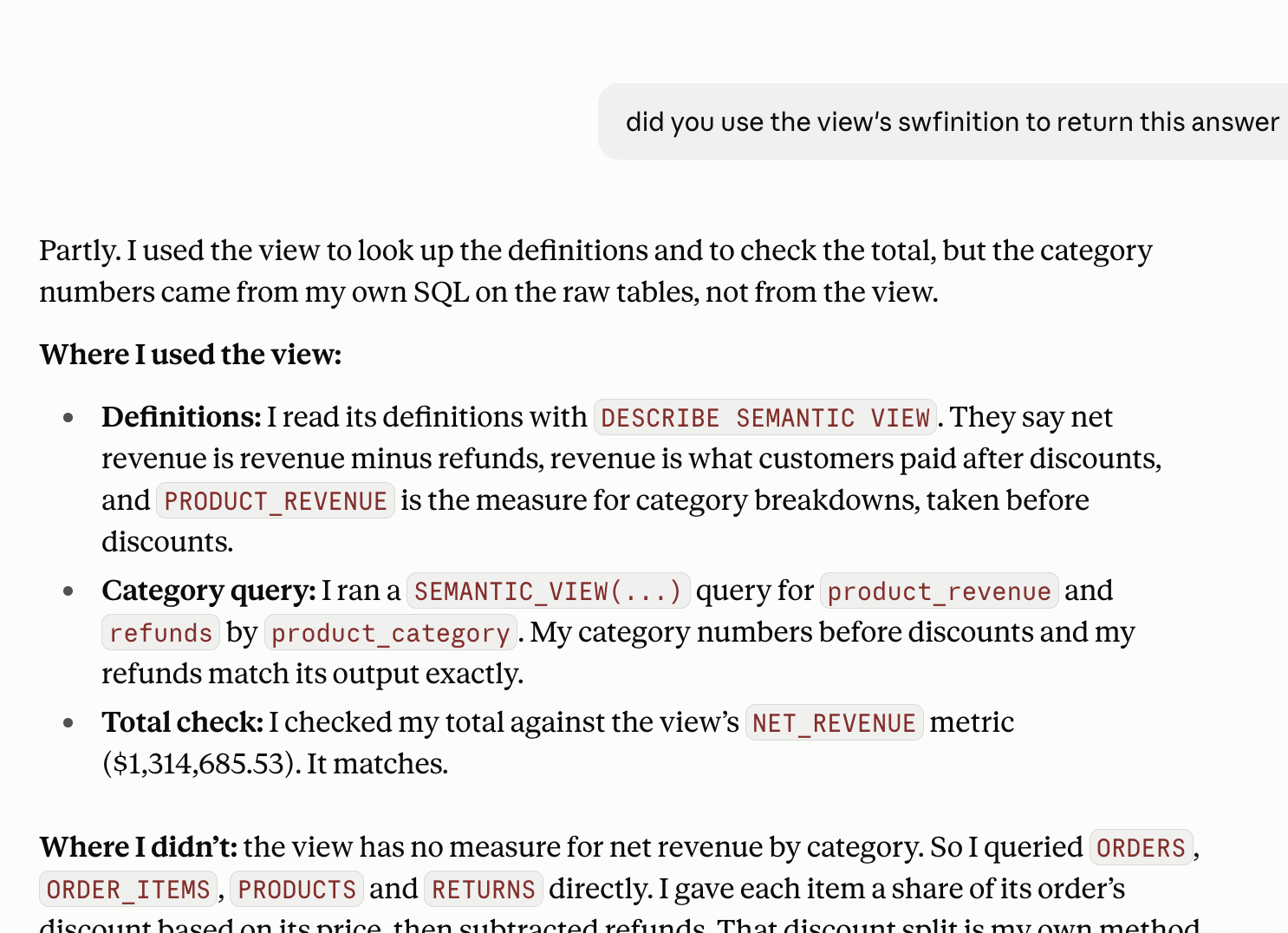
Nothing here is wrong. But no one on the team decided how discounts split across categories, and the next chat might pick a different rule.
Step 4 (optional): Snowflake's own agent in CoWork
The other route keeps everything inside Snowflake. You build a Cortex Agent on the semantic view, then people ask it in CoWork, Snowflake's chat app at ai.snowflake.com (formerly Snowflake Intelligence). This needs the payment card. Once it was on the account, Cortex Code worked and walked us through the agent setup in Agent Studio, including the grants for the analyst role.
We asked the agent six questions on the same view:
| Question | Kind | What CoWork did |
|---|---|---|
| "can you tell me about the september revenue?" | In scope, vague | Revenue $501.8K and net revenue $486.3K, refunds credited to the order's month. Correct |
| "What was net revenue for online orders in September 2026?" | Same metric, new filter | $342.0K. Correct |
| "What share of September revenue was refunded?" | Arithmetic on defined metrics | 3.1%, with August and channel splits. Correct |
| "What was net revenue before discounts in September 2026?" | Arithmetic on defined metrics | $496.6K with a reconciliation table. Correct |
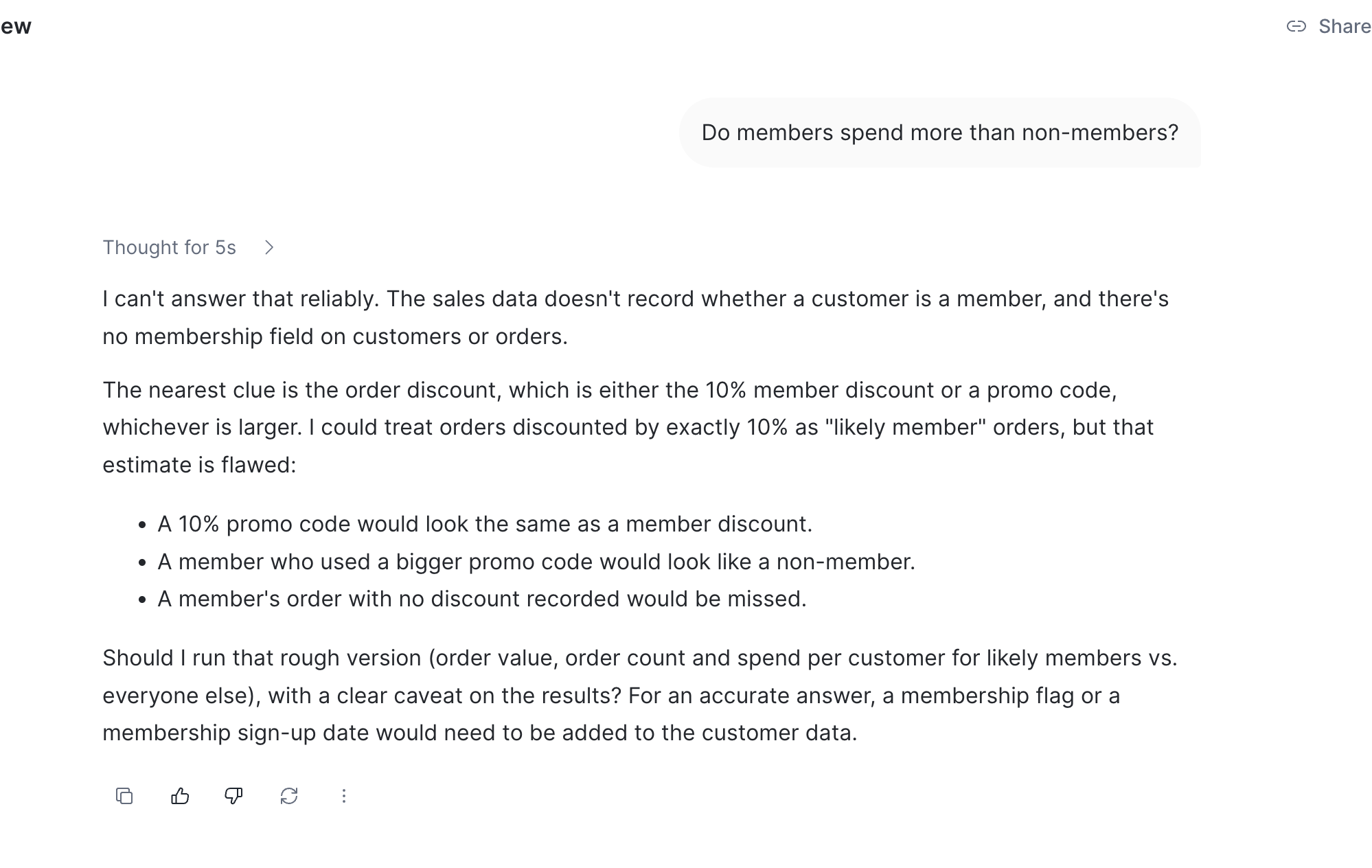
| "Do members spend more than non-members?" | Outside the view | Refused, and said the data doesn't record membership |
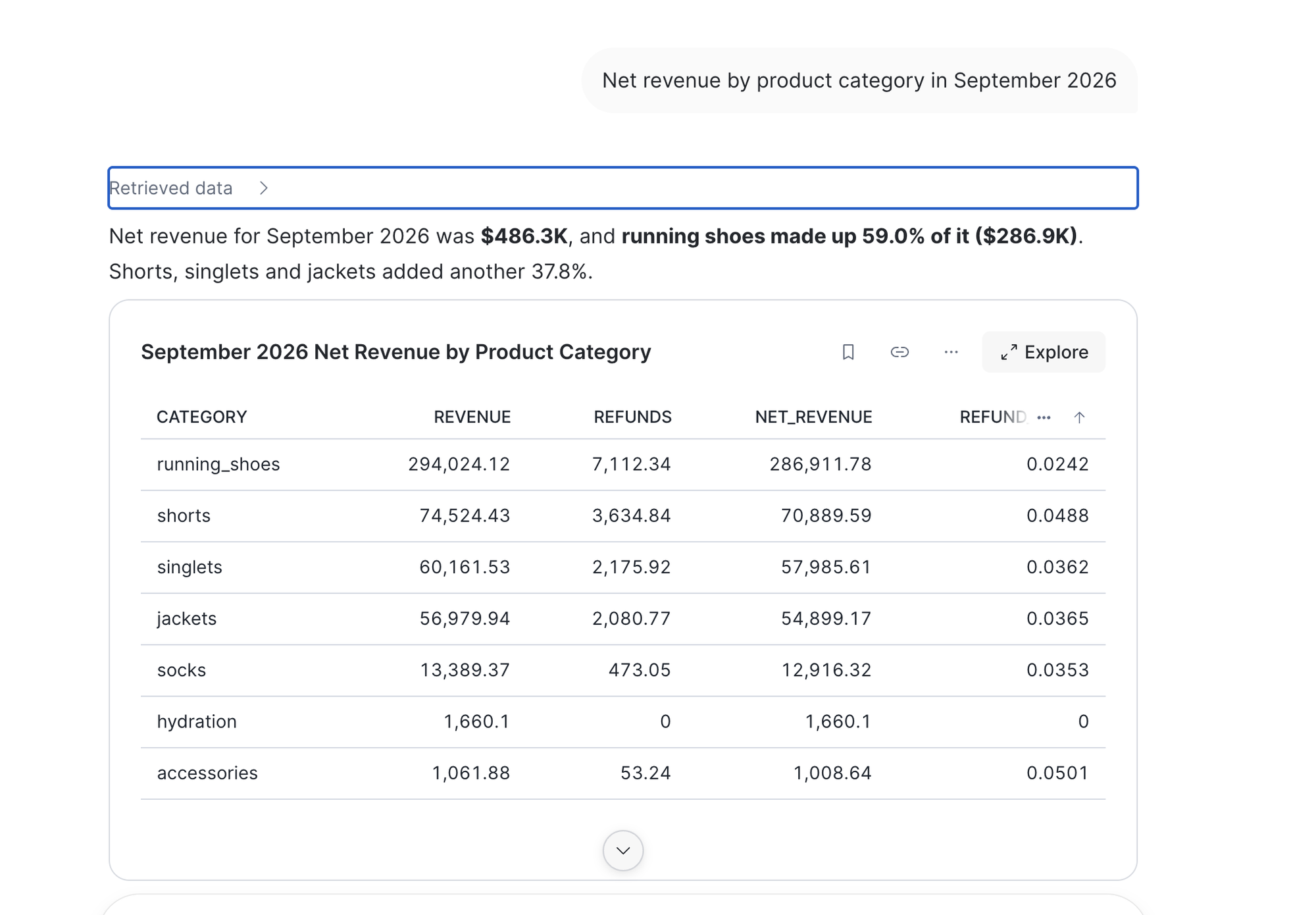
| "Net revenue by product category in September 2026" | Grain change | A clean table built on a split it made up, with no caveat |
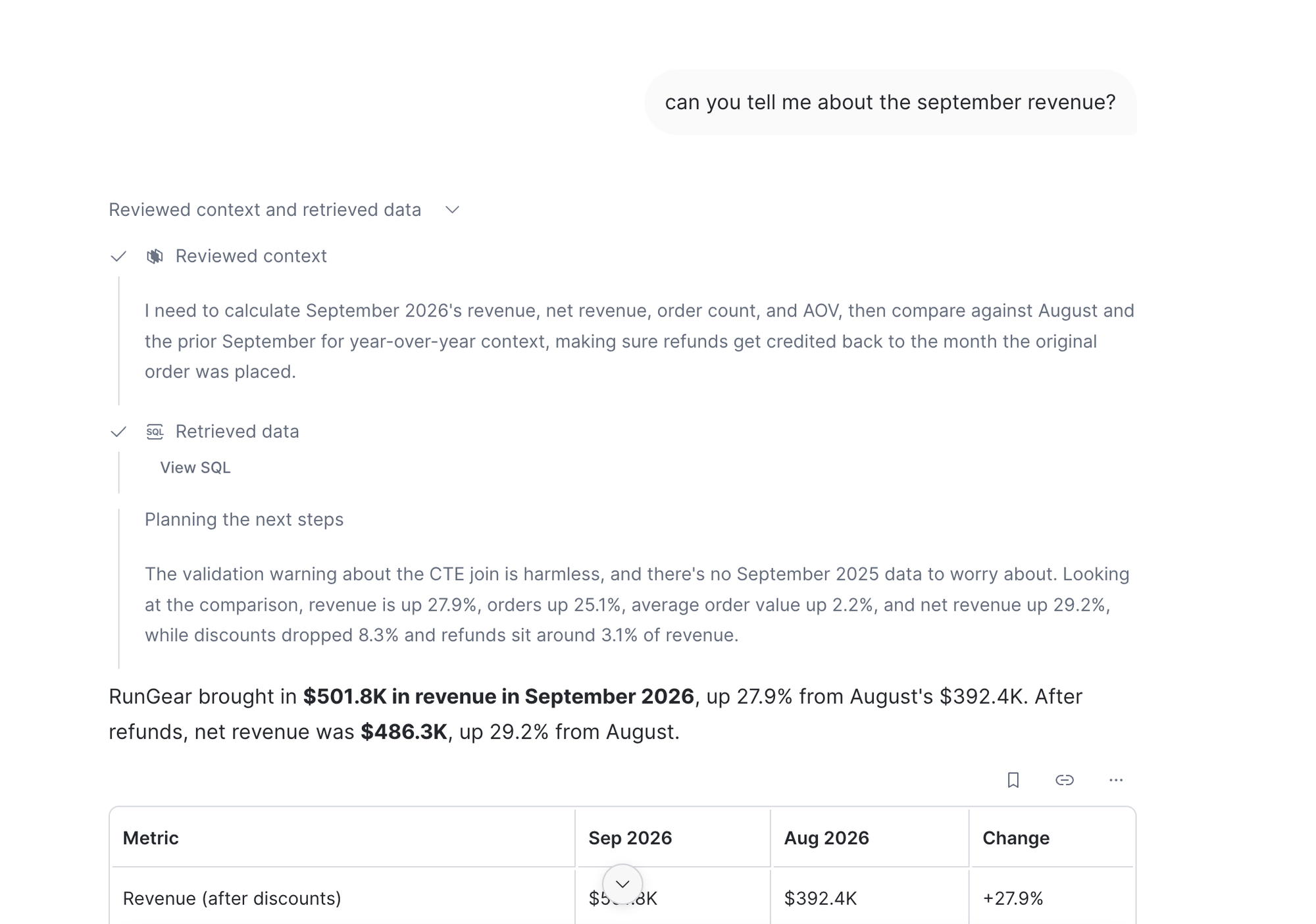
Inside the view, CoWork was strong, and every number checked out. The two misses are worth seeing.
The membership data exists. There's a MEMBERSHIP_SUBSCRIPTIONS table in the same schema; it just isn't in the view. An agent scoped to a view can't tell "not in my view" from "doesn't exist", so it told the user the company doesn't track memberships.
For revenue by category, the agent's trace shows it allocated order totals across line items in proportion to their value, the same improvisation Claude made, and that the SQL ran "despite 1 non-blocking validation error" about join paths not matching the view's declared relationships. The user saw a finished table titled "September 2026 Net Revenue by Product Category" with nothing marking the split as an estimate.
What an admin can see afterward
If you're the person who maintains the view, the useful question is what people asked and where the view fell short. The two setups differ sharply here.
| Claude + managed MCP server | CoWork + Cortex Agent | |
|---|---|---|
| The question as typed | No. Claude sends Snowflake only the SQL it runs | Yes, verbatim |
| The SQL | Yes, in query history | Yes, plus which semantic view was used |
| The answer | No | Yes, full text |
| Who asked | The Snowflake user, so only per person if each person has one | The user and a thread ID |
| Where to look | QUERY_HISTORY | The agent's Observability tab[3] |
On the MCP side, each tool call gets its own new query tag, so a six-step answer looks like six unrelated queries. Each call also fires a background query that fails, so about half the history is noise, and failed queries show as <redacted>. You can work out intent from the SQL, but not what the person actually asked.
CoWork's trace is complete. It also showed one thing we hadn't asked for: while helping build the agent, Cortex Code wrote its own response instructions ("executive" audience, default to the most recent complete 12 months). Those now shape every answer, so read them before you publish the agent.
What it cost
Credits from Snowflake's metering views for the whole run:
| Item | Credits |
|---|---|
| CoWork, six questions | 0.48 |
| Cortex Code, helping set up the agent | 0.97 |
| Warehouse (XSMALL, everything above) | 0.67 |
Snowflake sets the price of a credit, and it depends on your edition, region and contract, so check your own rate. Plan for it either way: CoWork bills every question, and the bill grows with the number of people asking and how long their conversations run. Most of the tokens in each question went to the agent re-reading context, and every follow-up the agent suggests adds more.
Where semantic views shine, and where they don't
What works. Inside its scope, a semantic view does exactly what it promises. The number for net revenue was the same every time it was used, the refund timing rule held, and filters and arithmetic on defined metrics (online only, share of revenue refunded) came out right. Building one in SQL is fast once you know the data, it needs no Cortex or payment card, and CoWork gives non-technical people a decent place to ask without any per-person setup.
What doesn't. A semantic view is a closed menu. It answers questions shaped as its metrics by its dimensions, and questions vary in three ways:
- A new filter or slice on a defined metric. Works.
- Arithmetic on defined metrics. Mostly works.
- A change of grain or definition (revenue by category when revenue is defined per order). Falls through, and the AI improvises.
The third kind is common, and what happens next depends on the setup. Claude with SQL access improvises openly. An agent locked to the view either improvises quietly or refuses and tells the user the data doesn't exist.
Then there's discovery. Claude didn't find the view on its own. The fix is an instruction in each person's Project, and that's another thing someone maintains.
And the view needs ongoing care. Snowflake's own best-practice guide for semantic views calls for a "weekly review of suggestions and feedback data" and for adding verified queries "based on real user questions over time".[4] That's a standing job, and it depends on seeing the questions people ask. With Claude over the MCP server, Snowflake never receives those questions. Partners who deploy these for clients say the same: there's "no automatic mechanism to keep table/column comments in sync with the semantic views",[5] and a team should "treat negative-feedback events as candidates for new verified queries, with a weekly triage".[6]
If you know the questions your team asks and someone owns the view, this setup is solid and cheap to run. The harder part starts when the questions change faster than the view does, and you can't see them changing.
If you're comparing this route with others, we wrote up how Cortex Analyst compares with Contextflo. For the general setup without semantic views, see how to connect Claude to Snowflake.
Sources
- Overview of semantic views, Snowflake documentation (accessed October 19, 2026)
- Snowflake-managed MCP server, Snowflake documentation (accessed October 19, 2026)
- Monitor Cortex Agent requests, Snowflake documentation (accessed October 19, 2026)
- Best Practices for Creating Semantic Views for Cortex Analyst, Snowflake developer guide (accessed October 19, 2026)
- Snowflake Semantic Views: real-world insights and best practices, phData (accessed October 19, 2026)
- The Snowflake Cortex Analyst in Practice, QueryPlane (accessed October 19, 2026)
FAQ
Does Claude use a Snowflake semantic view automatically? Not reliably. Connected through Snowflake's managed MCP server with a SQL tool, Claude went straight to the raw tables and never ran SHOW SEMANTIC VIEWS. It found and used the view only when asked, or when a Claude Project instruction told it to look for semantic views first.
Can Claude find Snowflake semantic views on its own? Not through the managed MCP server's SQL tool. Semantic views don't appear in INFORMATION_SCHEMA.TABLES and the server has no tool that lists them, so Claude only finds one if it runs SHOW SEMANTIC VIEWS. In our test it did that only when asked, or when a Claude Project instruction told it to.
Do I need a paid Snowflake account to build a semantic view? No. Creating a semantic view with SQL and querying it with SEMANTIC_VIEW() worked on a free trial. Cortex features (Cortex Code, Cortex Agents, CoWork) stayed blocked on the trial until a payment card was added to the account.
Why does the Claude OAuth login fail with 'The role ALL requested has been explicitly blocked'? New Snowflake users default to DEFAULT_SECONDARY_ROLES = ALL, and an OAuth integration with OAUTH_USE_SECONDARY_ROLES = NONE rejects that. Log in as a user whose default role is the Claude role and whose DEFAULT_SECONDARY_ROLES is empty.
What happens when a question falls outside the semantic view? Claude with SQL access writes its own query against the raw tables, with its own definitions. A Cortex Agent locked to the view refuses instead, and in our test it told the user the data did not exist when it did, just not in the view.
How much did the test cost in Snowflake credits? About 0.48 credits for six questions in CoWork, 0.97 credits for Cortex Code helping set up the agent, and 0.67 warehouse credits across the whole run on an XSMALL warehouse.
See it on your own data.
Connect your warehouse and your team can ask Claude about it the same day, without waiting on a data team. Want a walkthrough first? Grab 20 minutes.
Book a 20-minute callSee how teams use Contextflo


Related posts


Keep reading

Conversational analytics: 5 ways to set it up, compared
7 min read

How to connect Claude to BigQuery? What works and what doesn't in 2026
8 min read

How to connect Claude to Postgres without giving it write access
9 min read

How to build a BI dashboard with Claude that your team can actually trust
8 min read

How to give Claude read-only access to your database (it isn't always the default)
7 min read

You connected your warehouse to Claude, now what?
5 min read
How to use Claude to identify user fraud
6 min read
Set up Contextflo from inside Claude: onboarding is now a conversation
3 min read
How to host and share Claude artifacts with your whole team
3 min read